White label and agency rebranding for DefiniteSEO Pro
Replace the plugin's name, logo, and colors with your own agency branding on client sites.
Plan: Agency
On this page
- What it does
- Rebrand the plugin
- Lock branding on client sites
- Settings reference
- Limits and good to know
- FAQ
What it does
White Label lets agencies present DefiniteSEO Pro as their own product. You set a custom brand
name, logo, and accent color, and the plugin's menus, tabs, and emails use them instead of the
DefiniteSEO branding. You can also hide the documentation tab and plugin-update notices, and lock
the branding so clients cannot change or remove it.
Rebrand the plugin
- Go to DefiniteSEO > White Label.
- Turn on the white-label toggle.
- Enter your Brand name, choose a Logo, and pick an Accent color.
- Optionally add a Plugin description and Plugin URL, and choose whether to hide the
documentation tab and plugin-update notifications. - Save your settings.
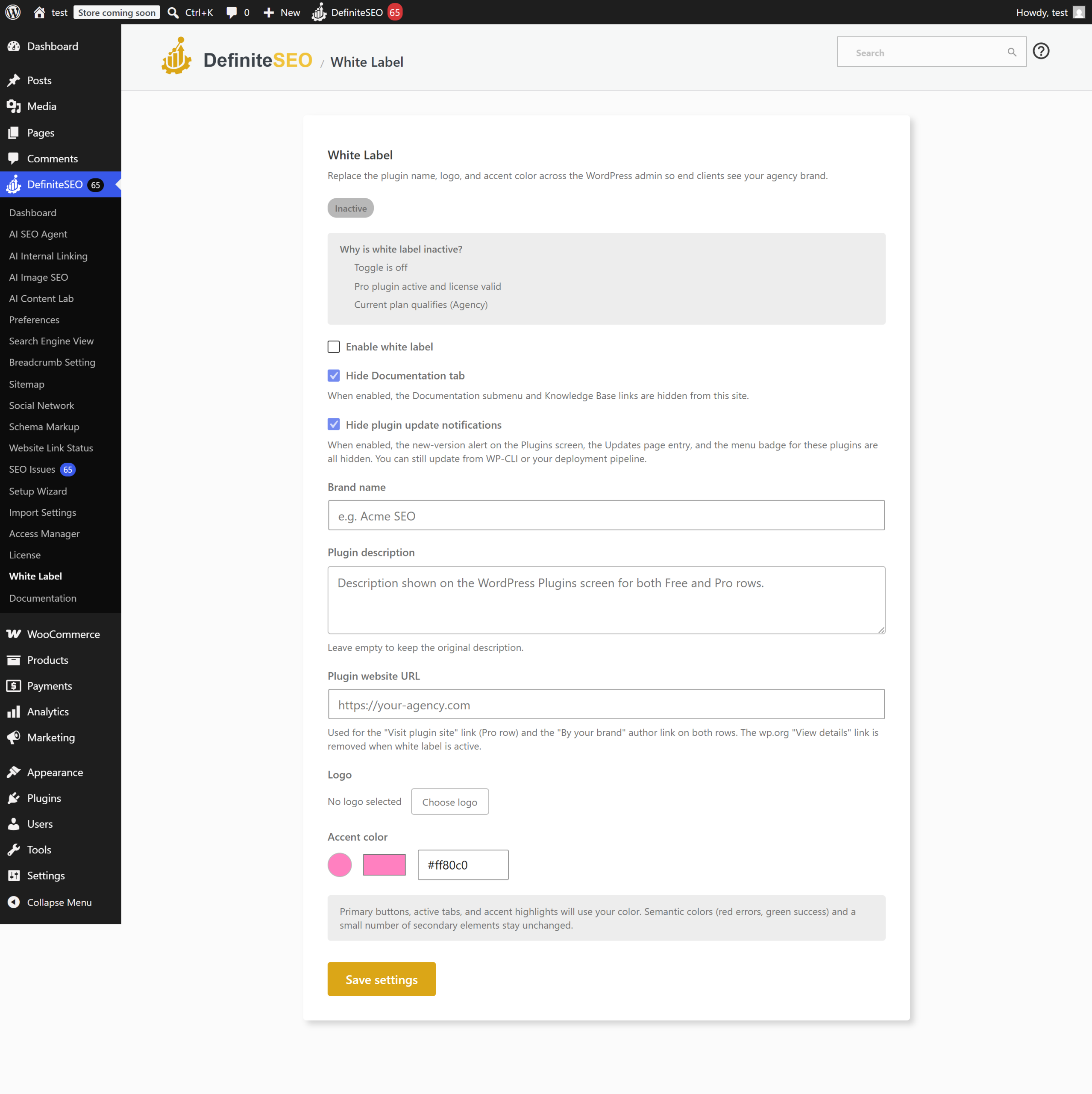
Note: The white-label page only appears on the Agency plan with a valid license. The
settings page shows why it is inactive if any requirement is not met.
Lock branding on client sites
Agencies can hard-lock the rebrand so a client cannot undo it. This is done in the site
configuration rather than in the settings screen:
- Lock the white-label settings so the branding cannot be changed or the page opened.
- Lock deactivation so the plugin cannot be deactivated from the Plugins screen.
These locks are set at the code or configuration level by the agency, which is why they survive
even if a client has admin access. Ask your developer to apply them when handing off a site.
Settings reference
| Setting | What it does | Default | Notes |
|---|---|---|---|
| Enable white label | Turn rebranding on or off | Off | Agency plan and valid license required |
| Brand name | The name shown across the plugin | Empty | Replaces "DefiniteSEO" in the UI |
| Logo | Your brand logo | None | Chosen from the media library |
| Accent color | The UI accent color | Empty | Hex color |
| Plugin description | Description shown for the plugin | Empty | Optional |
| Plugin URL | Link for the plugin | Empty | Optional |
| Hide documentation tab | Remove the documentation tab | Off | Hides help links from clients |
| Hide plugin updates | Hide plugin-update notifications | On | Keeps the update notice out of the client view |
Limits and good to know
- Plan: White Label is Agency-only and requires a valid license.
- Locks: The white-label lock and deactivation lock are configured by the agency at the code
or site-configuration level, not from the settings screen. - Consistency: Once rebranded, the name, logo, and color apply across menus, tabs, and emails.
FAQ
Which plan do I need for white label?
White label is available on the Agency plan only, and requires a valid license. On lower plans
the White Label page does not appear.
Can my client change or remove the branding I set?
Not if you lock it. Agencies can apply a white-label lock so the branding cannot be changed, and
a deactivation lock so the plugin cannot be turned off. These locks are set at the
site-configuration level, so they hold even for a client with admin access.
What parts of the plugin get rebranded?
The brand name, logo, and accent color apply across the plugin's menus, tabs, and email reports,
so the client sees your brand rather than DefiniteSEO.
Why is my White Label page inactive?
The page requires the Agency plan, a valid license, and the Pro plugin active. The settings page
shows which requirement is not met so you can resolve it.
Related
- Plans and licensing: how the Agency plan and gating work.
- Settings reference: all settings in one place.