Block AI crawlers and unwanted bots in WordPress
Choose which crawlers can access your site and block the ones you do not want with one click.
Plan: All Pro plans
On this page
What it does
Some crawlers scrape your content to train AI models or to power third-party tools, and you may
not want them accessing your site. The Crawler Optimization feature lets you block unwanted bots
by selecting them from a list. DefiniteSEO Pro adds the matching rules to your robots.txt so the
selected crawlers are asked not to crawl your site.
Block bots
- Open the DefiniteSEO Crawler Optimization settings.
- Under Block unwanted bots, select the crawlers you want to block from the AI Crawlers and
General Crawlers lists. - Use Select all to block every listed bot at once.
- Save your settings.
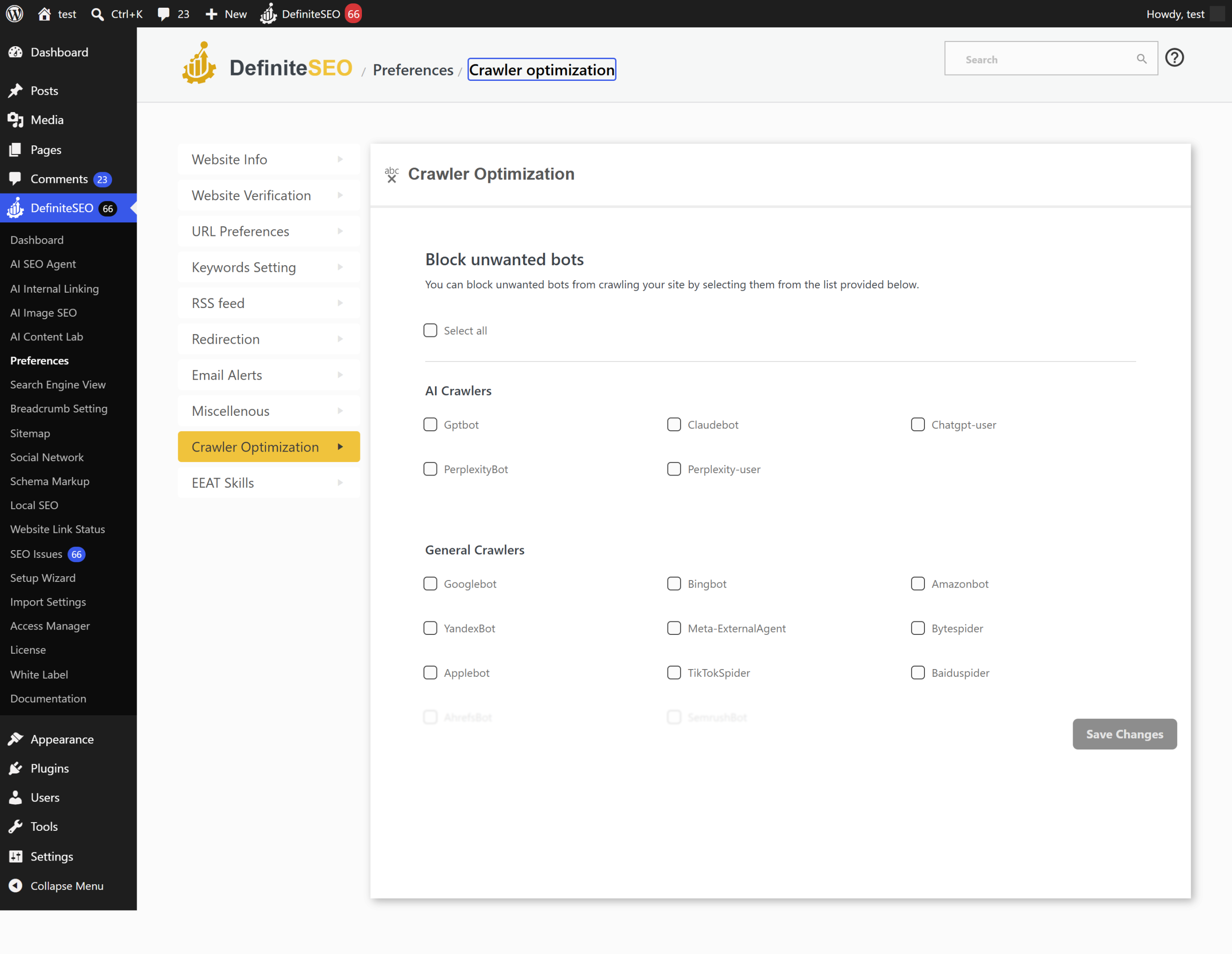
Which bots you can block
AI crawlers:
- GPTBot
- ClaudeBot
- ChatGPT-User
- PerplexityBot
- Perplexity-User
General crawlers:
- Googlebot
- Bingbot
- Amazonbot
- YandexBot
- Meta-ExternalAgent
- Bytespider
- Applebot
- TikTokSpider
- Baiduspider
- AhrefsBot
- SemrushBot
Warning: Blocking Googlebot or Bingbot stops those search engines from crawling your site,
which will hurt your search rankings. Only block a search engine crawler if you are certain you
want to.
Settings reference
| Setting | What it does | Default | Notes |
|---|---|---|---|
| Block unwanted bots | Select crawlers to block | None blocked | Adds rules to robots.txt |
| AI Crawlers | Block AI training and answer crawlers | None | GPTBot, ClaudeBot, ChatGPT-User, PerplexityBot, Perplexity-User |
| General Crawlers | Block search and tool crawlers | None | Includes Googlebot, Bingbot, and others |
| Select all | Block every listed bot at once | Off | Toggles the whole list |
Limits and good to know
- Plan: Available on all Pro plans.
- robots.txt is a request: Well-behaved crawlers honor robots.txt, but it does not force
blocking. Bad actors can ignore it. - Search engines: Be careful not to block the search engines you want to rank in.
- Robots.txt analyzer: DefiniteSEO Pro can analyze your robots.txt so you can confirm the
rules look right.
FAQ
How do I stop AI bots from scraping my content?
Open Crawler Optimization, and under Block unwanted bots select the AI crawlers you want to block
(such as GPTBot, ClaudeBot, and PerplexityBot). DefiniteSEO Pro adds the matching robots.txt
rules.
Does blocking a bot guarantee it cannot access my site?
No. robots.txt is a widely respected standard, but it is a request, not enforcement.
Well-behaved crawlers obey it; bad actors may ignore it. For hard blocking you would need
server-level rules.
Will blocking bots affect my Google rankings?
Only if you block a search engine crawler. Blocking AI or third-party tool crawlers does not
affect your rankings. Do not block Googlebot or Bingbot unless you specifically intend to.
Related
- Video, news, and additional-page sitemaps: help the crawlers you allow find your content.
- Settings reference: all settings in one place.