AI Image SEO: automatic alt text for WordPress images
Generate accurate alt text, titles, and captions for your images with AI, on upload and across your existing library.
Plan: Business
On this page
- What it does
- How to use it
- Filename optimization on upload
- Settings reference
- Limits and good to know
- FAQ
What it does
AI Image SEO (ISM) writes descriptive alt text, image titles, and captions for your
WordPress images using AI, so your media is accessible and search-friendly without manual typing.
It can optimize images as you upload them, sweep your existing library in the background, and
fill in empty alt attributes inside posts you have already published. Every change is
reversible for 30 days.
How to use it
Run a sweep across your existing library
- Go to DefiniteSEO > AI Image SEO.
- Switch the module on and review the settings (post types, per-day cap, length limits).
- Select Start full sweep. A confirmation shows how many images will be processed and the
estimated credits. - Confirm to begin. Progress and counters (processed, pending, failed, skipped) update on the
dashboard.
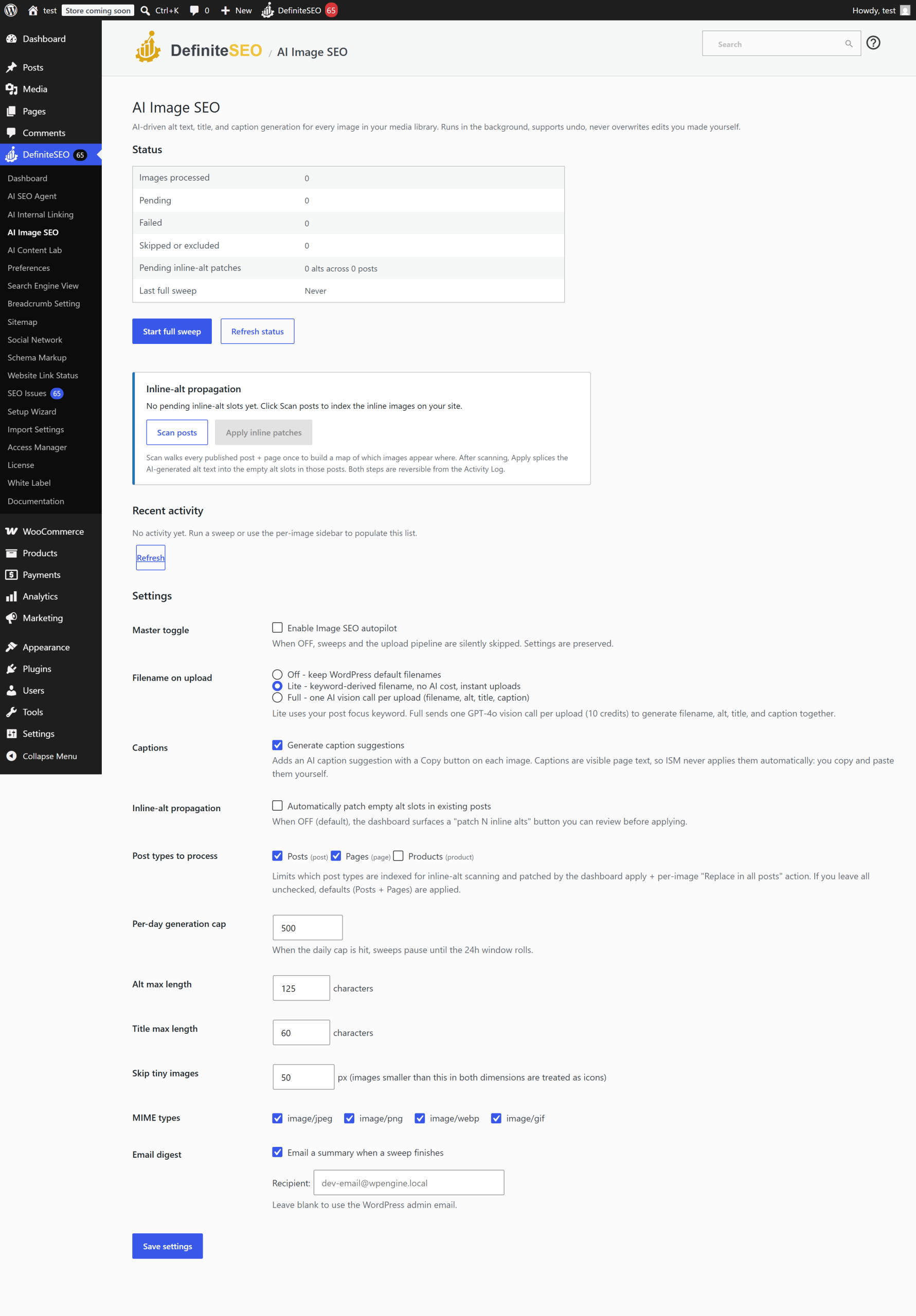
Optimize a single image
- Open an image in the Media Library.
- In the DefiniteSEO panel, generate alt text, title, and caption for that image.
- Accept and apply the suggestions you want.
Fill empty alt text in existing posts
Turn on inline propagation to copy generated alt text into empty alt="" slots in posts that
use the image. Use Scan posts and then Apply inline patches on the dashboard to review
and apply these changes.
Filename optimization on upload
The upload mode controls what happens to new images when you upload them:
- Off: no filename changes on upload.
- Lite: derives an SEO-friendly filename from keywords without using AI (no credits).
- Full: uses GPT-4o vision to generate a descriptive filename (about 10 credits per image).
Note: Captions are page-visible text, so AI Image SEO never applies them automatically. It
shows the suggested caption with a copy button for you to paste where you want it.
Settings reference
| Setting | What it does | Default | Notes |
|---|---|---|---|
| Enable module | Turns AI Image SEO on or off | Off | |
| Upload mode | Filename handling for new uploads | Lite | off, lite (no AI), full (about 10 credits per image) |
| Generate captions | Suggest captions (copy-only, never auto-applied) | On | Shown with a Copy button |
| Inline propagation | Fill empty alt text in existing posts | Off | Modifies posts you did not edit |
| Inline post types | Which post types inline propagation touches | Post, Page | |
| Per-day cap | Maximum images generated per day | 500 | 1 to 100,000 |
| Alt max length | Maximum characters in generated alt text | 125 | 20 to 250 |
| Title max length | Maximum characters in generated titles | 60 | 10 to 250 |
| Skip small images | Skip images narrower or shorter than this many pixels | 50 | 0 to 4096 |
| Allowed image types | MIME types processed | JPEG, PNG, WebP, GIF | Add or remove types |
| Excluded images or posts | Attachments or posts to skip | None | |
| Email digest | Summary email of sweep activity | On | Set recipient |
Limits and good to know
- Plan: Requires the Business plan or higher, and the AI Image SEO dashboard card must be on.
- Credits: Lite upload mode and mechanical steps are free. AI generation and Full filename
mode (about 10 credits per image) use credits; the per-day cap keeps costs bounded. - Undo: Every change is reversible for 30 days from the Activity log.
- Background behavior: Sweeps run in batches via WordPress cron; large libraries finish over
several runs. - Captions: Suggested only, never auto-applied, since captions are visible on the page.
FAQ
How many credits does an image use?
Lite filename mode and non-AI steps are free. AI alt and title generation uses credits per
image, and Full filename mode uses GPT-4o vision at about 10 credits per image. Set a per-day
cap to keep spending predictable.
Will AI Image SEO overwrite alt text I already wrote?
No. Inline propagation only fills empty alt="" slots. Existing alt text you wrote is left in
place. You can also exclude specific images or posts.
Why are captions not applied automatically?
Captions are visible page text, so the module never inserts them for you. It generates a
suggestion and gives you a copy button so you decide where, if anywhere, the caption goes.
Can I optimize images as I upload them?
Yes. Set the upload mode to Lite (no AI) or Full (AI filename), and choose whether alt text is
generated on upload. Existing images are handled by the sweep.
Does it skip tiny images like icons?
Yes, if you set the skip-small-images threshold. Images smaller than the pixel size you choose
are skipped, so icons and spacers are not processed.
Related
- SEO Autofix: includes AI image alt fixers for individual posts.
- AI SEO Agent (Autopilot): automate image and content fixes together.
- Settings reference: all settings in one place.