AI SEO Agent (Autopilot): schedule automatic SEO fixes
Let the plugin run SEO autofix on its own, on a schedule, on publish, within the limits you set.
Plan: Business
On this page
What it does
The AI SEO Agent (Autopilot) runs SEO Autofix automatically so your on-page
SEO stays fixed without manual effort. It works through a cohort of posts you define, on a
schedule you set or whenever you publish, and it keeps costs predictable with a daily credit cap
and per-fixer controls. A daily email digest reports what it did, and every change remains
reversible for 30 days.
How to set it up
Turn on Autopilot and pick a schedule
- Go to DefiniteSEO > AI SEO Agent.
- Switch the master toggle on.
- Choose a Schedule: Off, Daily, Weekly, or a custom schedule.
- Set the Scope (all posts, only posts modified in the last N days, or selected post types)
to define which posts the agent works on. - Select Save settings.
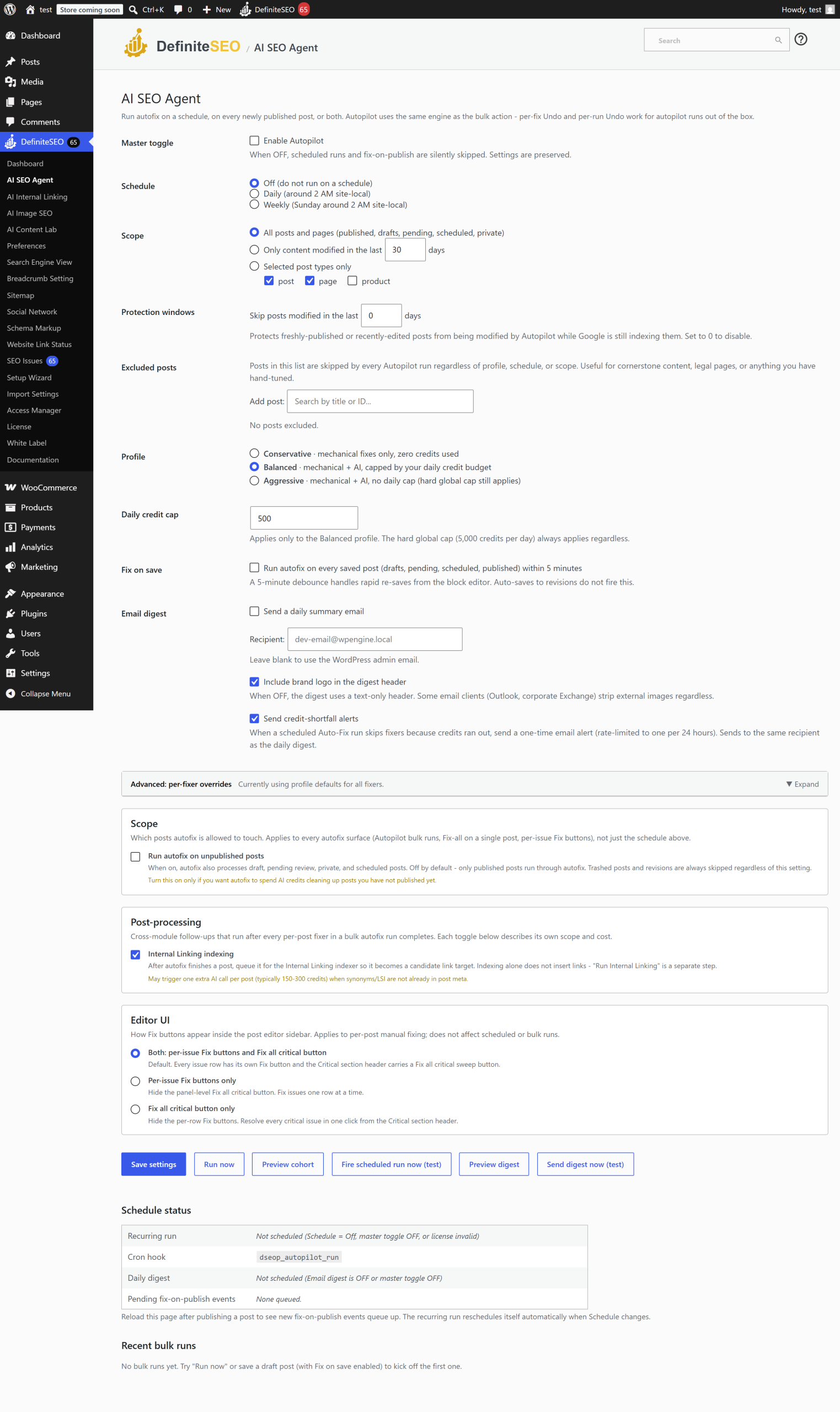
Preview before it runs
- Select Preview cohort to see how many posts a run would cover and the estimated credits.
- Select Run now to fix the cohort immediately, or Fire scheduled run now to test the
schedule path.
Fix on publish
Turn on Fix on save to have the agent fix each post shortly after you publish or update it,
so new content is optimized automatically. You can limit this to specific post types.
Get the email digest
Turn on the Email digest to receive a daily summary of what the agent fixed. You can set the
recipient and choose whether to include your brand logo. A separate credit-shortfall alert emails
you if a run stops because credits ran out.
Choosing a profile
The Profile decides how aggressive the agent is:
- Conservative: mechanical fixes only. Uses no credits. The safest option.
- Balanced: mechanical plus AI fixes, capped by your daily credit budget. The recommended
starting point. - Aggressive: mechanical plus AI fixes with no per-run credit cap (the site-wide daily cap
still applies).
You can also override individual fixers with the per-fixer matrix: force a fixer on (even
if the profile would skip it) or off (even if the profile would include it).
Settings reference
| Setting | What it does | Default | Notes |
|---|---|---|---|
| Master toggle | Turns the AI SEO Agent on or off | Off | Nothing runs until this is on |
| Schedule | How often scheduled runs fire | Off | off, daily, weekly, or custom |
| Scope | Which posts are eligible | All | all, modified-in-last-N-days, or selected post types |
| Scope: recent days | Look-back window for the "recent" scope | 30 | 1 to 365 days |
| Scope: post types | Post types included by default | Post, Page | Applies to the selected-types scope |
| Profile | How aggressive fixing is | Balanced | conservative, balanced, aggressive |
| Daily credit cap | Credit budget per day (Balanced) | 500 | A hard site-wide cap of 5,000 per day always applies |
| Protection window | Skip posts modified within N days | 0 (off) | Protects freshly published posts; up to 30 days |
| Excluded posts | Posts the agent always skips | None | For cornerstone or hand-tuned content |
| Fix on save | Fix a post shortly after publish or update | Off | Limit to chosen post types |
| Per-fixer overrides | Force individual fixers on or off | None | Overrides the profile defaults |
| Run on unpublished | Also fix drafts and scheduled posts | Off | Shared with SEO Autofix scope |
| Internal linking after autofix | Index posts for internal linking after fixing | On | Usually free; see AI Internal Linking |
| Email digest | Daily summary email | Off | Set recipient; optionally include brand logo |
| Include brand logo in digest | Show your logo in the digest email | On | |
| Credit-shortfall alert | Email when a run stops for lack of credits | On | Rate-limited to once per 24 hours |
Limits and good to know
- Plan: Requires the Business plan or higher, and the AI SEO Agent dashboard card must be on.
- Credits: Conservative uses none. Balanced is capped by your daily budget; a hard site-wide
cap of 5,000 credits per day protects you from runaway costs. - Undo: Every change is reversible for 30 days from the Activity log.
- Background behavior: Runs execute via WordPress cron in batches; large cohorts finish over
several runs. - Protection window: Use it to avoid editing posts while Google is still indexing them.
FAQ
What is a cohort in the AI SEO Agent?
A cohort is the set of posts a run targets, defined by your Scope settings (all posts, recently
modified posts, or selected post types) minus any posts you excluded or that fall inside the
protection window. Use Preview cohort to see it before running.
How do I keep AI costs under control?
Use the Balanced profile with a daily credit cap, or the Conservative profile for zero-cost
mechanical fixes only. A hard site-wide cap of 5,000 credits per day always applies, and the
credit-shortfall alert emails you if a run stops for lack of credits.
Will Autopilot change my newest posts before Google indexes them?
Not if you set a protection window. Posts modified more recently than the window are skipped,
so freshly published content is left alone until it settles.
Can I stop one specific fixer from running?
Yes. Use the per-fixer override matrix to force any fixer off regardless of profile, or force
one on that the profile would otherwise skip.
Does fix-on-publish slow down publishing?
No. The fix runs shortly after the publish or update completes, in the background, so it does not
delay saving your post.
Related
- SEO Autofix: the engine the agent runs.
- AI Internal Linking: the post-processing step that can follow a run.
- Plans and licensing: credits and plan requirements.