Orphan pages are one of the most overlooked yet damaging technical SEO issues on modern websites. When a page exists without internal links pointing to it, search engines struggle to discover, prioritize, and properly evaluate its relevance within your site architecture. In this comprehensive guide, we’ll explore what orphan pages are, why they silently weaken crawlability and indexing, how they affect AI-driven search visibility, and the exact frameworks you can use to detect, fix, and prevent them at scale.
Overview
- What Are Orphan Pages in SEO?
- Why Orphan Pages Matter for Crawlability, Indexing & AI Search
- Types of Orphan Pages (With Real Technical Scenarios)
- How Search Engines Discover Pages (And Where Orphans Break the System)
- How Orphan Pages Impact Crawl Budget & Indexation
- Orphan Pages vs. Dead-End Pages vs. Soft 404s
- Advanced Causes of Orphan Pages (Beyond “No Internal Links”)
- How to Detect Orphan Pages (Complete Technical Methods)
- CMS-based detection
- XML sitemap comparison
- Log file analysis
- Google Search Console method
- Screaming Frog & crawl gap analysis
- BigQuery enterprise method
- Step-by-Step Framework to Fix Orphan Pages
- Strategic Internal Linking Models to Prevent Orphans
- Orphan Pages in Large & Enterprise Websites
- E-commerce Orphan Pages (Filters, Facets & Expired Products)
- JavaScript & Rendering-Induced Orphan Pages
- Orphan Pages & AI-Driven Search (ChatGPT, Perplexity, Gemini)
- When Orphan Pages Are Intentional (And How to Handle Them Safely)
- Technical Audit Checklist for Orphan Page Detection
- Governance Framework: Preventing Orphans at Scale
- Real Case Study: Recovering Lost Traffic from Orphan Content
- Internal Linking Architecture Blueprint
- FAQs
What Are Orphan Pages in SEO?
An orphan page is a URL that exists on your website but has no internal links pointing to it from any other crawlable page. In structural terms, it is disconnected from your internal link graph. That means users cannot navigate to it naturally, and search engine crawlers cannot discover it through standard link-based crawling.
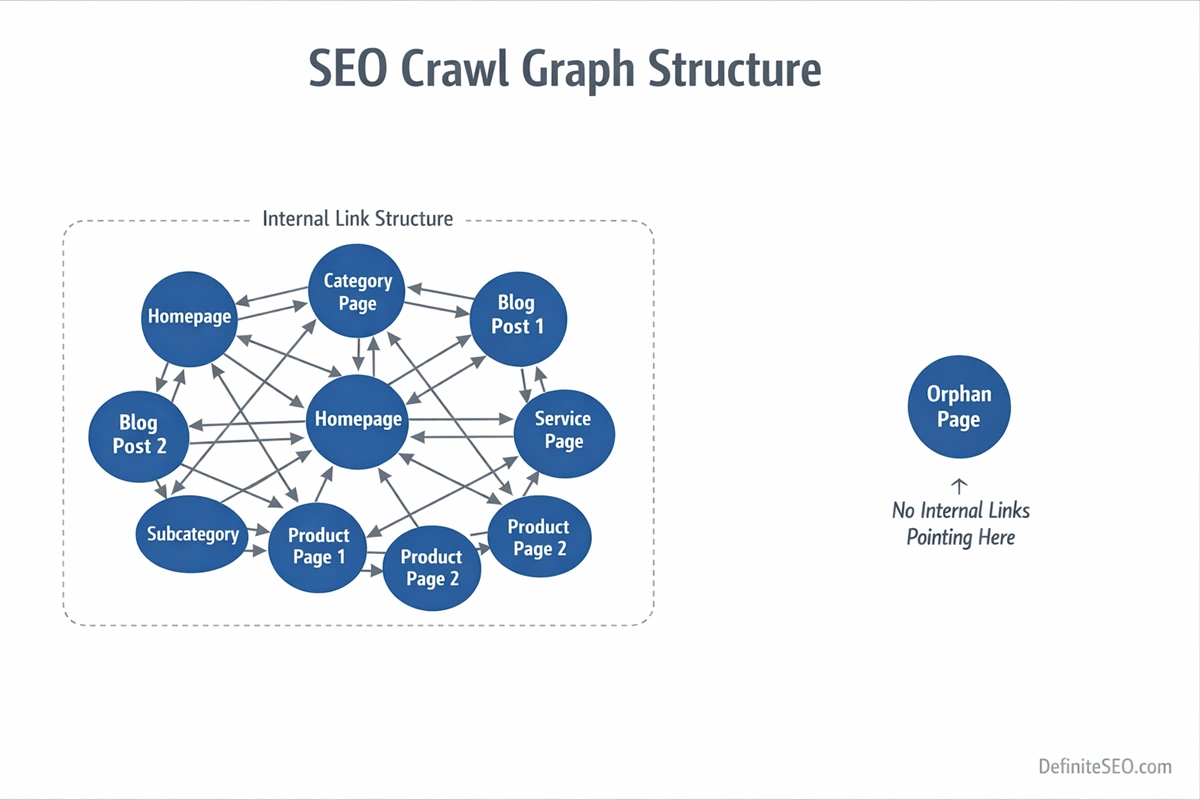
To understand why this matters, you need to think in terms of crawl graphs rather than individual pages. Modern search engines such as Google build a link-based model of your website. Every internal link strengthens relationships between pages, distributes authority, and provides contextual signals. When a page has no internal inbound links, it is effectively invisible within that model.
It may still exist technically:
- It might be included in your XML sitemap
- It could be accessible via direct URL entry
- It may have external backlinks
- It may sit quietly inside your CMS database
But structural existence is not the same as structural integration.
One of the most common misconceptions I see during enterprise audits is this: “It’s in the sitemap, so it’s fine.” That assumption ignores how search engines prioritize URLs. Sitemaps are discovery hints. Internal links are authority signals. A page that lives only in a sitemap has no contextual reinforcement, no anchor text relationships, and no defined place in your topical hierarchy.
When reviewing large websites, I often describe orphan pages as structural authority leaks. The content may be valuable. It may even convert well. But without internal pathways, search engines treat it as peripheral or expendable.
Why Orphan Pages Matter for Crawlability, Indexing & AI Search
Many SEO discussions treat orphan pages as minor housekeeping issues. In reality, they interfere with how search engines evaluate importance, topical authority, and crawl prioritization.
Crawlability and Link-Based Discovery
Search engines do not discover pages randomly. They follow links. Every crawl begins from known URLs and expands outward through internal connections. When a page has no internal links pointing to it, it is not part of that expansion path.
Even if a crawler discovers it through an XML sitemap, it lacks reinforcement signals. Over time, search engines may reduce crawl frequency because there are no internal signals suggesting the page is important.
Internal links function as internal endorsements. A page without endorsements signals low importance.
Indexing Stability and Contextual Relevance
Internal links do more than pass authority. They provide semantic context. Anchor text, surrounding copy, and placement within navigation all contribute to how a page is understood.
When that structure is missing, indexing becomes unstable. In large-scale audits, orphan pages frequently fall into states like:
- Crawled but not indexed
- Indexed but not ranking
- Indexed temporarily and later dropped
The reason is not always content quality. Often, it is structural isolation.
AI Search & Semantic Retrieval
Search visibility no longer depends solely on traditional ranking systems. AI-driven engines such as ChatGPT, Google Gemini, and Perplexity AI interpret websites through entity relationships and contextual clustering.
Internal links help reinforce those clusters. They signal that multiple pages belong to a cohesive topical system.
When content is orphaned, it becomes semantically isolated. AI systems are less likely to retrieve it in synthesized responses because it lacks structural confirmation from related documents.
As AI search evolves, structural clarity becomes more important than ever. Orphan pages weaken that clarity.
Types of Orphan Pages (With Real Technical Scenarios)
Not all orphan pages are created the same way. Understanding the cause determines whether you should fix, consolidate, redirect, or intentionally isolate them.
1. Accidental Publishing Orphans
This is common in content-heavy sites. A new blog post, service page, or landing page is published but never linked from category pages, navigation menus, or related content modules.
The page exists. It may even be included in the sitemap automatically. But because it was not integrated into the internal linking system, it becomes isolated.
I’ve seen this frequently in editorial teams where content publishing and SEO oversight are disconnected processes.
2. Migration Orphans
During redesigns or CMS migrations, link structures change. Old URLs may remain accessible but are no longer referenced in the updated navigation or category systems.
This often happens when:
- Category structures are simplified
- Old blog tags are removed
- Legacy content is archived without redirection
The pages are still live, but no internal path leads to them.
3. Structural Orphans
These occur when hierarchical pathways break. Removing a category page without reassigning child URLs is a classic example. Once the parent node disappears, its children become disconnected from the crawl tree.
Breadcrumb misconfigurations can also cause this issue, especially on large ecommerce platforms.
4. JavaScript-Induced Orphans
Modern frameworks sometimes rely on client-side navigation. If links are injected via JavaScript and not present in the raw HTML, crawlers may fail to detect them.
In SPA architectures, a page might appear fully navigable to users but remain undiscoverable to crawlers if rendering is not handled properly.
5. Intentional Orphans
Not every orphan page is a mistake. Some are created deliberately for paid campaigns, private partnerships, or testing environments.
Examples include:
- PPC landing pages not meant for organic search
- Email campaign pages
- A/B testing variants
- Private gated resources
The problem arises when these pages are left indexable without strategic control. Intentional isolation requires explicit handling through noindex directives, canonical tags, or robots configuration.
How Search Engines Discover Pages (And Where Orphans Break the System)
To understand orphan pages fully, you need to understand how search engines discover URLs in the first place.
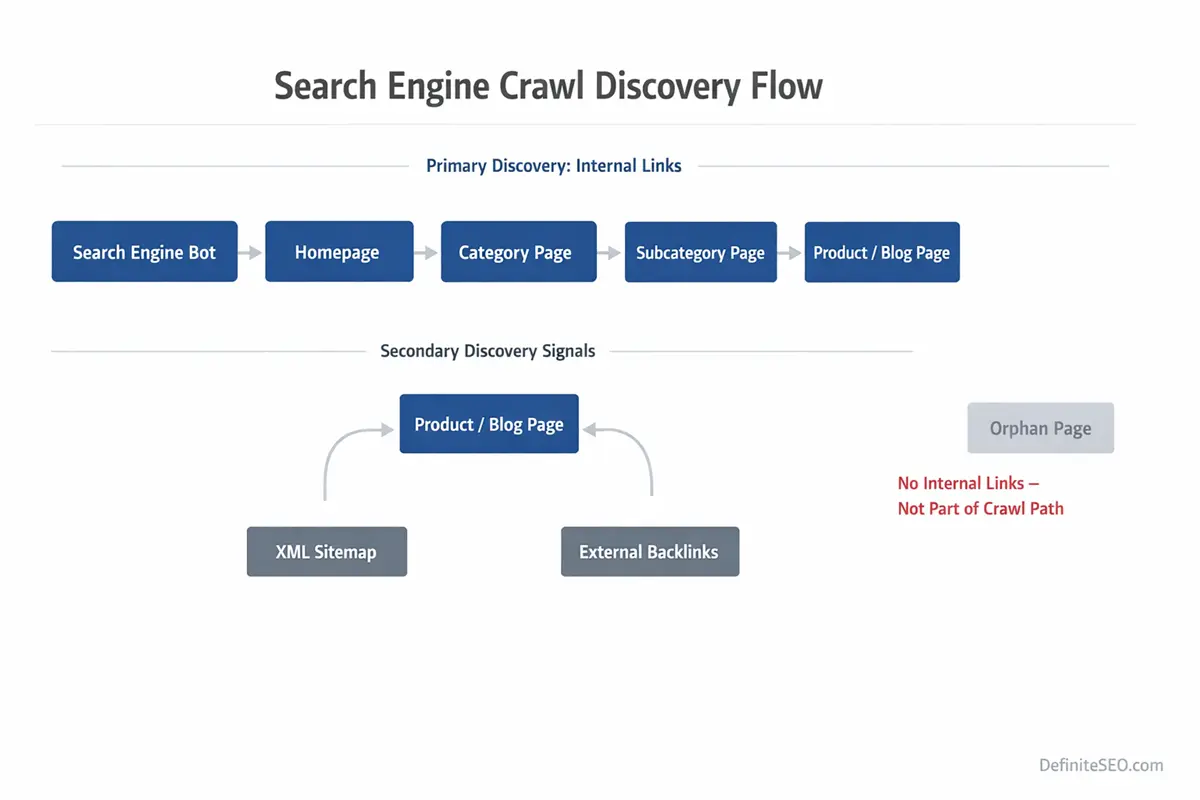
Search engines follow a structured lifecycle:
- Discovery
- Crawling
- Rendering
- Evaluation
- Index integration
Discovery primarily happens through links. Crawlers begin with known URLs and expand through internal and external links. This forms what is commonly referred to as a crawl frontier.
Internal linking defines the expansion map.
When a page has no inbound internal links, it is excluded from that expansion pathway. It can only be discovered through alternative mechanisms such as XML sitemaps or external backlinks. Even then, it lacks internal reinforcement.
Search engines treat link-based discovery differently from sitemap-based discovery. Sitemaps act as suggestions. Links act as structural endorsements.
Rendering adds another layer. If navigation relies on client-side scripts, and those scripts fail or delay link visibility, the crawler may never add deeper pages to the frontier.
Orphan pages break the system at the discovery stage. They never fully integrate into the crawl graph. Without graph integration, they struggle to gain sustained indexing and ranking signals.
As explained in Google’s crawling and indexing documentation, search engines discover URLs primarily through link-based exploration rather than isolated URL submission.
How Orphan Pages Impact Crawl Budget & Indexation
On small websites, orphan pages may seem harmless. On large sites, they quietly drain crawl efficiency.
Search engines allocate finite crawl resources to each domain. This is often referred to as crawl budget. While not every site faces crawl budget constraints, medium to large websites almost always do.
When orphan pages are discovered through sitemaps or external links, they consume crawl resources without contributing to your structural authority system. They are crawled in isolation, without contextual reinforcement from other pages.
This creates three common outcomes:
- Low crawl frequency over time
- Weak ranking potential due to minimal internal authority
- Index instability or gradual deindexation
In enterprise audits, I’ve seen situations where thousands of orphaned product pages were still present in sitemaps. Search engines attempted to crawl them periodically, but because they lacked internal links and category reinforcement, they were treated as low-priority documents.
The result was wasted crawl cycles that could have been allocated to higher-value URLs.
Even more concerning is index decay. Pages that lack internal links are more likely to drop out of the index during quality reevaluations. Search engines continuously reassess the importance of indexed documents. Structural isolation signals low ongoing relevance.
Orphan Pages vs. Dead-End Pages vs. Soft 404s
One of the most common technical SEO misunderstandings is treating orphan pages, dead-end pages, and soft 404s as interchangeable problems. They are not. Each affects crawl behavior and indexing differently, and the fix for one can worsen another if misdiagnosed.
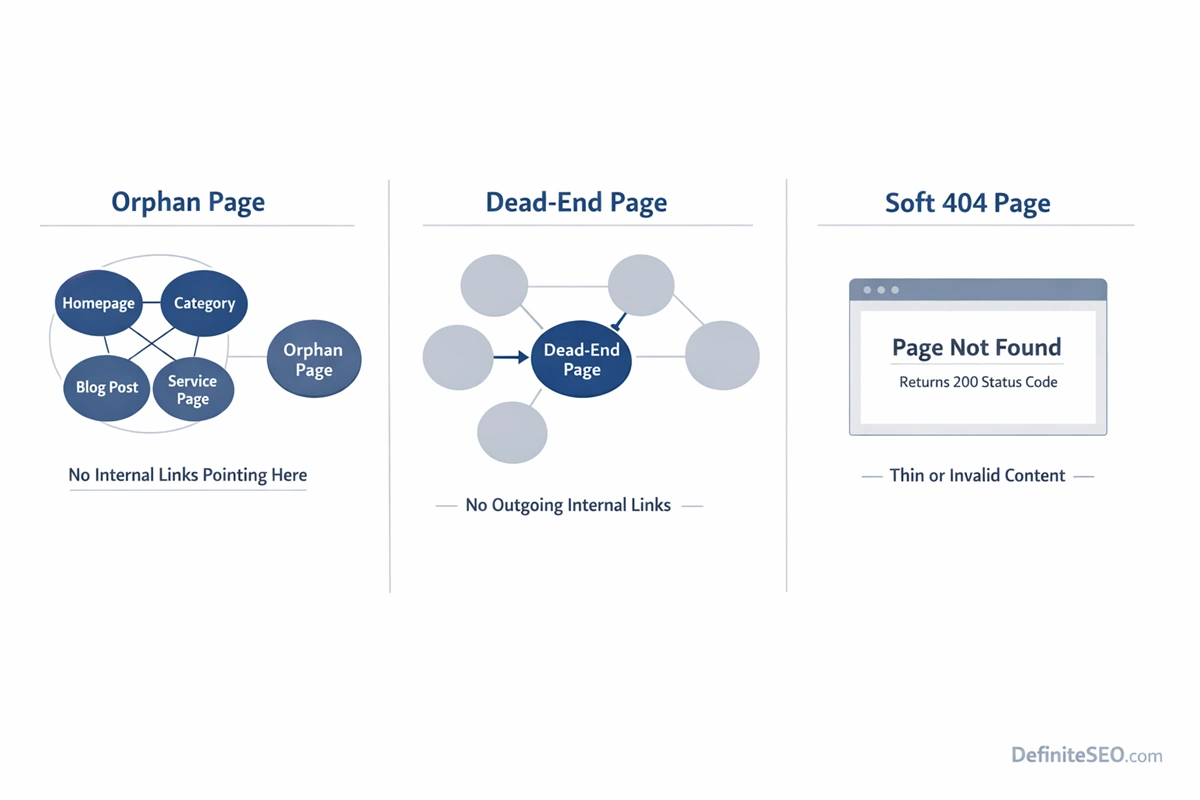
An orphan page has no internal inbound links. It is disconnected from your site’s crawl graph.
A dead-end page, on the other hand, has inbound links but no outbound internal links. Users and crawlers can reach it, but once there, they cannot continue navigating deeper into your site. Dead ends interrupt crawl flow but do not prevent discovery.
Soft 404s are something entirely different. A soft 404 occurs when a page returns a 200 status code but signals low-value or non-existent content. Search engines such as Google interpret the page as effectively empty, expired, or thin, even though technically it is accessible.
The structural differences matter:
- Orphan pages disrupt discovery.
- Dead-end pages disrupt crawl continuation.
- Soft 404s disrupt quality evaluation.
In audits, I often see orphan pages misdiagnosed as indexing issues. Teams attempt to improve content quality, add schema, or build backlinks. The problem is not quality. It is isolation.
Conversely, I’ve seen dead-end pages “fixed” by adding links, when the real issue was that the page should have been redirected due to thin or expired content.
The key is understanding where the breakdown occurs: discovery, flow, or quality. Orphan pages fail at discovery. That makes them fundamentally structural problems, not content problems.
Advanced Causes of Orphan Pages (Beyond “No Internal Links”)
Saying that orphan pages exist because “there are no internal links” is technically accurate but strategically shallow. In real-world environments, orphan pages are symptoms of deeper architectural or governance issues.
Canonical Misconfiguration
Improper canonical tagging can effectively isolate pages. If a page self-canonicalizes incorrectly or points to another URL unintentionally, search engines may consolidate signals elsewhere, reducing crawl priority and internal integration.
Misconfigured canonicals often lead to structural confusion, something clearly addressed in Google’s canonicalization best practices.
Noindex Leftovers from Development
A common enterprise issue involves pages marked noindex during staging that later lose internal links during production changes. The noindex may be removed, but the page never regains its structural position.
This frequently happens during partial rollouts where development and SEO teams are misaligned.
HTTPS and Domain Version Splits
During protocol migrations, especially HTTP to HTTPS transitions, link references sometimes fail to update consistently. Pages on the secure version may lose inbound internal links if navigation templates reference legacy URLs.
The same issue appears in www vs non-www inconsistencies. These structural mismatches create unintended isolation.
Parameter URL Isolation
Filtered or parameterized URLs often become orphaned if they are generated dynamically but not linked statically. Some exist only through user interaction states and are never discoverable via crawlable anchor links.
Parameter management is a frequent cause of partial orphaning within ecommerce ecosystems.
Hreflang Structural Breakdowns
International websites can create orphan scenarios at the language layer. If a localized page exists but is not internally linked within its regional architecture, hreflang annotations alone will not rescue it.
Without proper internal references, even valid alternate versions struggle to gain crawl consistency.
JavaScript Navigation Failures
Modern frontend frameworks sometimes inject links after initial page load. If links are not present in the rendered HTML accessible to crawlers, entire sections can become effectively orphaned.
Rendering issues amplify orphan risks significantly in SPA and headless CMS environments.
How to Detect Orphan Pages (Complete Technical Methods)
Detecting orphan pages requires comparing multiple data sources. No single tool provides a complete picture because orphan status is defined by absence of internal links, not by presence in a crawl.
Below is a systematic detection framework used in professional audits.
CMS-Based Detection
The most foundational method involves exporting all published URLs from your CMS database and comparing that list against URLs discovered in a full site crawl.
If a URL exists in the CMS export but does not appear in crawl results, it is potentially orphaned.
This method is especially effective in content-heavy platforms like WordPress, Shopify, or custom enterprise systems. It reveals pages that exist technically but are not connected structurally. If you are using WordPress, DefiniteSEO WordPress Plugin can help you automate the orphan pages detection and fixing task.
XML Sitemap Comparison
Export URLs from your XML sitemap and compare them with crawl-discovered URLs.
If URLs exist in the sitemap but are not discovered via internal crawling, they are strong orphan candidates.
It is important to understand that sitemap presence alone does not equal internal discoverability. Sitemaps are hints. Internal links are structural proof.
Log File Analysis
Log file analysis provides a deeper layer of truth. By examining server logs, you can see which URLs search engine bots actually request.
If certain URLs receive occasional bot visits but are not linked internally, they may be discovered via sitemaps or external backlinks. However, inconsistent crawl frequency often signals orphan status.
Log analysis becomes particularly powerful on large sites where crawl behavior patterns reveal structural weaknesses.
Google Search Console Method
Within Google Search Console, exported indexed URLs can be compared against crawl results. If URLs are indexed but not discoverable in a crawl, they are likely orphaned.
Additionally, the “Crawled – currently not indexed” report may reveal structurally weak pages that lack internal reinforcement.
Search Console does not explicitly label orphan pages, but when combined with crawl data, it becomes a powerful validation layer.
Screaming Frog & Crawl Gap Analysis
Tools such as Screaming Frog SEO Spider allow crawl comparison. By importing sitemap URLs or analytics data and comparing them against crawl results, you can isolate non-discovered URLs.
The concept here is crawl gap analysis: identifying URLs that exist in known data sources but do not appear in the internal crawl graph.
This method works well for mid-sized websites and provides fast insights.
BigQuery Enterprise Method
For enterprise environments, combining log files, crawl exports, analytics data, and sitemap feeds within Google BigQuery allows scalable orphan detection.
By building SQL queries that compare datasets, teams can identify:
- URLs in logs but not in crawl
- URLs in CMS but not in logs
- URLs in sitemap but not internally linked
This layered comparison reveals both true orphans and weakly integrated pages.
In large ecosystems with millions of URLs, automated data modeling is not optional. It is necessary.
Step-by-Step Framework to Fix Orphan Pages
Once orphan pages are identified, the next question is strategic: should this page exist at all?
Not every orphan should be saved.
The repair process typically follows a structured decision tree:
First, determine whether the page serves strategic value. Does it drive traffic? Conversions? Authority? If not, deletion or redirection may be appropriate.
Second, evaluate topical relevance. If the page aligns with a core cluster, it should be reintegrated via contextual links from related content, category hubs, and navigation systems.
Third, assess duplication. If similar content exists, consolidation through canonicalization or merging may be more effective than reintegration.
Fourth, evaluate indexation intent. Some pages, such as campaign landing pages, may intentionally remain isolated but should use noindex directives to avoid quality dilution.
Strategic Internal Linking Models to Prevent Orphans
Preventing orphan pages requires system design, not reactive cleanup.
High-performing websites rely on deliberate internal linking models. These models ensure that every published URL is connected intentionally within a structured hierarchy.
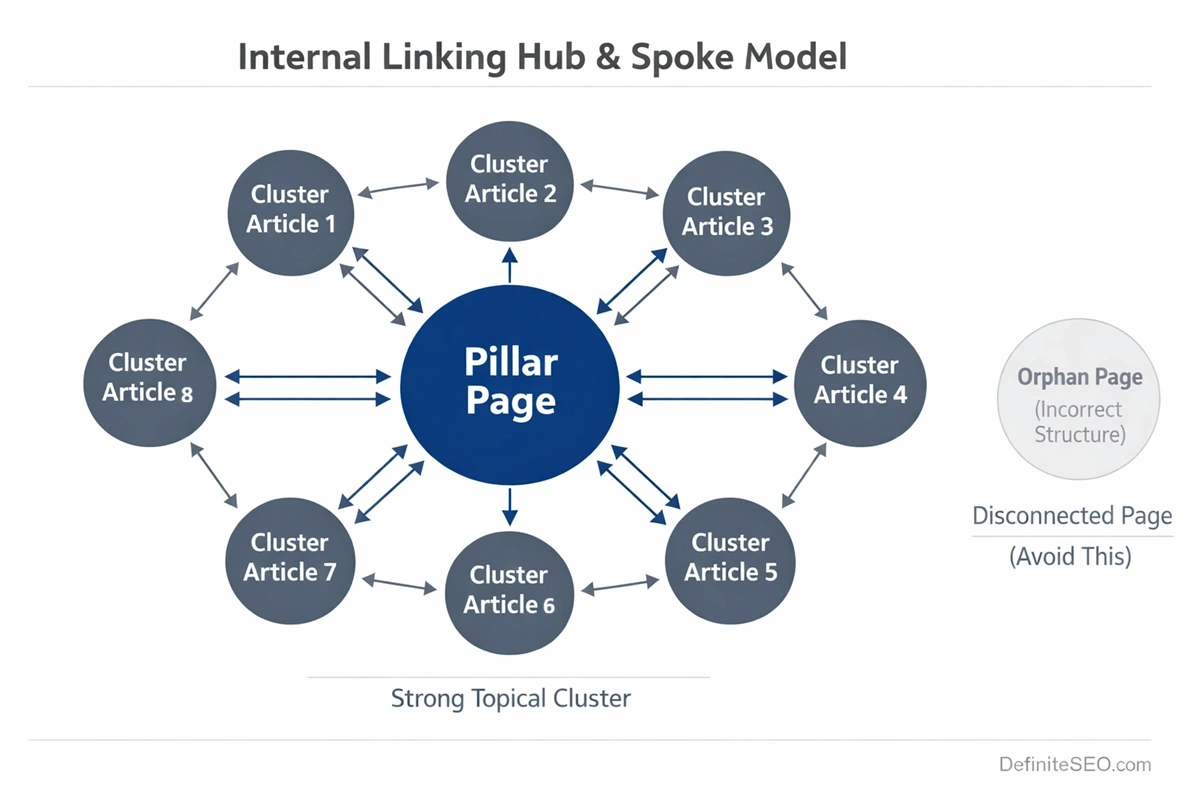
One proven approach is the hub-and-spoke model. Core pillar pages act as authority hubs, linking to supporting cluster content. Each cluster page links back to the hub and laterally to related pages. This creates bidirectional reinforcement.
Another effective method is contextual deep-linking within editorial workflows. Instead of publishing content in isolation, writers are required to link to at least three related existing pages and update at least one older page to reference the new one. This reciprocal integration prevents structural isolation.
Breadcrumb systems further reinforce hierarchy by creating consistent upward linking.
Finally, maintaining shallow click depth helps prevent accidental orphaning during structural updates. Pages buried beyond four clicks from the homepage are at higher risk of becoming weakly integrated over time.
In enterprise environments, internal linking should be governed by workflow rules, not memory. CMS validations, pre-publish checklists, and periodic crawl-diff audits help ensure that no page is published without structural placement.
Orphan Pages in Large & Enterprise Websites
Orphan pages become exponentially more dangerous as site size increases. On a 50-page website, an orphan might be a minor oversight. On a 500,000-URL enterprise platform, orphaning can quietly undermine entire revenue segments.
Large websites introduce structural complexity: layered navigation, pagination systems, seasonal content, legacy URLs, regional variants, automated publishing pipelines. Each system creates new pathways for structural disconnects.
In enterprise audits I’ve led, orphan pages rarely exist in isolation. They appear in clusters. Entire content silos become partially detached after redesigns. Product lines become disconnected when category logic changes. Editorial archives lose parent relationships when taxonomy systems are restructured.
The most common enterprise orphan scenarios include:
- Legacy content retained after CMS migrations
- Category consolidation that leaves child URLs unlinked
- International versions published without regional navigation updates
- Product detail pages excluded from updated faceted systems
The scale problem makes detection harder. Standard crawlers may not fully process millions of URLs within reasonable time constraints. As a result, partial crawls give a false sense of structural integrity.
Enterprise orphan management requires layered validation:
- Crawl data
- Log files
- CMS exports
- XML sitemaps
- Analytics landing page reports
When these datasets are not reconciled regularly, orphaning becomes chronic rather than accidental.
E-commerce Orphan Pages (Filters, Facets & Expired Products)
E-commerce ecosystems are uniquely vulnerable to orphan pages because they are dynamic by design.
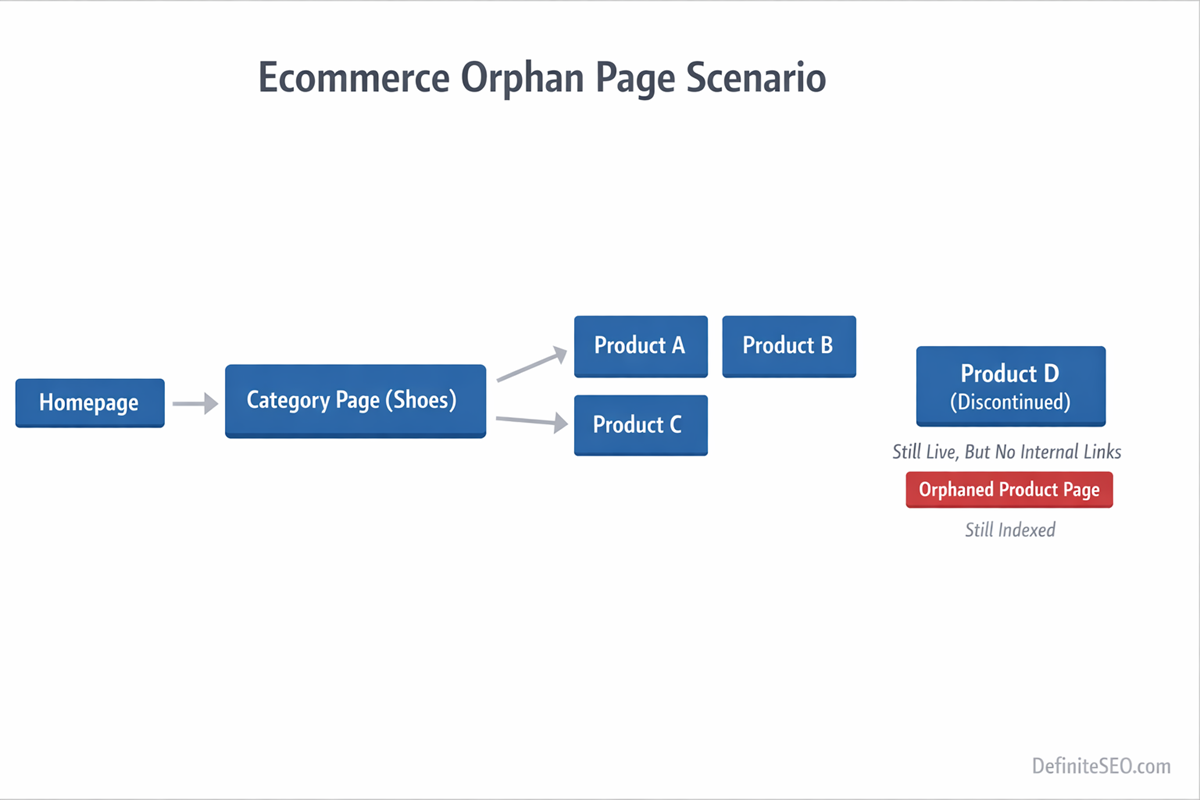
Products are added and removed daily. Categories evolve. Filters generate combinations. Seasonal inventory appears and disappears. Without careful governance, structural disconnects accumulate quickly.
Faceted Navigation & Filter Combinations
Faceted systems generate parameterized URLs based on user-selected filters. Some of these URLs become indexed. Others remain accessible but unlinked. Still others are generated dynamically without static references.
When filters create crawlable URLs that are not linked internally in a consistent way, they become semi-orphaned. They may be reachable only through specific interaction paths rather than crawlable anchor links.
Expired and Out-of-Stock Products
Another common orphan scenario occurs when product pages are removed from category listings but left live.
The URL still exists. It may still rank. But once it disappears from category pagination or filtered views, it loses inbound internal links. Over time, crawl frequency drops. Rankings decline. Eventually, the page decays.
The correct handling depends on context:
- Permanently discontinued products with no replacement may warrant 301 redirection to the closest relevant category.
- Temporarily unavailable products may remain live but require clear messaging and continued structural integration.
- High-performing discontinued products may justify keeping the URL live with alternative recommendations.
The key principle is consistency. Removing a product from navigation without making a deliberate SEO decision creates orphan risk automatically.
JavaScript & Rendering-Induced Orphan Pages
Modern web architecture has made orphan detection more complex. In server-rendered environments, links are visible in the HTML source. In client-side rendered systems, links may only appear after JavaScript execution.
If crawlers fail to execute scripts properly, internal links may not be recognized. Entire sections of a site can appear disconnected from the crawl graph even though users experience normal navigation.
This is especially common in:
- Single Page Applications
- Headless CMS architectures
- Infinite scroll implementations
- Lazy-loaded navigation menus
While Google has advanced rendering capabilities, rendering is resource-intensive. It may delay or limit link discovery. If link injection occurs after hydration events or requires user interaction, the crawler may never see it.
In audits of JavaScript-heavy sites, I frequently see product collections that are technically linked in the UI but absent in the rendered HTML snapshot. From a crawler’s perspective, those URLs are effectively orphaned.
Diagnosing this requires comparing:
- Raw HTML crawl results
- Rendered crawl results
- Log file bot requests
If URLs only appear after rendering, they are at higher risk of crawl inconsistency.
Orphan Pages & AI-Driven Search (ChatGPT, Perplexity, Gemini)
Search is no longer limited to ten blue links. AI systems increasingly synthesize information from structured content clusters. Internal linking now influences not just ranking, but retrieval confidence.
Systems such as ChatGPT, Perplexity AI, and Google Gemini rely on entity relationships, contextual reinforcement, and semantic clustering to determine which documents represent authoritative sources.
Internal links help establish those relationships. They signal that multiple documents belong to the same topical ecosystem. When a page is orphaned, it lacks that contextual reinforcement.
From an AI retrieval perspective, this has several implications:
- Reduced likelihood of being included in synthesized responses
- Weaker topical cluster representation
- Lower trust weighting compared to well-integrated cluster pages
Modern search engines also evaluate site-level authority patterns. If a page is not referenced anywhere else on your domain, it appears structurally insignificant.
This is especially important for informational content. A well-written article that sits outside the cluster architecture may never achieve its retrieval potential in AI-generated summaries.
When Orphan Pages Are Intentional (And How to Handle Them Safely)
Not every orphan page is an error. Some are strategically isolated by design. The difference between harmful orphaning and intentional isolation lies in control.
Common intentional scenarios include:
- Paid advertising landing pages
- Email campaign URLs
- Private event registration pages
- A/B testing variants
- Partner-specific content
In these cases, the goal is often to prevent organic discovery while preserving conversion tracking. The mistake occurs when these pages are left indexable without clear signals.
Safe handling typically involves one or more of the following:
- Applying a noindex directive to prevent indexation when needed.
- Blocking via robots.txt when appropriate
- Using canonical tags to consolidate signals
- Ensuring they are excluded from XML sitemaps
Intentional orphaning should always be explicit, documented, and monitored. It should never be accidental.
Technical Audit Checklist for Orphan Page Detection
By the time a site accumulates orphan pages, the issue is rarely visible in surface-level reports. Rankings may fluctuate. Crawl stats may look inconsistent. But unless you deliberately test for structural isolation, orphan pages remain hidden in plain sight.
A proper orphan page audit is not a single action. It is a reconciliation exercise across multiple data layers.
The first layer is crawl data. Run a full crawl using a reliable crawler and export all internally discovered URLs. This becomes your structural baseline. These are the URLs that your internal link graph currently exposes.
The second layer is your source-of-truth dataset. This may be your CMS export, product database, blog index, or content repository. If a URL exists in the CMS but not in the crawl export, you have a structural disconnect.
The third layer is your XML sitemap. URLs listed in the sitemap but absent from the crawl are strong orphan candidates. Sitemap inclusion without crawl discovery usually indicates missing internal links.
The fourth layer is server log analysis. Logs reveal which URLs search engine bots actually request. If bots are accessing URLs that your internal crawl did not discover, those pages may be externally linked or sitemap-discovered but structurally isolated.
The fifth layer is index verification through Google Search Console. Export indexed URLs and compare them to crawl results. Indexed URLs absent from your internal crawl graph are structurally weak, even if currently ranking.
When these datasets are layered together, patterns emerge:
- URLs present in CMS but absent in crawl and logs are likely fully orphaned.
- URLs present in sitemap and logs but absent in crawl suggest sitemap-dependent discovery.
- URLs indexed but absent in crawl indicate structural instability.
A thorough audit also evaluates click depth distribution. Pages buried excessively deep may not be fully orphaned but are at risk of becoming so during structural updates.
Governance Framework: Preventing Orphans at Scale
Fixing orphan pages is reactive. Preventing them requires governance.
In growing organizations, orphan pages usually result from workflow fragmentation. Content teams publish. Developers deploy. SEO teams audit periodically. Without integrated controls, structural consistency erodes over time.
Prevention begins at the publishing layer. Every new URL should pass a structural validation check before going live. That check answers three questions:
Where does this page live in the hierarchy?
Which pages link to it?
Which related pages does it reinforce?
If a page cannot answer those questions, it should not be published.
CMS-level automation plays a critical role here. Editorial interfaces can require at least one category assignment and multiple contextual links before publishing. Navigation modules can be dynamically updated when new content enters specific taxonomies.
Periodic crawl-diff analysis is equally important. By comparing crawl exports month over month, you can identify newly disconnected pages before traffic impact occurs.
Enterprise environments benefit from automated alerts that trigger when:
- A page loses all inbound internal links
- A category page is deleted without child reassignment
- Sitemap URLs exceed crawl-discovered URLs by a defined threshold
Real Case Study: Recovering Lost Traffic from Orphan Content
Several years ago, I worked with a content-heavy B2B platform that had undergone a partial redesign. Traffic had declined steadily over six months, particularly across long-tail informational articles. No penalties. No major algorithm updates. Content quality was strong.
The issue was structural.
During the redesign, category pages were consolidated. Older blog posts were removed from pagination and replaced with curated “featured” content modules. The legacy articles still existed. They remained indexed. But they no longer had internal links from category hubs or newer posts.
In effect, hundreds of historically strong URLs became orphaned or near-orphaned.
My audit combined:
- Full crawl exports
- CMS database exports
- Server log analysis
- Index coverage reports
The findings were clear. Crawl frequency for these articles had dropped significantly. Many were categorized as “Discovered – currently not indexed” or had unstable ranking positions.
The recovery strategy was architectural, not content-driven.
My team rebuilt contextual link bridges between new and legacy articles. We restored category-level pagination logic for older content. We implemented related-post modules that dynamically reinforced topical clusters.
Within three months:
- Crawl frequency normalized.
- Index stability improved.
- Organic traffic across affected segments increased by over 30 percent.
No new content was added. No backlinks were built. The recovery came from reintegrating orphaned assets into the crawl graph.
This is why I consistently emphasize structural audits before tactical optimizations. If authority cannot flow internally, external signals lose leverage.
My Internal Linking Architecture Blueprint
Over years of technical SEO consulting, I’ve developed a layered approach to internal linking that minimizes orphan risk while maximizing authority distribution.
I refer to this as the four-layer structural model.
Layer 1: Crawl Map Layer
This is the foundational structure. Every indexable page must have at least one crawlable HTML link from another indexable page. No JavaScript dependency. No interaction requirement.
If this layer fails, orphaning begins.
Layer 2: Authority Flow Layer
Here, internal links are intentionally distributed from high-authority pages to strategically important cluster pages. Pillar pages link downward. Supporting pages link upward. Cross-links reinforce lateral relationships.
This prevents structural isolation over time.
Layer 3: Contextual Reinforcement Layer
Within content, contextual links clarify semantic relationships. Instead of generic navigation-only linking, content embeds meaningful references to related topics.
For example, an orphan page about crawl budget should be contextually linked from broader technical SEO guides. That ensures semantic integration, not just structural placement.
Layer 4: AI Retrieval Layer
As AI-driven engines become more prominent, structured reinforcement becomes critical. Pages should exist within clearly defined topical clusters supported by schema, breadcrumb hierarchy, and consistent internal referencing.
This layered model reduces orphan risk because every page is integrated at multiple levels, not just one.
FAQs
Can a page rank if it is orphaned?
Yes, an orphan page can rank if it has strong external backlinks or direct discovery signals, but its rankings are usually unstable due to weak internal authority reinforcement.
Are orphan pages always bad for SEO?
Not always; some pages are intentionally isolated for campaigns or testing, but unintentional orphan pages typically weaken structural authority and crawl efficiency.
Does being in an XML sitemap prevent a page from being orphaned?
No, a sitemap only suggests URLs to search engines, but without internal links the page remains structurally disconnected from your site architecture.
How do I find orphan pages without paid SEO tools?
You can export URLs from your CMS, compare them with a basic crawl, and reconcile the list with your sitemap and index data in Google Search Console.
Should I delete or redirect orphan pages?
It depends on value; high-value pages should be reintegrated into the link structure, while low-value or outdated pages may be better redirected or removed.
Do orphan pages waste crawl budget?
Yes, especially on larger sites, because search engines may still attempt to crawl them even though they lack structural reinforcement and priority signals.
Can orphan pages still be indexed?
Yes, they can be indexed through sitemaps or external links, but they are more prone to deindexation over time due to low internal importance.
How often should I check for orphan pages?
For active websites, orphan checks should be part of quarterly technical audits, while enterprise or ecommerce sites benefit from monthly crawl-diff monitoring.
Are PPC landing pages considered orphan pages?
They can be, but if intentionally isolated they should use clear indexation controls to avoid diluting site quality signals.
Do orphan pages affect AI search visibility?
Yes, because AI systems rely on structured internal relationships, orphaned pages are less likely to be included in semantic clusters and AI-generated summaries.