Most of the breadcrumb questions that hit my inbox sound the same: someone dropped a “Home > Category > Page” trail onto their site, watched nothing obvious happen in Search Console, and now wants to know if it was a waste of an afternoon. Breadcrumb SEO is the practice of using that small navigational trail, together with its BreadcrumbList structured data, to show search engines and readers exactly where a page sits in your site hierarchy. Done right, it earns richer search snippets, tighter crawl paths, and a site shape that both Google and AI answer engines can actually understand.
Breadcrumbs are the secondary navigation row that traces a page back to the homepage, like Home > Technical SEO > Breadcrumb SEO. For SEO they do three jobs: they hand Google a clean signal about your site hierarchy, they spread internal link equity to parent categories, and when you add BreadcrumbList schema they can still show a readable path in desktop search results, though Google dropped the breadcrumb from mobile snippets in January 2025. They help most on sites three or more levels deep. They do not directly raise rankings on their own, but the structure, crawl efficiency, and navigation gains they support absolutely move results over time. Add hierarchy based breadcrumbs, mark them up with valid JSON-LD using at least two list items, and never let a breadcrumb link point at a broken page.
- What Breadcrumb Navigation Is
- The Three Types of Breadcrumbs
- Why Breadcrumbs Matter for SEO and AI Search
- How Breadcrumbs Help Google Understand Your Site Structure
- Breadcrumbs, Crawl Efficiency, and Internal Linking
- How Breadcrumbs Show Up in Search Results
- How to Add Breadcrumbs in WordPress
- BreadcrumbList Schema Markup (JSON-LD)
- Breadcrumb Best Practices That Actually Move the Needle
- Common Breadcrumb Mistakes to Avoid
- How to Measure Whether Breadcrumbs Are Working
- Frequently Asked Questions
What Breadcrumb Navigation Is
Breadcrumb navigation is a row of links, usually near the top of a page, that shows the path from your homepage down to the page a visitor is currently on. The name comes from the Hansel and Gretel trail, and the job is the same: give people a way to retrace their steps. A typical trail reads Home > Category > Subcategory > Current Page, with each step before the last one clickable.
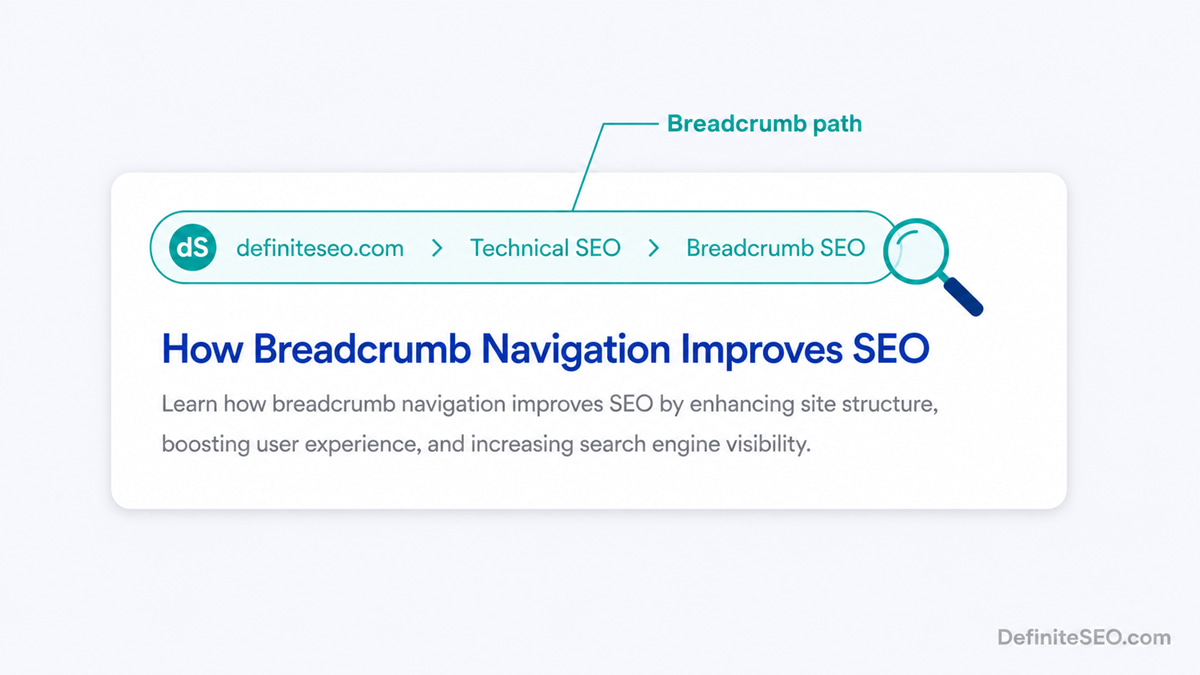
That is the whole idea on the surface. Underneath, a breadcrumb is doing something more useful than decoration. Every link in the trail is a real internal link with descriptive anchor text, and the order of those links describes your information architecture in a form a machine can parse. So a breadcrumb is two things at once: a human wayfinding aid and a compact, structured statement about where this page belongs.
One thing worth saying early, because it saves a lot of wasted effort: breadcrumbs earn their keep on sites with depth. Nielsen Norman Group has been clear that breadcrumbs only orient users meaningfully when a site has three or more hierarchy levels. On a flat five page brochure site, a breadcrumb trail just adds visual noise without telling anyone anything they did not already know. If your site has categories, subcategories, and pages beneath them, breadcrumbs start to pull their weight.
The Three Types of Breadcrumbs
There are three kinds of breadcrumbs, and for SEO you almost always want the hierarchy based type. Here is how they differ and where each one fits.
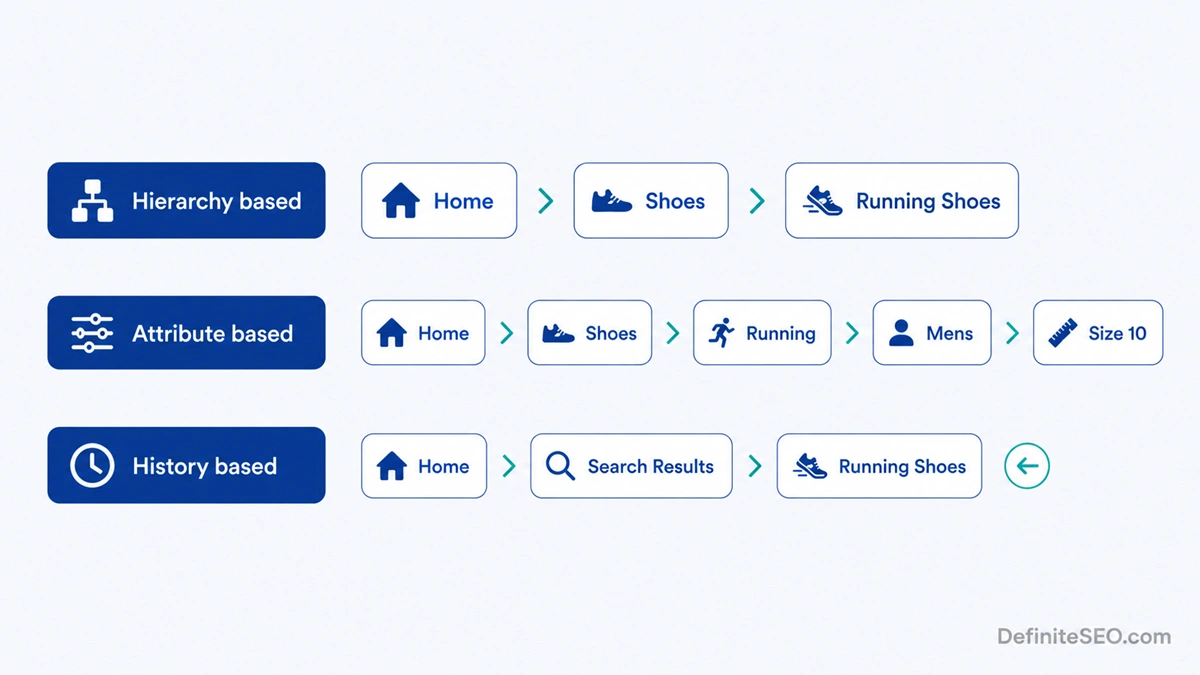
Hierarchy based breadcrumbs reflect your site structure. They show the fixed path from the homepage through the category tree to the current page, and they look identical no matter how the visitor arrived. This is the type Google reads for structured data, and the type I recommend for nearly every site. Example: Home > Technical SEO > Breadcrumb SEO.
Attribute based breadcrumbs describe a page by its properties rather than its position in a tree. You see these on ecommerce stores running heavy filtering, where a trail might read Home > Shoes > Running > Men’s > Size 10. They overlap with faceted navigation, and if you run a store you should read how I handle faceted navigation on ecommerce stores before you let filter combinations spawn endless breadcrumb permutations.
History based breadcrumbs trace the path the user personally took to reach the page, more like a session trail than a site map. They read Home > Previous Page > Current Page based on click history, so they change from visit to visit. They are essentially a styled back button, and because they are not stable they are useless for structured data and can confuse people who expect the trail to mean something.
This split matters more than it looks. A Baymard Institute benchmark of 50 large ecommerce sites found that 68 percent had sub par breadcrumb implementations, with 23 percent offering no breadcrumbs at all and 45 percent providing only one type when their product pages genuinely needed both a hierarchy trail and a history trail. Baymard’s point is that a shopper who filtered a category and then opened a product wants a way back to that filtered view, not just to the bare category. For most non ecommerce sites, though, a single clean hierarchy based trail is exactly right, and that is the one Google wants to see in your markup.
Why Breadcrumbs Matter for SEO and AI Search
Breadcrumbs matter because they make your site’s structure legible to both people and machines, and legible structure is what modern search rewards. They do not flip a ranking switch by themselves. What they do is strengthen several signals that compound: clearer hierarchy, more internal links to important pages, better snippets, and lower exit rates from deep pages.
The user behaviour piece is real and well documented. Visitors who land on a deep page from a search result often use the breadcrumb to jump up to the parent category instead of bouncing straight back to Google, and that single move reduces exits and rescues sessions that would otherwise end. Jakob Nielsen, after years of usability testing, put it about as plainly as anyone could: breadcrumbs never cause problems in user testing. People may overlook the element, but they never misread it. That is a rare thing in interface design, a feature with upside and effectively no downside.
For AI search the structural angle gets more interesting. Engines like ChatGPT, Perplexity, and Google AI Overviews are trying to place a page in context, to understand what a page is about and how authoritative the surrounding site is on that topic. A breadcrumb trail spells out that context in a structured, unambiguous way: this page is a child of this category, which sits under this site. It reinforces the same topical clustering and the broader trust and clarity signals Google rewards. Breadcrumbs are not a magic citation lever on their own, but they are part of the structural scaffolding that helps an answer engine decide your page belongs in its answer.
How Breadcrumbs Help Google Understand Your Site Structure
Breadcrumbs give Google an explicit, machine readable map of how your pages relate to one another, which removes guesswork from how it categorises and ranks them. Without breadcrumbs, Google infers hierarchy from your URL pattern, your navigation menus, and your internal links. With breadcrumbs plus BreadcrumbList schema, you are stating the hierarchy directly instead of leaving it to inference.
That direct statement does a few concrete things. It groups related pages into clear topical clusters, so Google understands that a dozen articles all sit under one category and treat that category as a hub. It reinforces which pages are parents and which are children, which feeds into how authority flows around the site. And it complements the broader picture Google assembles from your site structure that search engines map through your sitemap, so the breadcrumb and the sitemap tell a consistent story rather than two conflicting ones.
When the signals agree, indexing gets more predictable and category pages tend to rank better for their head terms because Google can see they sit at the top of a real cluster. When the signals fight each other, for example a breadcrumb that claims one parent while your URL path implies another, you blur the very structure you were trying to clarify. Consistency is the whole game here.
The cleanest site structures I have ever audited had three things saying the same thing about every page: the URL path, the breadcrumb trail, and the internal links. When those three agree, Google almost never gets your hierarchy wrong. When they disagree, it almost always does.
Breadcrumbs, Crawl Efficiency, and Internal Linking
Breadcrumbs are internal links, and that is exactly why they help with crawling and link equity. Every breadcrumb trail adds contextual links back to your category and subcategory pages on every single child page, which quietly builds one of the densest, most consistent internal linking patterns on your whole site. Because breadcrumbs are a form of internal linking, they pass authority upward to the parent pages you most want to rank, automatically, without you hand placing a single link.
That density pays off in crawl behaviour. The widely cited guideline is to keep important pages within three clicks of the homepage, because crawl frequency drops sharply with depth and a page Googlebot rarely reaches is a page that struggles to rank. Breadcrumbs flatten the effective click depth by linking every child straight back to its parents, so even a product buried five folders deep is one click from its category. When every deep page links back up like that, Googlebot finds it easier to discover and recrawl your important hub pages, which lets you spend crawl budget more efficiently rather than burning it on dead ends. Breadcrumbs also reduce the risk of orphan pages with no path back to them, because a page carrying a breadcrumb trail is, by definition, linked from the hierarchy it names. An orphaned page with a breadcrumb is almost a contradiction in terms.
There is a structural sibling worth mentioning here too. On large category archives, breadcrumbs and pagination across long category archives work together: the breadcrumb anchors each product or article to its category, while pagination handles the depth within that category. Get both right and a crawler can move through even a very large catalogue without losing its place.
How Breadcrumbs Show Up in Search Results
On desktop, valid BreadcrumbList structured data lets Google replace the raw URL in your search snippet with a readable breadcrumb path, so a result shows definiteseo.com > Technical SEO > Breadcrumb SEO instead of a long ugly link. On mobile, that path is gone. This is the single most important update to know, and a lot of older breadcrumb guides still get it wrong: on January 23, 2025, Google removed the breadcrumb element from mobile search snippets in every language and region, replacing the visible URL with the domain only, because the trail kept getting cut off on small screens.
So the snippet benefit is now a desktop only benefit. On desktop the breadcrumb still sits right under the title, sharing prime real estate with the headline. It does not replace your title, it sits alongside your title tag in the SERP and adds context the title alone cannot carry. On mobile, where the majority of searches now happen, the visible URL is just your domain regardless of your markup.
Here is the part people overreact to: this change does not mean you should rip out your breadcrumbs. Google was explicit in its own announcement that nothing needs to change, that it still fully supports BreadcrumbList markup, and that the Breadcrumbs report in Search Console and the Rich Results Test are unaffected. The markup still powers the desktop snippet, still feeds Google’s understanding of your hierarchy, and still drives the on page navigation and internal linking value that never depended on the snippet in the first place. In my own testing across a few dozen WordPress sites I help manage, pages with valid BreadcrumbList markup still surface the desktop breadcrumb path within roughly two to three weeks of the markup going live, assuming the pages are already crawled on a normal schedule. The mobile snippet went away; every other reason to use breadcrumbs stayed exactly where it was.
How to Add Breadcrumbs in WordPress
In WordPress, the simplest path is to let an SEO plugin generate both the visible breadcrumb trail and its matching BreadcrumbList schema for you, so the two never drift apart. Most modern SEO plugins, including my own DefiniteSEO plugin, output the breadcrumb HTML and the JSON-LD together from your existing category structure, which means you enable the feature once and every page inherits a correct trail. That paired output is the part that matters: a visible trail with no schema misses the SERP benefit, and schema with no visible trail risks a structured data warning for a breadcrumb users cannot see.
If you would rather wire it up by hand, you have two common routes. The first is a theme function: many themes ship a breadcrumb function you call in your template, for example a single line placed in your header or above the post title that prints the trail. The second is a manual template build where you construct the trail from the current page’s category and ancestors using template tags, then output the JSON-LD separately. Both work, but both put the burden on you to keep the visible trail and the schema in sync whenever your structure changes.
Whichever route you take, the rules are the same. Build the trail from your real hierarchy, not from session history. Make every step except the current page a working link. Put the current page last, as plain text rather than a link, because linking a page to itself is pointless. And place the trail high on the page, above the main heading, where both users and crawlers expect to find it.
BreadcrumbList Schema Markup (JSON-LD)
BreadcrumbList is the schema.org type that tells Google your breadcrumb trail in structured form, and Google supports it as one of its standard rich result types. You add it as a block of JSON-LD in the page source, listing each step in the trail as an ordered ListItem with a name, a URL, and a position number. Google’s documentation requires a BreadcrumbList to contain at least two ListItem entries to qualify, each with a position integer and a name, with the item URL optional on the final, current page. Google reads that block, matches it against the visible trail, and may use it to render the breadcrumb in your desktop search result.
Worth knowing: Google’s official guidance actually recommends that breadcrumbs represent a typical user path to the page rather than strictly mirroring your URL folders. In practice, for most content sites a stable hierarchy based trail is both the typical path and the cleanest signal, so the two line up. Where they genuinely differ, on a complex store for example, lead with the path a real visitor would take to reach that page.
Treat this markup as machine readability and rich result eligibility, not as a magic citation trick. Valid schema makes your page clean for engines to parse and eligible for the breadcrumb snippet, but it does not, on its own, make ChatGPT or Google AI Overviews cite you more often. The structural clarity helps; the JSON-LD tag by itself is hygiene, not a growth lever. Add it because it is correct and because it unlocks the snippet, not because you expect it to conjure rankings.
Here is a minimal, valid BreadcrumbList block for a three step trail:
<script type="application/ld+json">
{
  "@context": "https://schema.org",
  "@type": "BreadcrumbList",
  "itemListElement": [
    {
      "@type": "ListItem",
      "position": 1,
      "name": "Home",
      "item": "https://definiteseo.com/"
    },
    {
      "@type": "ListItem",
      "position": 2,
      "name": "Technical SEO",
      "item": "https://definiteseo.com/technical-seo/"
    },
    {
      "@type": "ListItem",
      "position": 3,
      "name": "Breadcrumb SEO",
      "item": "https://definiteseo.com/technical-seo/breadcrumb-seo/"
    }
  ]
}
</script>
Two details people miss. The final item, the current page, still gets a position and a name, and including its URL is fine and now standard. And the names in your JSON-LD should match the visible trail word for word, because a mismatch between what users see and what the markup claims is exactly the kind of inconsistency Google’s structured data testing flags. Run any breadcrumb markup through Google’s Rich Results Test before you trust it.
Breadcrumb Best Practices That Actually Move the Needle
The breadcrumb practices that matter are the boring, consistent ones: match the trail to your real hierarchy, keep the anchor text descriptive, and never break the chain. Flashy is not the goal here. Reliable is.
Start with the anchor text, because it is doing double duty as navigation and as an internal link signal. The words in each breadcrumb step are anchor text pointing at your category pages, so the keywords you place in that anchor shape how Google reads those categories. Use the real category name, the one you actually want to rank, not a cute label.
Beyond anchor text, here is what consistently pays off:
- Reflect the path that makes sense to a visitor. For most content sites that is your hierarchy, and it should line up with your URL: a URL of /technical-seo/breadcrumb-seo/ pairs naturally with Home > Technical SEO > Breadcrumb SEO. Google’s own advice is to show a typical user path, so where the natural route differs from the raw folder structure, follow the route a real person would take.
- Keep it to one row. A breadcrumb should fit on a single line. If your hierarchy is so deep the trail wraps onto two or three lines, the problem is your architecture, not your breadcrumb.
- Place it above the fold. Put the trail near the top of the page, above the H1, where users and crawlers expect it. Buried breadcrumbs help no one.
- Make every parent step clickable. The whole point is letting people jump up a level. A trail of plain text that does not link anywhere is just a label.
- Use the greater than separator or a clear arrow. Home > Category > Page reads instantly. Avoid ambiguous separators that could be mistaken for something else.
- Pair the visible trail with schema, always. One without the other leaves value on the table or risks a warning.
If I had to give one piece of breadcrumb advice and nothing else, it would be this: make your breadcrumb, your URL, and your menu agree on the hierarchy. Almost every breadcrumb problem I have ever fixed was really three systems disagreeing about where a page lived.
Common Breadcrumb Mistakes to Avoid
The most damaging breadcrumb mistake is a trail that points at broken or wrong pages, because a breadcrumb is a promise about structure and a broken one breaks trust with both users and crawlers. Here are the errors I see most often, roughly in order of how much harm they do.
Breadcrumb links that lead to 404s. When you delete or rename a category and forget the breadcrumb, every child page suddenly carries a breadcrumb link that points to a 404. That is a self inflicted crawl error multiplied across your whole catalogue. Audit your trails whenever you touch your category structure.
Forgetting redirects when you restructure. Closely related, when you move or restructure URLs your breadcrumbs need to follow, and the old category URLs need proper redirects so the trail does not point at dead ends or bounce through redirect chains. A breadcrumb that 301s twice before resolving is slow and sloppy.
Schema that does not match the visible trail. If your JSON-LD claims one path and your visible breadcrumb shows another, Google may distrust the markup or flag it. Keep the names and order identical in both.
History based trails dressed up as navigation. A trail that changes based on how the user arrived confuses people who expect it to mean structure, and it is worthless for schema. If you want a back to results link, label it as one rather than disguising it as a breadcrumb.
Breadcrumbs on a site too shallow to need them. On a site with one or two levels, a breadcrumb adds clutter without orientation. Save them for sites with genuine depth.
Linking the current page to itself. The last step in the trail is where the user already is. It should be plain text, not a link. A self referential link is a tiny thing, but it signals carelessness.
How to Measure Whether Breadcrumbs Are Working
You measure breadcrumb success through three lenses: structured data health, snippet appearance, and user behaviour on deep pages. None of them is a single ranking number, because breadcrumbs work by improving structure and experience rather than by directly lifting a position, so you watch the things they actually influence.
Start in Google Search Console. The Breadcrumbs enhancement report tells you how many pages have valid BreadcrumbList markup and flags any errors or warnings, so it is your first stop for confirming the schema is even being read. A clean report with rising valid item counts means Google sees your trails. Errors there mean your snippet benefit is at risk.
Next, watch the search results themselves, on desktop, since that is the only place the trail still renders. Search for your own deep pages, or use the Rich Results Test, and confirm the breadcrumb path is actually showing under your titles. If valid markup has been live for a few weeks and the desktop trail still is not showing, the pages may simply not be crawled often enough yet, or Google may be choosing not to display it for those queries. Do not judge success by the mobile snippet, where Google now shows only your domain by design.
Finally, look at behaviour. In your analytics, segment visitors who land on deep pages from search and watch their exit rate and their onward clicks into category pages over time. If breadcrumbs are doing their job, you should see deep page visitors moving up into categories rather than bouncing, which is exactly the pattern usability research predicts. That upward movement, more than any single ranking, is the breadcrumb paying you back.
FAQs
Do breadcrumbs actually improve SEO rankings?
Breadcrumbs do not directly raise rankings on their own, but they improve several factors that do, which is why they are worth adding. They strengthen internal linking to your category pages, clarify your site hierarchy for Google, enable a richer search snippet, and reduce exits from deep pages. Those gains compound into better results over time, even though no algorithm rewards the breadcrumb element itself with a ranking boost.
What is the difference between hierarchy based and history based breadcrumbs?
Hierarchy based breadcrumbs show a page’s fixed position in your site structure and look the same for every visitor, while history based breadcrumbs trace the individual path a user took to reach the page and change from visit to visit. For SEO you want hierarchy based breadcrumbs, because they are stable, they map to BreadcrumbList schema, and they pass consistent link equity to your categories. History based trails are essentially a styled back button.
Do I need BreadcrumbList schema if I already have a visible breadcrumb?
Yes, you need the BreadcrumbList schema even with a visible trail, because the visible breadcrumb helps users while the schema is what lets Google show the breadcrumb path in your search snippet. Without the JSON-LD, Google may not display the trail in the SERP at all. The ideal setup pairs a visible trail with matching structured data so users and crawlers see the same thing.
Where should breadcrumbs be placed on a page?
Breadcrumbs belong near the top of the page, above the main H1 heading, where both users and search crawlers expect to find them. Placing them above the fold means visitors can orient themselves immediately and crawlers encounter the internal links early. Burying a breadcrumb at the bottom of the page wastes most of its navigational and SEO value.
Can breadcrumbs hurt my SEO?
Breadcrumbs rarely hurt SEO when implemented correctly, and usability research has found they never confuse users in testing. The harm comes only from mistakes: trails that link to deleted pages and produce 404s, schema that contradicts the visible trail, or history based breadcrumbs that mislead. Fix those and breadcrumbs are about as close to pure upside as a technical feature gets.
Do breadcrumbs help with AI search and answer engines?
Breadcrumbs help indirectly with AI search by making your site structure explicit, which helps engines like ChatGPT, Perplexity, and Google AI Overviews place a page in context and judge the surrounding site’s topical depth. They are not a direct citation lever, since answer engines lift quotable facts and clear answers rather than navigation elements. But the structural clarity breadcrumbs provide supports the broader signals that influence whether your page gets surfaced.
Should small websites use breadcrumbs?
Small websites with only one or two levels of depth generally do not need breadcrumbs, because there is no real hierarchy to navigate. Nielsen Norman Group recommends breadcrumbs mainly for sites with three or more hierarchy levels. On a shallow site, a breadcrumb adds visual clutter without orienting anyone, so the effort is better spent elsewhere.
How many levels should a breadcrumb trail have?
A breadcrumb trail should reflect your actual hierarchy and ideally fit on a single line, which usually means three to five steps including the homepage and the current page. If your trail regularly runs longer than that, the issue is often an overly deep site structure rather than the breadcrumb itself. A flatter architecture produces cleaner, more usable trails.
Do breadcrumbs replace the URL in Google search results?
On desktop, yes: with valid BreadcrumbList schema Google can replace the raw URL in your snippet with a readable breadcrumb path like yoursite.com > Category > Page. On mobile, no longer. Since January 23, 2025, Google shows the domain only on mobile snippets and has dropped the breadcrumb trail there. Valid markup is still the prerequisite for the desktop path, and Google decides whether to display it.
Did Google remove breadcrumbs, and should I delete my breadcrumb markup?
No, do not delete your breadcrumb markup. Google only removed the breadcrumb trail from mobile search snippets on January 23, 2025, replacing it with the domain name, and it said plainly that nothing needs to change on your end. Desktop snippets still show the trail, Google still fully supports BreadcrumbList, and the Search Console Breadcrumbs report and Rich Results Test still work. The on page navigation, internal linking, and site structure benefits never depended on the mobile snippet at all.
What separator should I use between breadcrumb items?
The clearest separator is the greater than symbol or a simple right pointing arrow, because Home > Category > Page reads instantly as a path from left to right. Avoid ambiguous separators like slashes or pipes that could be confused with other elements. Consistency matters more than the exact character, so pick one separator and use it sitewide.
Will breadcrumbs cause duplicate content issues?
Breadcrumbs themselves do not cause duplicate content, since they are navigation rather than body content. The duplicate risk lives in the pages the breadcrumbs point to, for example faceted or filtered URLs that generate many near identical category views. Manage that at the URL and canonical level, and your breadcrumbs will simply reflect whatever clean structure you settle on.
How do I add breadcrumbs in WordPress without a plugin?
You can add breadcrumbs in WordPress without a plugin by using your theme’s built in breadcrumb function or by building the trail manually in your template from the current page’s category and ancestors. The catch is that you then have to output the matching BreadcrumbList JSON-LD yourself and keep the visible trail and the schema in sync whenever your structure changes. A good SEO plugin like DefiniteSEO handles both halves together, which is why most people use one.