Astra has become a preferred starting point for site owners who want a fast, flexible WordPress theme that doesn’t get in the way of SEO. Its lightweight structure, clean markup, and builder-friendly layout make it a dependable foundation for websites that need both performance and clarity. When paired with DefiniteSEO, Astra gains an additional layer of intelligence: metadata control, structured enhancements, and content insights designed for both traditional search engines and the new wave of generative answer systems. This combination gives users a stable framework where design freedom and modern optimization practices work together instead of competing for attention.
Astra SEO : Table of Contents
- How DefiniteSEO Integrates Seamlessly with Astra
- Core Compatibility Features Explained
- Breadcrumbs Navigation: Astra vs. DefiniteSEO
- Optimizing an Astra-Powered Site Using DefiniteSEO
- Real-World Setup Examples
- Performance Insights and Technical Alignment
- FAQs
Website owners often choose Astra WordPress Theme because it delivers a combination many themes still struggle to balance: speed, flexibility, and a clean markup structure that search engines can parse without resistance. For users who expect their site to rank well not just on Google but on generative engines that draw meaning from entities, context, and schema, Astra provides a reliable foundation.
DefiniteSEO works alongside Astra by handling the SEO intelligence layer that the theme alone cannot provide. While Astra manages layout and performance, DefiniteSEO handles metadata analysis, AI SEO signals, content scoring, and structured enhancements that help pages perform across traditional search and AI-driven answer engines. These systems intersect cleanly because both prioritize clarity, lightweight output, and semantic consistency.
This article is part of DefiniteSEO’s Compatible Themes series, where we explore how the plugin interacts with specific WordPress themes, where the strengths converge, and what configurations produce the strongest outcome. Astra stands out as one of the most widely used themes, which makes understanding this compatibility particularly valuable.
How DefiniteSEO Integrates Seamlessly with Astra
DefiniteSEO’s compatibility with Astra goes beyond surface-level alignment. The plugin interacts with the theme’s structure in a way that feels intentional, even though Astra was not built for any single SEO tool. Several design choices make this integration smooth.
-
Structural Harmony
The plugin’s content scanner reads Astra’s headings, titles, custom layouts, and Gutenberg blocks with ease. Astra does not insert unnecessary wrappers around content elements, making DefiniteSEO’s semantic analysis more accurate. Whether a user is working on a long guide or a simple service page, the plugin delivers consistent content insights based on the actual structural hierarchy.
-
No Conflicts with Astra’s Modules
Many themes package proprietary builders, header engines, special post formats, or module systems that introduce compatibility issues. Astra’s modules; such as the header builder and custom layouts follow predictable markup patterns. DefiniteSEO recognizes these elements naturally, so there are no overlapping meta tags, conflicting schema fragments, or ambiguous title replacements.
-
AI SEO and Generative Engine Readiness
A growing portion of search traffic comes from systems that summarize content instead of listing it. Generative engines evaluate pages based on clarity, contextual meaning, entity coherence, and structured guidance. DefiniteSEO was designed with this shift in mind. Because Astra already outputs clean HTML and minimal styling frameworks, DefiniteSEO can analyze and optimize your content for AI summaries without interference.
Core Compatibility Features Explained
Compatibility between a theme and an SEO plugin depends heavily on the invisible connections between how elements are output and how optimization rules are applied. DefiniteSEO and Astra align naturally across several areas.
-
Automatic Metadata Detection
DefiniteSEO reads Astra’s title structures, meta elements, and heading hierarchy without any need for manual tuning. Even in custom layouts built through Astra’s layout engine, the plugin correctly detects main content areas and processes them during content scoring.
-
Schema Interaction
Astra includes basic schema, which helps define breadcrumbs, articles, products, and other common templates. DefiniteSEO supplements this foundation with more comprehensive structured data, especially for pages requiring advanced schema such as FAQs, services, or local businesses. The plugin detects existing Astra schema to minimize potential duplication.
-
Performance Optimization Alignment
Both Astra and DefiniteSEO are engineered with efficiency in mind. Astra reduces front-end bloat, while DefiniteSEO avoids heavy backend logic or script injection. The plugin’s checks and content scoring operate without slowing the editor or producing visible slowdowns on public-facing pages.
-
Accessibility and Semantic Structure
Astra emphasizes accessibility standards, which benefits SEO indirectly because search engines reward clarity in headings, labels, and keyboard navigation. DefiniteSEO recognizes these improvements and incorporates them into its content scoring logic, especially in evaluations related to readability, structure, and user experience.
Breadcrumbs Navigation: Astra vs. DefiniteSEO
Breadcrumbs may seem like a small detail, yet they influence both user navigation and the way search engines interpret a site’s hierarchy. Astra and DefiniteSEO both offer breadcrumb systems, and the plugin includes a Customizer option that allows you to choose which one you prefer.
-
How Breadcrumbs Work in Astra
Astra includes a built-in breadcrumb engine that many users enable through the theme’s Customizer. It inserts hierarchical navigation at the top of posts, pages, and WooCommerce templates. Astra’s breadcrumbs prioritize visual consistency and general theme-wide styling. They integrate well with the theme’s spacing and typography systems, which means users can activate breadcrumbs without touching CSS or HTML.
-
DefiniteSEO’s Enhanced Breadcrumb Options
While Astra’s breadcrumbs are straightforward, DefiniteSEO adds several enhancements designed specifically for search performance. The plugin’s breadcrumb generator produces schema-friendly markup that helps search engines interpret your site structure more precisely. Because generative engines sometimes rely on breadcrumb structures to determine topical relationships, the added markup can provide a more complete semantic map.
DefiniteSEO’s breadcrumbs also work uniformly across themes, so switching themes in the future will not disrupt breadcrumb structure or appearance.
-
Choosing Your Breadcrumb Source in Customizer
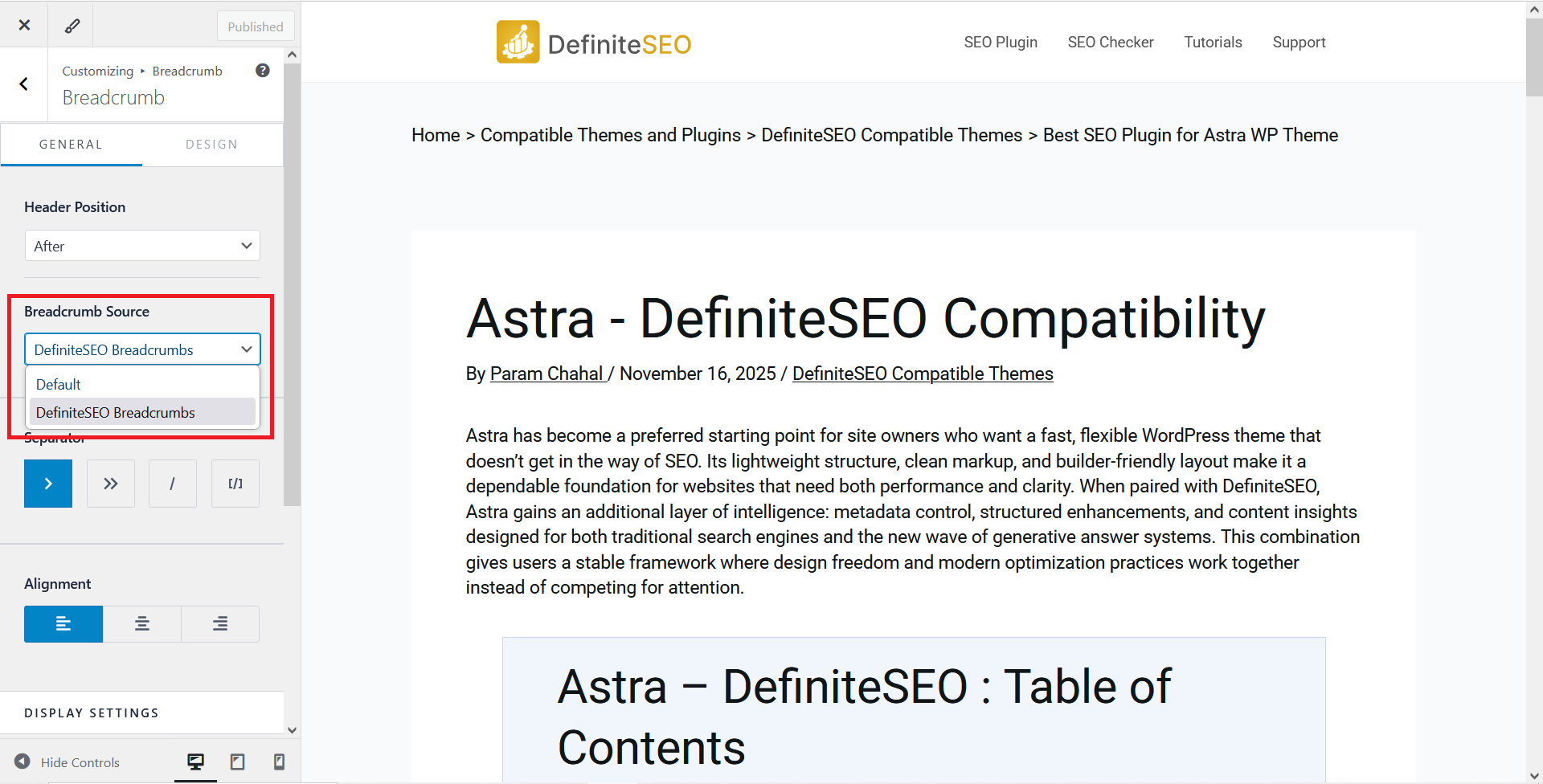
DefiniteSEO introduces an option in the WordPress Customizer that allows you to choose between Astra’s breadcrumb system and DefiniteSEO’s. You can activate one and disable the other, which prevents the duplicate breadcrumb problem that often occurs when two systems run simultaneously. Site owners can choose Astra’s breadcrumbs for visual integration or DefiniteSEO’s for enhanced structured data and flexible output.
Optimizing an Astra-Powered Site Using DefiniteSEO
Astra provides the structural base, but DefiniteSEO gives you the tools to turn that structure into a search-ready and AI-ready website. This section explains how the two work together in practice.
-
Ideal Settings for Astra + DefiniteSEO
Many users leave Astra’s settings untouched, yet small adjustments can influence SEO outcomes. DefiniteSEO’s recommendations include selecting content container widths that support readability, enabling Astra’s responsive image handling, and setting typography scales that align with accessibility guidelines.
Within DefiniteSEO, enabling content scoring and full metadata analysis ensures that the plugin evaluates your Astra templates correctly. Most settings work out of the box, though advanced users sometimes customize schema behavior if their site uses special content types.
-
Content Optimization Workflow in Gutenberg or Elementor
A common scenario involves writing content using Gutenberg blocks inside Astra’s layout system. DefiniteSEO detects block headings, text groups, images, and other elements in real time. This live scoring helps writers correct issues before publication, especially around semantic structure and entity coherence.
For Elementor users, the workflow is similar. DefiniteSEO recognizes Elementor’s heading widgets and ensures that content is analyzed as if it were written in standard HTML.
-
AI SEO Enhancements
DefiniteSEO’s AI SEO features operate independently of theme markup. However, Astra’s clean output helps the plugin identify keyword intent, semantic variations, and contextual gaps without sifting through bloated code. This clean separation of responsibilities benefits both SEO accuracy and editorial efficiency.
Real-World Setup Examples
Examples help reveal how Astra and DefiniteSEO perform together in practical scenarios.
-
A Blog Setup Scenario
Blogs often rely on fast-loading themes and straightforward layouts. Astra offers minimal header designs, efficient typography, and well-spaced article layouts. When paired with DefiniteSEO, bloggers can optimize each post with content scoring, metadata suggestions, and structured enhancements such as FAQ schema.
-
A Business or Service Website
Service websites use Astra’s starter templates as a quick framework. DefiniteSEO layers meaning on top by analyzing service descriptions, ranking signals, and local-relevance elements. Pages that describe services benefit from entity optimization, which helps generative engines interpret offerings more clearly.
-
WooCommerce Example
Astra’s WooCommerce integration already optimizes product templates for speed and layout consistency. DefiniteSEO contributes product-level metadata, improved product descriptions, and rich schema. Together, they create a stable environment for eCommerce SEO.
Performance Insights and Technical Alignment
Modern SEO requires balancing speed, accessibility, and relevance. Astra assists performance at the theme level, while DefiniteSEO ensures that SEO features do not interfere with loading times.
-
Page Speed Benchmarks
Sites running Astra often achieve excellent performance scores even before optimization. Adding DefiniteSEO does not introduce performance penalties, so the combined setup remains competitive.
-
Mobile Responsiveness
Astra’s responsive architecture is predictable and logical. This allows DefiniteSEO’s mobile-readiness checks to identify layout problems accurately, especially around heading sizes and content density.
-
Code Output and Clean Markup
Generative engines increasingly depend on structured meaning. Astra’s minimal markup ensures that DefiniteSEO can evaluate context without filtering out unnecessary HTML elements.
FAQs
Does Astra require special settings to work with DefiniteSEO?
No. Astra works out of the box with DefiniteSEO. Only breadcrumbs and schema settings may need adjustment.
Should I disable Astra’s schema if I use DefiniteSEO?
In most cases, DefiniteSEO should handle schema. Astra’s schema can be disabled to prevent overlap.
Can I use Astra’s breadcrumbs instead of DefiniteSEO’s?
Yes. The Customizer includes an option to choose which breadcrumb system you prefer.
Is Astra suitable for AI SEO and generative engine optimization?
Yes. Astra’s clean structure supports entity-focused optimization and AI summary readiness.
Does DefiniteSEO slow down Astra websites?
No. The plugin is engineered to be lightweight and minimally intrusive.