Launching a multilingual WordPress website often begins with a simple goal; make your content accessible in more than one language. But once translations are added, everything from metadata to internal linking becomes more complex. Polylang handles the structural side of multilingual publishing, giving each language its own space to live. DefiniteSEO steps in as the optimization layer that brings clarity, consistency, and search-ready detail to every translated page. When both plugins work together, you get a multilingual setup that is organized for users and fully understood by search engines and modern AI systems. This guide explores how the two integrate, what to expect when running them side by side, and the best ways to maintain clean, high-performing SEO across all languages.
Polylang SEO : Table of Contents
- Why Multilingual SEO Needs More Than Translation
- The Role of Polylang in Modern Multilingual WordPress Sites
- How DefiniteSEO Complements Polylang’s Core Features
- Language URLs, Indexing, and Technical Consistency
- Managing Multilingual Meta Data with DefiniteSEO
- Handling Canonical Tags, Open Graph, and Structured Data Across Languages
- Content Translation Workflows: Practical Examples from a Polylang + DefiniteSEO Setup
- XML Sitemaps and Multilingual Crawling Behavior
- Improving Multilingual Content Quality with DefiniteSEO’s Content Score
- Interlinking and Navigation for Multilingual SEO
- Avoiding Common Polylang SEO Issues Using DefiniteSEO Tools
- Performance Considerations When Running Both Plugins
- Recommended Setup Checklist
- Summary and Strategic Takeaways
- FAQs
Why Multilingual SEO Needs More Than Translation
Building a multilingual WordPress site is usually framed as a matter of translating pages into multiple languages. Anyone who has actually operated a multilingual website knows it is far more complex. Once you introduce additional languages, you’re not simply translating, you’re creating an entirely new version of your site’s structure. Every translation becomes a distinct URL, a separate set of metadata, an independent sitemap entry, and a unique search entity evaluated by Google and AI-driven engines alike.
This is where many website owners run into trouble. Traditional multilingual plugins like Polylang are powerful in the way they manage translations, but the plugin’s job stops at language assignment, URL routing, and switcher functionality. The plugin does not assess content quality, maintain SEO consistency, or ensure that each translated version sends correct signals to crawlers and modern AI summarization systems.
DefiniteSEO fills in those crucial gaps. It functions as a quality and structure layer above your multilingual framework, ensuring every translated page meets the same technical and semantic standards as the primary language. When both plugins run together, you get a workflow that handles the linguistic aspect and the SEO aspect in a complementary way.
This article explores how DefiniteSEO and Polylang work side by side, why the combination is valuable, and what you need to optimize when building a website that’s readable for humans and understandable for search engines.
The Role of Polylang in Modern Multilingual WordPress Sites
Polylang is designed to manage translations in an intuitive way. It lets you create language versions of posts, assign menus to specific languages, and add a switcher that helps visitors navigate between translations. In practice, Polylang doesn’t actually translate anything, it organizes content based on language code and allows you to create relationships between versions.
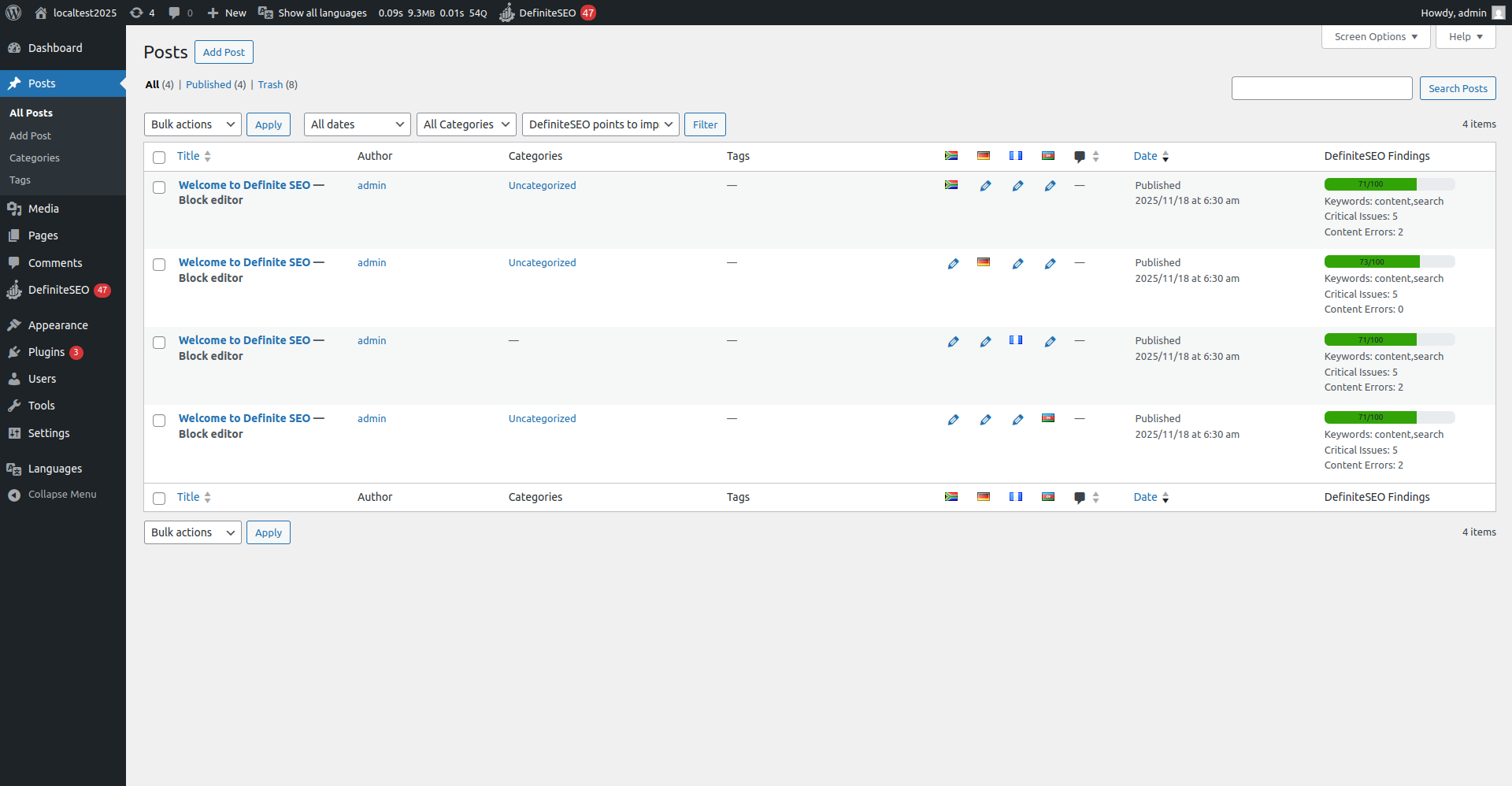
In the WordPress dashboard, this is obvious when you view your post list. Each translation appears as a separate post, housed under its own language flag. The attached screenshots, illustrate this well: for a single article, Polylang generates separate entries for Spanish, German, Afrikaans, and Azerbaijani versions. Each version has its own slug and metadata container, which means it can be optimized individually.
Polylang’s strength is in this structural clarity. Search engines need language versions to be segmented, not mixed together. Without dedicated URLs, crawlers may have difficulty determining which language is intended for which audience. Polylang solves this by keeping everything clean and explicitly separated.
However, once the structure is created, you must still optimize it. Metadata has to be translated. Canonical URLs must be written correctly. Open Graph needs localized titles. Internal links have to make sense within each language environment. Polylang doesn’t evaluate or enforce any of this, and that’s where DefiniteSEO becomes essential.
How DefiniteSEO Complements Polylang’s Core Features
DefiniteSEO recognizes each Polylang translation as an entirely separate page with its own SEO signals. This is important because one of the biggest mistakes multilingual sites make is assuming translated content inherits SEO value from the original language. It doesn’t. Search engines treat every translated URL as new, independent content that must meet quality and relevance thresholds on its own.
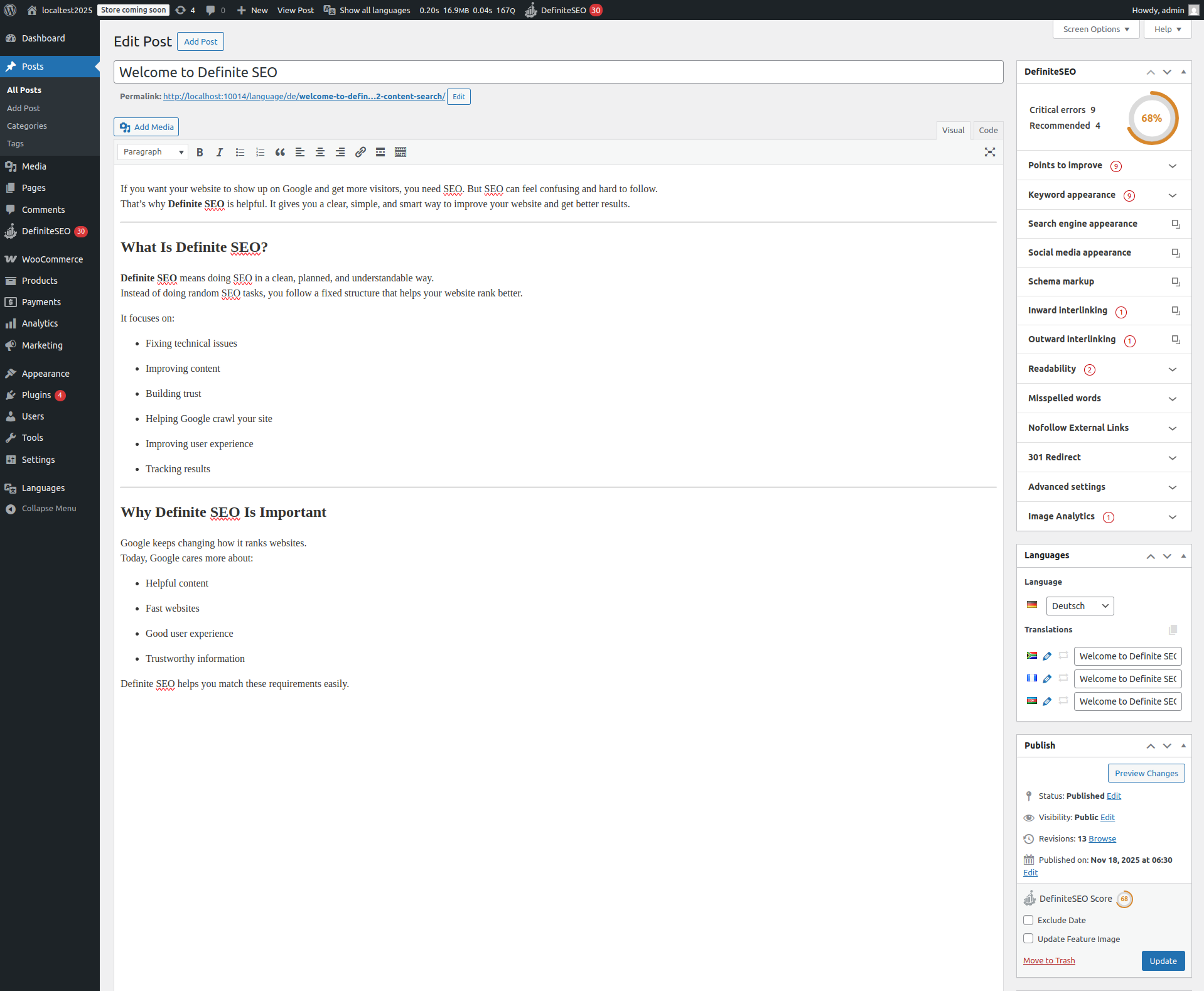
The DefiniteSEO analyzer, visible in this screenshot, shows this clearly. Each translation is given its own content score, its own list of critical issues, and its own improvement points. A German translation may have a readability concern, while the Spanish version may be missing an internal link. The plugin doesn’t copy analysis results between languages, and that’s exactly how it should work.
This approach helps you avoid a very common multilingual SEO failure: copying English metadata or using a single keyword strategy across all languages. A keyword that works in English may not even exist in Afrikaans or Azerbaijani, and real users might search differently. DefiniteSEO guides you toward optimizing each translation uniquely, just as Google expects.
Another benefit is that DefiniteSEO’s analysis integrates smoothly with Polylang’s translation workflow. When you switch languages using the Polylang selector, DefiniteSEO updates its analysis instantly. This creates a natural editing sequence: translate content, optimize the translation, move on to the next language.
Language URLs, Indexing, and Technical Consistency
When running Polylang, each language resides at its own URL path. Your screenshots highlight several examples from the test environment:
- /language/az/
- /language/de/
- /language/es/
- /language/af/
This structure is simple and predictable, and search engines typically have no trouble crawling it. What matters more is the metadata and indexing behavior associated with these URLs. A multilingual setup introduces specific requirements that apply to every translated page.
-
How URLs Influence SEO
A URL is a signal. It tells both users and search engines what language a page is in and what audience it is meant for. Polylang ensures these signals are clearly defined. But once the URL exists, the page still needs to express consistent language information through its metadata, schema, and canonical logic.
This is where DefiniteSEO plays its role. The plugin aligns each translation’s metadata with its URL so the two never contradict. Contradictions can happen when:
- The URL is in German
- The metadata remains in English
- The canonical points to the original English page
- The Open Graph locale stays in the default language
These inconsistencies are more than minor errors, they can cause indexation gaps where Google chooses not to display the translated version at all.
-
Hreflang and Language Mapping
Polylang outputs hreflang tags to link translations together. DefiniteSEO works on top of this by ensuring each hreflang entry is supported by clean metadata, accurate canonical tags, and crawled content. Even when the multilingual plugin handles hreflang, you still need strong SEO signals on each URL to support those connections.
-
Impact on AI Search Engines
Generative AI search engines, such as ChatGPT, Perplexity, or Gemini rely heavily on structured language cues. Clear URL segmentation, accurate metadata, and consistent language structure make it easier for these systems to understand which version of your site fits the user’s language intent. This is increasingly important as AI engines continue to index structured content more aggressively.
Managing Multilingual Meta Data with DefiniteSEO
Once your site contains multiple translations, metadata becomes one of the most important elements to handle correctly. Every translated page needs its own title, description, and social preview. Translating the content but leaving metadata unchanged is one of the quickest ways to weaken your multilingual SEO performance. DefiniteSEO prevents this oversight by prompting you to review and optimize metadata per language.
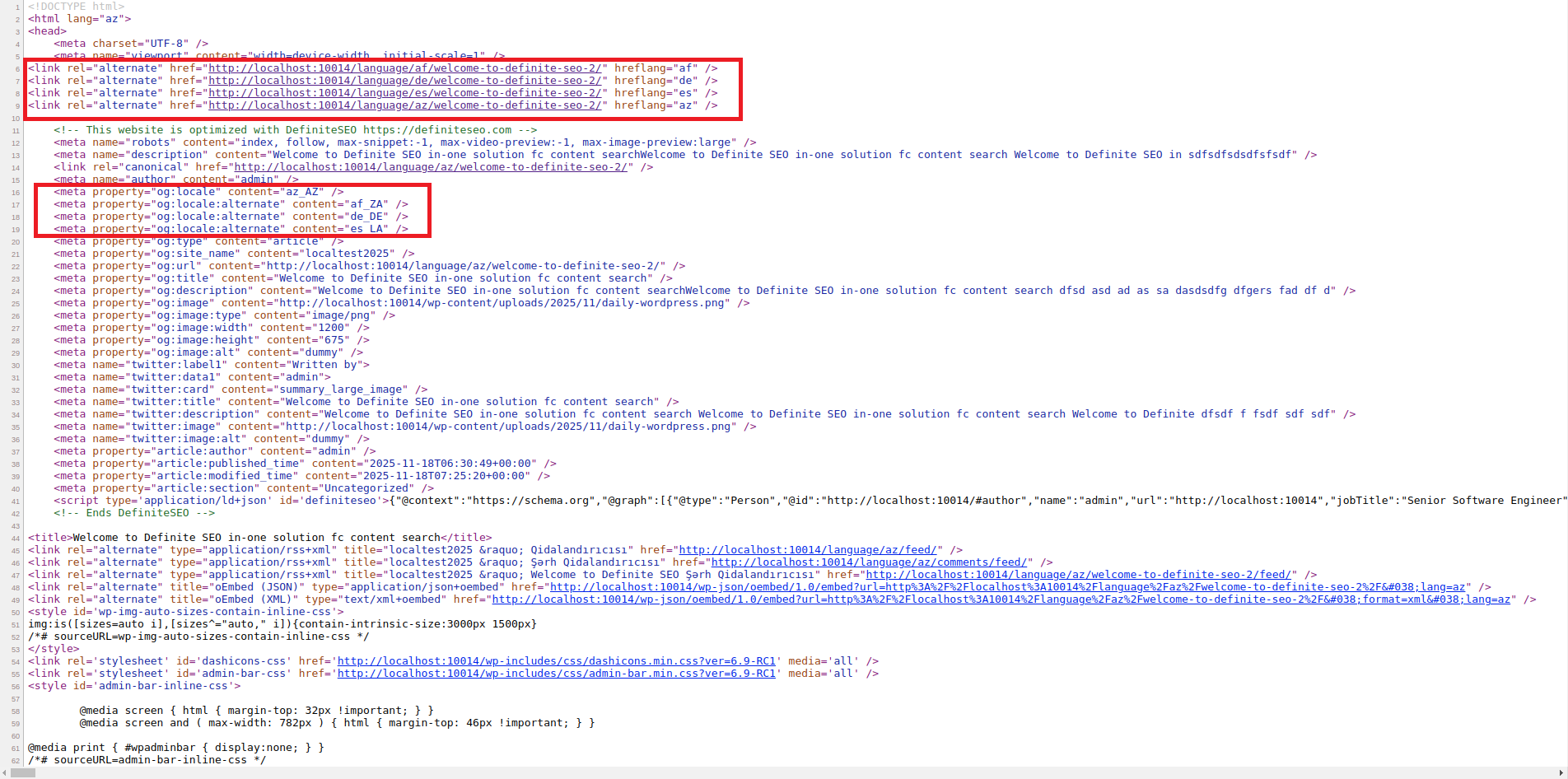
When Polylang creates separate entries for each translation, DefiniteSEO treats them independently. You can see this reflected in the HTML source from your screenshots. For each language version, the plugin outputs a unique title, a unique description, and separate preview data for social networks. This separation is essential because Google evaluates the relevance of these fields to each individual page. Translating a page into another language without updating the metadata is equal to telling search engines that your content does not entirely match what users expect to find.
The metadata panel in DefiniteSEO makes this easy by giving you language-specific input boxes. When you change languages through the Polylang selector in the WordPress editor, these fields automatically update to show the correct translation’s metadata. This helps you maintain a fluid editing process where title optimization, description refinement, and preview preparation occur naturally as part of your translation workflow.
Another point worth noting is consistency. Metadata for translated pages should not only be linguistically correct but also strategically aligned. This does not mean repeating the same keywords in every translation. Instead, the keywords should match the way real users search in that language. DefiniteSEO’s keyword appearance and search engine appearance panels give you cues about optimization opportunities for each translation. A keyword that performs well in English may not be ideal for your German or Spanish versions. You should expect differences, and DefiniteSEO helps highlight them.
Good multilingual metadata also influences AI-driven search systems. These engines frequently rely on short text fields like titles and descriptions when generating answers or summaries. Clean, well-structured metadata across multiple languages helps AI systems return your content when users search in different linguistic contexts.
Handling Canonical Tags, Open Graph, and Structured Data Across Languages
Translation introduces a unique challenge regarding canonical tags. Each language version of a page is a separate URL that represents a different piece of content. This means each translated page should generally have its own canonical URL pointing to itself, not the original page. If your canonical points back to the English version, Google may ignore your translated page entirely, treating it as a duplicate rather than a standalone resource.
DefiniteSEO handles this automatically. When you save a translated page, the plugin inserts a canonical link that matches the URL of that specific translation. This ensures that search engines understand the page as its own entity. In your screenshots, the canonical entries for the Azerbaijani and German versions point to their respective URLs, reflecting correct behavior.
Open Graph metadata follows the same logic. Platforms like Facebook, LinkedIn, and X rely on OG tags to generate previews. A multilingual site should output OG:locale fields that match each translation. Whenever DefiniteSEO detects a language version, it adjusts these fields accordingly so that social platforms display previews that match the user’s language and expectations.
Structured data is also a critical part of multilingual SEO. While the structured data doesn’t change dramatically between languages, it still needs to reflect correct URLs, date formats, and identifiers. DefiniteSEO ensures schema entries reference the translated URL rather than the default language. This prevents search engines and AI systems from mixing language signals.
Multilingual structured data becomes even more relevant as AI engines increasingly rely on structured signals to understand content. When schema markup is clear and localized per page, engines that aggregate information; such as ChatGPT, Perplexity, or Gemini have a more accurate understanding of your site’s language segmentation.
Content Translation Workflows: Practical Examples from a Polylang + DefiniteSEO Setup
The combination of Polylang and DefiniteSEO creates a workflow where translation and optimization become part of a unified process. When editing the German version of a post, the DefiniteSEO options appears with language-specific scores, issues, and recommendations.
This pattern is crucial for maintaining quality. Many multilingual sites simply translate text and publish it without checking readability, structure, or keyword consistency. DefiniteSEO effectively acts as a reviewer. It highlights missing links, short paragraphs, inconsistent headings, and keyword mismatches. These checks apply separately to every language version.
Imagine a scenario where the English version of your article is fully optimized with a high content score. When you switch to the Spanish translation, the DefiniteSEO score may drop because the translated text introduces longer sentences, missing headings, or improper formatting. You might also find missing internal links because the translated page does not include references to other Spanish-language content. DefiniteSEO flags these issues so they can be fixed immediately.
This workflow produces far more reliable multilingual content. Instead of publishing translations that vary widely in quality, you build a consistent content ecosystem where each language version meets the same standards. The result is stronger performance in both traditional search engines and modern AI search engines that evaluate clarity, structure, and comprehensiveness.
Another valuable aspect is how DefiniteSEO supports iterative editing. Translating content is not always a single pass process. You might translate text manually or use a translation service, then refine it after reviewing SEO recommendations. Because DefiniteSEO shows its feedback directly in the editor, you can adjust content on the spot. If you’re optimizing multiple translations at once, this workflow helps maintain momentum.
Polylang’s role in this process is purely structural. It ensures that each translation is assigned to its language and connected to the main post. DefiniteSEO adds the analytical layer that ensures the content does not just exist—it performs.
XML Sitemaps and Multilingual Crawling Behavior
A multilingual site has different crawling needs from a single-language site. Each translation represents a separate page that must be included in your XML sitemap. Search engines rely on accurate sitemap entries to discover new URLs, understand site structure, and index content efficiently.
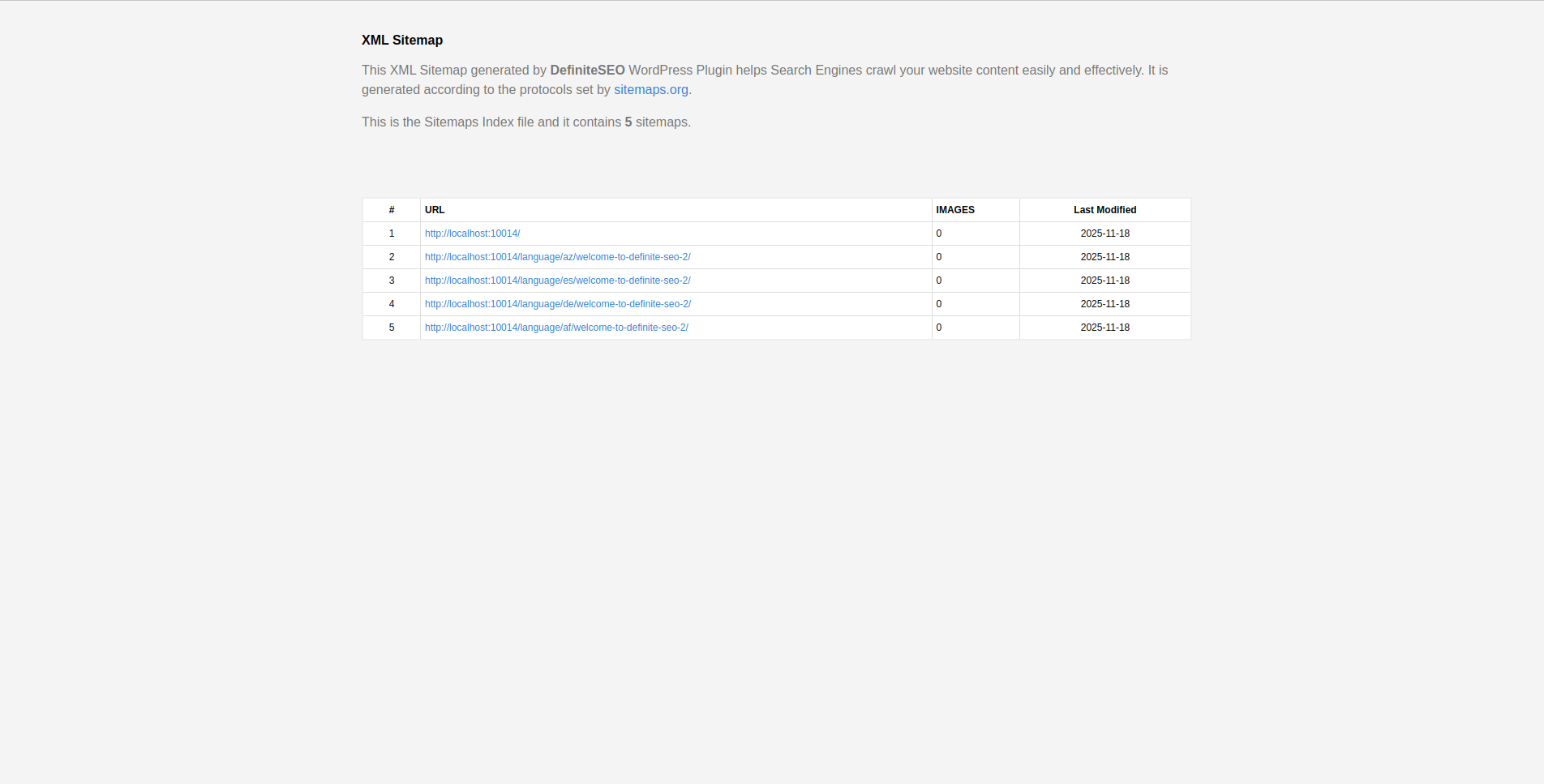
Attached screenshot shows how DefiniteSEO handles this automatically. The sitemap index file includes multiple entries for language versions, and each entry corresponds to a translated URL. This ensures clear segmentation so that search engines can crawl each version without confusion.
For example:
- /language/az/welcome-to-definite-seo
- /language/de/welcome-to-definite-seo
- /language/es/welcome-to-definite-seo
- /language/af/welcome-to-definite-seo
Each entry is treated as a separate page with its own last modified date. This matters because Google may use these dates to prioritize crawling. If you update a translation, DefiniteSEO updates the sitemap timestamp, prompting search engines to revisit that version.
Multilingual sitemaps also help prevent crawling gaps. Without proper sitemap entries, a crawler may detect only the primary language and miss the others. Polylang itself does not generate sitemaps; it relies on SEO plugins for that function. DefiniteSEO fills this role by producing structured sitemap files that reflect all language versions.
AI search engines also benefit from clean sitemaps. These engines increasingly crawl sitemap URLs to find structured content clusters. When your sitemap clearly lists language variants, AI models can understand that your site contains multilingual versions of the same topic. This enhances your visibility across more countries and language contexts.
Improving Multilingual Content Quality with DefiniteSEO’s Content Score
Every multilingual website faces an unavoidable problem: translations rarely maintain the same structural balance as the original content. A paragraph that reads smoothly in English might become longer and more complex once translated into German. A concise sentence in Spanish may lack the clarity of its English counterpart. Some languages naturally expand, others compress, and translation methods, manual or automated, introduce variation.
This is why evaluating translated content using the same scoring system as the original language is risky. Instead, each translation must be reviewed independently. DefiniteSEO’s content score solves this by treating every translated page as its own document with its own optimization potential.
DefiniteSEO evaluates each page based on areas such as:
- Clarity and readability
- Paragraph structure
- Keyword relevance
- Link placement
- Heading organization
- Metadata completeness
- Technical signals
This ensures that no translation gets overlooked. The content score becomes a quality control tool for the entire multilingual website. When working with several languages at once, this feedback helps you avoid a situation where the primary language version is polished while the other versions fall behind.
The score also influences performance in AI search engines. These engines analyze linguistic clarity, structural integrity, and completeness to produce answers. Translated content that is technically correct but poorly structured may appear less frequently in AI-generated results. A high content score encourages more visibility because the translation aligns better with how these engines interpret relevance and quality.
For many multilingual sites, the translation workflow ends the moment text is converted from one language to another. DefiniteSEO extends that process by adding an optimization phase that elevates the translated content beyond simple linguistic equivalence. This moves your multilingual site closer to a balanced, high-quality ecosystem where every language receives equal attention.
Interlinking and Navigation for Multilingual SEO
Internal linking is one of the most influential signals in modern search engines, yet it is often mismanaged on multilingual websites. Links serve multiple purposes: they guide user navigation, distribute authority throughout your site, and help search engines understand the relationship between pages. When translations are introduced, these relationships become more complex.
A common mistake is pointing internal links within a translated page back to the default language. For example, linking from a German translation to an English article. This disrupts both the user journey and the semantic integrity of your site structure. DefiniteSEO helps prevent this by flagging interlinking issues directly within the sidebar analyzer.
In your screenshots, the plugin highlights missing inward and outward links for the translations. These warnings are important. They show that internal linking should be handled per translation, not copied from the original language. Each version of a page should link to other content in the same language, creating parallel navigational paths that reflect linguistic intent.
Multilingual interlinking also affects how AI systems organize your site’s content. These engines rely heavily on contextual linking to infer how pages relate to each other. When the German version links to German pages and the Spanish version links to Spanish pages, the structure becomes easier for AI engines to interpret. It reinforces the idea that each language cluster forms its own semantic network.
Polylang’s role in this is structural. It groups translated pages together and provides a language switcher for user navigation. It does not, however, enforce internal linking behavior within each language. DefiniteSEO steps in by signaling where links are missing and encouraging you to integrate multilingual linking logically.
Another area to consider is menu structure. Polylang allows each language to have its own menu, but these menus should also include links to high-value pages in that language. DefiniteSEO’s interlinking analysis, combined with thoughtful menu design, results in language-specific navigation ecosystems that improve both crawlability and user experience.
Avoiding Common Polylang SEO Issues Using DefiniteSEO Tools
Multilingual websites built with Polylang often encounter predictable SEO issues. These problems arise not because the plugin does something wrong, but because translation introduces complexity that needs careful management. DefiniteSEO provides clear tools to detect and prevent many of these issues.
-
Duplicate Metadata Across Languages
Copying the original language’s title and description into a translation is a frequent mistake. It creates duplicate search snippets and reduces the relevance of the translated page. DefiniteSEO flags missing or irrelevant metadata, helping you adapt these fields to each language.
-
Incorrect Canonical Tags
Some multilingual setups inadvertently assign the canonical URL to the original language. This causes search engines to treat translations as duplicates. DefiniteSEO automatically assigns language-specific canonicals and lets you review them in the editor.
-
Inconsistent Hreflang Attributes
Although Polylang handles hreflang output, it depends on correct page relationships. If translations are incomplete or misassigned, hreflang output may be inconsistent. The combined structure of Polylang and DefiniteSEO helps solidify these relationships by keeping language metadata aligned.
-
Missing Internal Links in Translated Pages
Without internal links, a translated page becomes isolated in your site architecture. DefiniteSEO highlights missing interlinking so you can add direction and context to multilingual pages.
-
Metadata Left in the Wrong Language
Translators often focus on the body text while leaving headings or snippet fields in the original language. DefiniteSEO’s scanning tools recognize when keywords or metadata don’t match the page’s language.
-
Thin or Low-Quality Translations
Quick or automated translation may result in content that lacks clarity or structure. DefiniteSEO’s readability and keyword analysis panels highlight structural issues and help refine the translation.
-
Social Preview Mismatch
Open Graph and Twitter Card fields must match the language of the page. DefiniteSEO ensures these values update with each translation instead of falling back to the original language.
With the help of these tools, multilingual sites avoid the typical pitfalls that prevent translations from ranking or being indexed. The combined ecosystem of Polylang for structure and DefiniteSEO for optimization ensures that your multilingual pages maintain both linguistic accuracy and technical quality.
Performance Considerations When Running Both Plugins
Running multiple plugins that modify URLs, metadata, and content raises predictable concerns about performance. A multilingual website already requires more database queries and more complex routing. Adding an SEO layer introduces additional logic. Understanding how these plugins interact allows you to maintain a fast, stable site.
In most setups, Polylang and DefiniteSEO run efficiently together. Polylang’s architecture is lightweight because it relies on WordPress’s native post type relationships. The plugin stores language data as taxonomies and metadata, which means it does not introduce heavy processing during page load.
DefiniteSEO also follows a modular approach. Its analysis routines run only within the WordPress admin interface. This means the front end is not burdened by real-time computation. Metadata output is generated cleanly without requiring continuous database processing. Your rendered pages reflect static fields already saved in the database.
For larger multilingual websites, performance considerations become more important. Here are a few strategies:
- Use a caching plugin to store rendered pages so metadata is not recalculated on each request
- Combine DefiniteSEO with a CDN to reduce latency for users in different countries
- Monitor database size, especially when maintaining hundreds of translated posts
- Keep image sizes optimized to reduce the load on each translation
Most performance concerns arise from the fact that every translation is a separate page. If your site has hundreds of translations across multiple languages, the number of rendered pages grows significantly. DefiniteSEO handles this expansion well as long as caching and optimization layers are already in place.
Both plugins have been designed to operate independently without interfering with core WordPress performance. In a multilingual environment, this is essential. You maintain flexibility while avoiding the slowdowns that can occur when plugins attempt to modify the same elements of your site in conflicting ways.
Recommended Setup Checklist
A multilingual website benefits from a structured setup routine that ensures consistency across all translations. The following checklist summarizes the most reliable configuration when using Polylang with DefiniteSEO:
Technical Configuration
- Verify that every language has its own URL structure
- Check that Polylang’s language taxonomy is assigned correctly to each post
- Ensure canonical URLs reflect the correct translation
- Confirm that hreflang tags map language relationships accurately
- Validate that structured data references the translated URL version
Metadata and Content
- Translate titles and descriptions instead of reusing them
- Review Open Graph and Twitter Card fields for each translation
- Adjust keywords to match search intent in each language
- Use the DefiniteSEO content score as a baseline for improving clarity
Internal Linking
- Add inward and outward links within each language version
- Ensure menus point to pages in the same language
- Avoid linking to the default language from translated pages unless intentional
Sitemap Management
- Review the sitemap index to confirm all translations appear correctly
- Verify timestamps update when translations are modified
Quality Assurance
- Check for readability issues introduced during translation
- Replace automated translations that lack clarity
- Ensure headings follow a logical structure across languages
- Use DefiniteSEO warnings to catch broken or missing elements
By following this checklist, site owners maintain control over the multilingual structure while consistently applying SEO standards across every translation.
Summary and Strategic Takeaways
Building a multilingual website is not simply a matter of converting words from one language to another. Every translation becomes a separate version of your website with its own URL, metadata, schema, and search performance profile. Polylang gives you the structural foundation to manage these translations cleanly, but the process does not end there. Search engines examine far more than language labels. They evaluate the clarity, metadata, internal linking, and overall quality of every translated page.
This is where DefiniteSEO completes the workflow. The plugin brings structure, analysis, and optimization into every translation without disrupting Polylang’s core functionality. It ensures that every language version performs as a complete, independent page that satisfies expectations for modern SEO and AI-driven search systems.
When these two plugins operate together, you gain one of the most streamlined multilingual SEO workflows available on WordPress. Polylang organizes your content by language, while DefiniteSEO refines the technical and qualitative elements that determine visibility. The result is a site where users and search engines alike can navigate seamlessly across languages.
The long-term strategy for any multilingual website should involve consistent auditing. Translations should be reviewed regularly with DefiniteSEO’s content scores, metadata tools, and interlinking suggestions. As AI-powered search engines continue to influence how content is discovered, multilingual sites with coherent structure and high-quality translations will have the strongest advantage.
This combination; clear language organization from Polylang and deep optimization from DefiniteSEO gives your website a level of precision and clarity that benefits both human readers and the increasingly sophisticated systems that analyze web content. By approaching translations not just as linguistic conversions but as full SEO assets, you build a global content platform that performs effectively in every language you support.
FAQs
1. Does DefiniteSEO automatically detect each Polylang translation as a separate page?
Yes. Every language version created through Polylang is treated as an independent page in DefiniteSEO. This means each translation gets its own metadata fields, content score, and optimization recommendations.
2. Should I translate metadata for every language version?
Absolutely. Titles, descriptions, and social preview fields should be translated and optimized for each language. DefiniteSEO shows separate fields for each translation so your metadata remains relevant to local audiences.
3. How do DefiniteSEO and Polylang work together when generating hreflang tags?
Polylang creates hreflang relationships between translations. DefiniteSEO enhances this by ensuring each translated page has correct metadata, canonicals, and content quality to support those relationships. When both plugins are configured properly, hreflang output remains consistent.
4. Do multilingual sitemaps work automatically with both plugins active?
Yes. DefiniteSEO generates sitemap entries for every language version. Polylang organizes the URLs, and DefiniteSEO adds them to the sitemap index so search engines can crawl each translation independently.
5. Can I use DefiniteSEO’s content score for each translation?
Yes. Content scores and improvement suggestions are language-specific. A translated page is evaluated on its own, ensuring issues introduced during translation do not go unnoticed.
6. Should internal links point to the translated versions or the original language pages?
Within a translated page, internal links should point to content in the same language whenever possible. This creates a cleaner user journey and helps search engines associate content clusters by language.
7. How does combining Polylang and DefiniteSEO influence AI search visibility?
AI search engines interpret content through structured patterns. When each translation has consistent metadata, schema, and interlinking, AI systems can map your multilingual site more accurately. This increases your likelihood of appearing in language-specific AI answers.
8. Can I use automatic translation tools and still optimize pages effectively?
You can, but you should still review the translated content. Automatic translations often produce structure or clarity issues. DefiniteSEO’s readability and keyword analysis tools help refine these translations into high-quality content.
9. How do I prevent duplicate content issues between language versions?
Ensure each translation has its own canonical URL, translated metadata, and unique content structure. DefiniteSEO handles canonical logic for you and flags situations where metadata needs updating.
10. What’s the best workflow for publishing new multilingual content?
A reliable workflow is: Create original content → Translate using Polylang → Switch languages → Optimize each translation with DefiniteSEO → Publish → Review sitemap updates. This ensures each translation is always optimized before going live.