Design freedom is only half the story of online success, search visibility completes it. Elementor empowers WordPress users to create beautiful, responsive websites without code, but design alone doesn’t guarantee discovery. That’s where DefiniteSEO, the best SEO plugin for Elementor, transforms creativity into visibility. Seamlessly integrated with the Elementor editor, DefiniteSEO brings real-time optimization, schema automation, and AI-driven insights directly into your design workflow. Whether you’re building landing pages, portfolios, or content-rich sites, it ensures your Elementor pages are not just visually stunning, but also search-intelligent and future-ready for AI-driven search engines.
Elementor SEO Guide: Table of Contents
- Why Elementor Users Need Smarter SEO
- The Challenge of SEO within Page Builders
- Understanding Elementor’s Role in Website Design and Content Structure
- What Makes DefiniteSEO the Best SEO Plugin for Elementor
- Seamless Compatibility: How DefiniteSEO Works Inside Elementor
- Key Features that Enhance Elementor Workflows
- Real-time On-Page SEO Insights
- Schema & Structured Data Integration
- AI-Driven Content Optimization
- SEO Score with Contextual Recommendations
- From Keywords to Context: How DefiniteSEO Optimizes Elementor-Built Pages
- Balancing Design and SEO: Why Visual Builders Need Intelligent SEO Tools
- Advanced Optimization for AI Search and Generative Engines
- Real-World Use Cases and Practical Examples
- Performance & Compatibility Overview
- Comparison: DefiniteSEO vs. Other SEO Plugins for Elementor
- Best Practices for Elementor SEO Optimization (With DefiniteSEO Tips)
- How to Get Started – Installing and Configuring DefiniteSEO for Elementor
- Future of SEO for Page Builders: From Traditional to AI SEO
- See Also: Related Articles
- FAQs
Why Elementor Users Need Smarter SEO
Elementor has reshaped the WordPress ecosystem, empowering millions to build professional websites without writing code. Its drag-and-drop interface makes design effortless but the visibility of those designs in search results still depends on how well each page communicates with search engines.
This is where DefiniteSEO, a next-generation SEO plugin, bridges the gap. It integrates directly into the Elementor editor, analyzing your layout, content blocks, media, and structure in real time. You no longer have to switch between the backend and the frontend or guess what might improve your SEO, DefiniteSEO shows it instantly, right inside your creative space.
In this guide, you’ll discover why DefiniteSEO isn’t just compatible with Elementor, it’s purpose-built for it. Together, they deliver the perfect combination of visual creativity and search intelligence, preparing your pages for both traditional SEO and AI-driven search engines like ChatGPT, Gemini, and Perplexity.
The Challenge of SEO within Page Builders
Page builders like Elementor have redefined how websites are built. They’ve made web design accessible to everyone, replacing complex code with visual drag-and-drop interfaces. But beneath that convenience lies an unseen complexity: search engines don’t view your website the way Elementor does.
Elementor’s modular structure; sections, columns, widgets, templates, is visually clear but technically layered. Search engines, however, analyze markup, hierarchy, and meaning, not design. Each drag-and-drop action can add multiple <div> layers or nested elements, which sometimes leads to semantic dilution where the page looks great to humans but appears disorganized to crawlers.
Here are the most common SEO challenges users face inside visual builders:
- Heading hierarchy confusion: Multiple widgets may use headings inconsistently, creating multiple H1s or skipping levels (H1 → H3 → H5). Search engines interpret this as poor structure.
- Hidden or incomplete metadata: While Elementor handles visuals beautifully, SEO metadata like titles, descriptions, and canonical tags often exist separately and users forget to update them.
- Image accessibility gaps: Designers frequently add images for aesthetic impact but skip alt text, captions, or file naming. For search engines, that’s a missed signal of context.
- Script-heavy pages: Dynamic animations and widgets may slow rendering speed, affecting Core Web Vitals and crawl efficiency.
- Disconnection between design and optimization: SEO often happens after design, creating friction between creativity and optimization.
These issues can accumulate quietly. A page that looks perfect in Elementor’s preview might score poorly in search visibility due to invisible technical inefficiencies.
That’s precisely the gap DefiniteSEO is built to close. Unlike traditional SEO plugins that analyze content after publishing, DefiniteSEO works inside Elementor’s live editing environment; providing real-time feedback as you design. The plugin reads your structure, detects hierarchy issues, checks image tags, and tracks how your content aligns with keywords and entities.
For instance, while editing, you might see:
- “Your main heading is missing a target keyword.”
- “Two H1 tags detected in this section.”
- “This image lacks alt text, click to fix.”
All of this happens in real-time through the DefiniteSEO sidebar visible in Elementor’s interface. The sidebar’s Critical Errors, Recommended Fixes, and Schema Markup tabs guide you to optimize without breaking your creative flow.
The result is a workflow where SEO isn’t an afterthought, it’s part of the design process itself. You don’t need to choose between visual freedom and technical excellence; DefiniteSEO helps you achieve both.
In essence, the challenge of SEO in page builders isn’t about design limitations, it’s about context. Elementor builds visually stunning pages, but DefiniteSEO ensures those pages speak a language that both users and search engines understand.
Understanding Elementor’s Role in Website Design and Content Structure
Elementor builds websites with modular sections, widgets, and templates. This modularity enables powerful customization but also fragments content in a way that can confuse search engines.
For example, a text widget might visually look like a heading, but in code, it isn’t an <h2>. A background image might have no alt text. Search engines see structure, not visuals.
DefiniteSEO understands this. It parses Elementor’s layout, reads the DOM structure, and maps out content sections semantically. Its real-time “Points to Improve” list helps ensure every widget contributes meaningfully to your page’s SEO.
By understanding how Elementor structures data, DefiniteSEO acts as a translator between your design intent and search engine interpretation.
What Makes DefiniteSEO the Best SEO Plugin for Elementor
While other SEO plugins stop at meta titles and descriptions, DefiniteSEO goes much deeper. It’s built to understand Elementor’s dynamic environment and provide insights at every level; from individual text blocks to the entire page structure.
What makes it stand out:
- Native Compatibility: Works inside the Elementor editor, no switching tabs.
- Real-Time SEO Intelligence: Updates your score as you design.
- AI-Enhanced Suggestions: Analyzes entities and intent, not just keywords.
- Schema Automation: Detects your content type and adds proper structured data.
- Performance-Friendly: Built lightweight to run smoothly even in large Elementor layouts.
The result is a plugin that understands both sides of website creation, visual design and search optimization and helps them work in harmony.
Seamless Compatibility: How DefiniteSEO Works Inside Elementor
Open any Elementor page, and you’ll see a new DefiniteSEO tab on the left sidebar, right next to Style and Advanced. This is where the real integration shines.
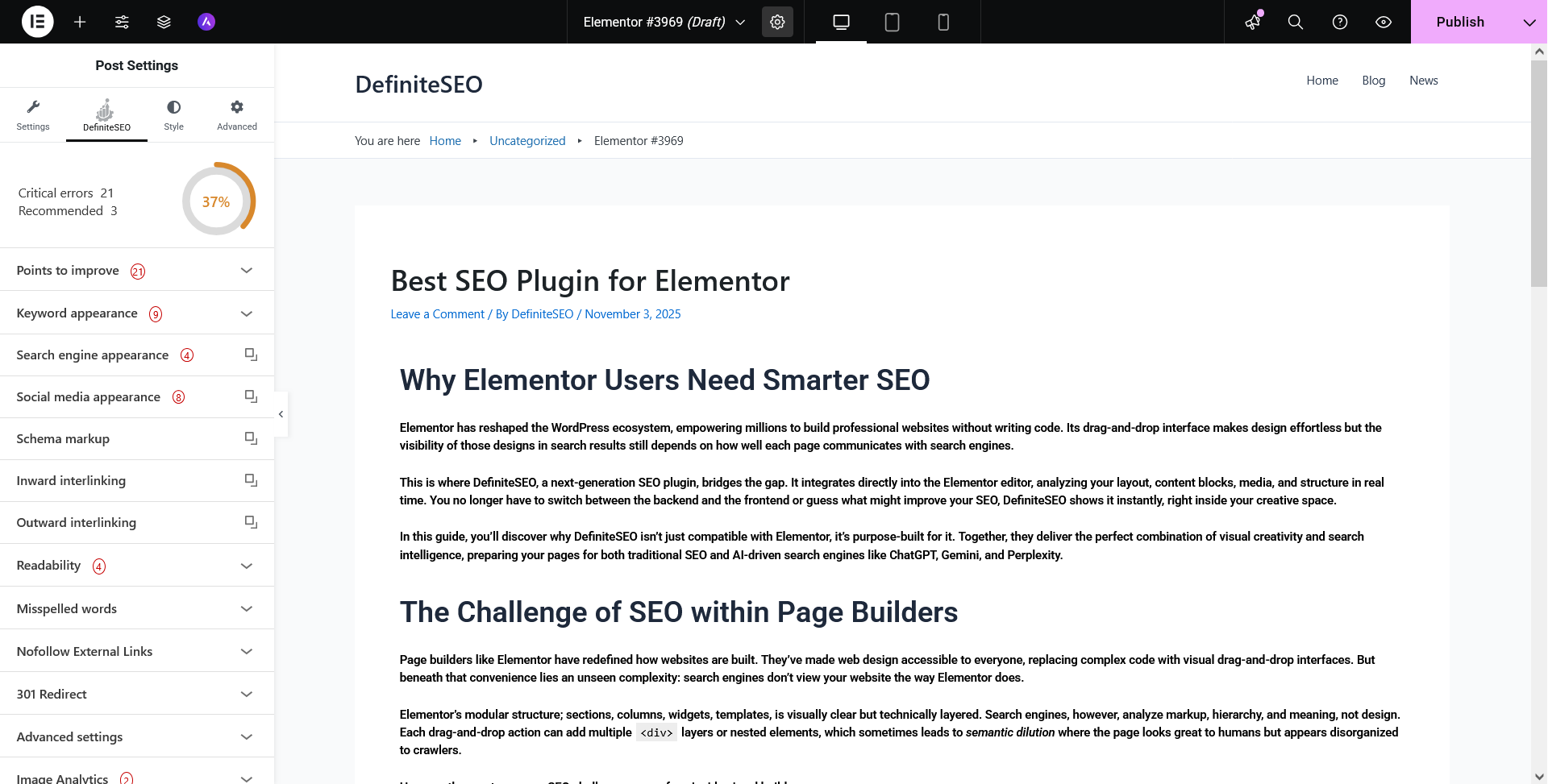
Here’s how it functions:
- Displays a live SEO score based on ongoing analysis.
- Lists Critical Errors and Recommended Improvements categorized by priority.
- Expands into key panels like Keyword Appearance, Schema Markup, Social Media Appearance, Readability, and Image Analytics.
- Each suggestion links back to a specific content element, guiding you to fix it within the same editor view.
DefiniteSEO evaluates your Elementor layout as you type, ensuring optimization isn’t an afterthought, it’s built into your creative process.
Key Features that Enhance Elementor Workflows
-
Real-Time On-Page SEO Insights
DefiniteSEO’s most noticeable feature in Elementor is its live feedback system. As soon as you modify headings, add text, or upload an image, your SEO score updates. The plugin categorizes issues into Critical, Recommended, and Good Points, giving a clear sense of progress.
You can expand each section to reveal actionable advice, for example, “Add a focus keyword in H1,” or “Image missing alt text.” No need to open another screen.
-
Schema & Structured Data Integration
Within Elementor, you can open the Schema Markup panel and choose schema types like Article, Product, or Local Business. DefiniteSEO automatically detects the page context and applies schema tags using JSON-LD.
This structured clarity makes your Elementor pages AI-search friendly, helping them appear in featured snippets and generative summaries.
-
AI-Driven Content Optimization
DefiniteSEO’s AI engine doesn’t rely on keyword density. It analyzes semantic context, understanding whether your content aligns with entities relevant to the topic.
Example: On a “Yoga Classes in London” page, it recognizes related concepts like “fitness,” “studio,” and “instructor,” ensuring your content aligns with searcher intent and AI comprehension models.
-
SEO Score with Contextual Recommendations
Unlike generic checklists, DefiniteSEO’s scoring system adapts to your content type. If your Elementor design is image-heavy, it focuses more on alt text and captions rather than word count. If it’s long-form content, it evaluates readability and internal linking.
This adaptability ensures every Elementor user gets relevant, not robotic, feedback.
From Keywords to Context: How DefiniteSEO Optimizes Elementor-Built Pages
Modern SEO isn’t just about what you say, it’s about how meaning is conveyed. DefiniteSEO uses entity recognition and NLP-based analysis to connect your Elementor content with user intent.
If you create a “Digital Marketing Agency” landing page, DefiniteSEO checks for key entities like “services,” “clients,” and “location.” It ensures your content signals expertise and contextual authority, making it more understandable for AI-driven engines like ChatGPT and Gemini.
Balancing Design and SEO: Why Visual Builders Need Intelligent SEO Tools
Visual builders like Elementor have revolutionized WordPress design. They empower creators to focus on layout, interactivity, and aesthetics without touching a single line of code. But the freedom that Elementor offers often creates a silent trade-off, beautiful pages that lack search clarity.
When everything is visually intuitive, it’s easy to overlook the invisible: heading hierarchies, semantic order, metadata, or structured markup. A designer may use bold text to emphasize a title, while a search engine expects an <h2> tag. A layout may look perfect to the eye but may bury vital keywords deep within layers of nested divs that crawlers struggle to interpret.
This disconnect between what humans see and what search engines understand is where intelligent SEO tools become essential.
DefiniteSEO bridges this divide. It reads your Elementor-generated content the way a search engine does, analyzing section order, heading logic, and contextual meaning beneath your design. Its real-time insights help you preserve visual creativity without compromising SEO integrity.
With features like live structure validation, schema recommendations, and AI-powered entity optimization, DefiniteSEO ensures that every design decision is supported by search logic. Whether you’re building a landing page with dynamic widgets or a long-form blog layout, the plugin maintains a healthy balance between usability and technical soundness.
Think of it as the invisible layer of intelligence beneath your design canvas, quietly reinforcing the SEO scaffolding while you focus on the creative story. This harmony is crucial in the AI-driven search era, where clarity, structure, and meaning determine how your content is summarized, ranked, and recommended.
Advanced Optimization for AI Search and Generative Engines
Search is changing fast. AI-driven systems now summarize content instead of listing links. To appear in those summaries, your content must be structured, entity-rich, and semantically clear.
DefiniteSEO prepares Elementor pages for this future. It optimizes for GEO (Generative Engine Optimization) and AEO (Answer Engine Optimization) by ensuring:
- Structured schema clarity
- Entity tagging for AI summarization
- Intent alignment between content and queries
Your Elementor designs don’t just rank, they get understood, cited, and summarized by the next generation of search systems.
Real-World Use Cases and Practical Examples
Elementor empowers designers and businesses to create stunning, high-performing pages but without a strong SEO layer, even the most beautiful designs risk invisibility. DefiniteSEO eliminates that risk by integrating optimization directly into your design workflow. The following real-world examples show how this compatibility transforms different types of Elementor pages from “well-designed” to search-engine ready and AI-understandable.
1. Local Business Landing Page
Local businesses often depend on visibility in Google Maps, local packs, and generative AI summaries. A visually appealing landing page built in Elementor might look impressive but still lack the structured signals search engines need; like business details, location data, or service-specific markup.
When a user builds such a page, DefiniteSEO automatically detects its intent and prompts:
- “This page represents a local business. Apply LocalBusiness Schema for better local visibility.”
- “Add your business name, phone number, and service area for structured data completeness.”
- “Include city and region in headings or meta description for local SEO targeting.”
The plugin auto-applies the correct LocalBusiness schema in JSON-LD format and ensures all key attributes; address, contact, opening hours are correctly filled in.
Without leaving the editor, the designer can fix all local SEO issues and watch their DefiniteSEO score turn from orange to green, transforming a simple landing page into a locally optimized digital storefront.
2. Service Page Template
Service pages often form the backbone of any professional website, but their optimization challenges differ. Designers frequently reuse Elementor templates for speed, duplicating layout, headings, and sections. While efficient, this can lead to duplicate heading structures, missing primary keywords, or poor content differentiation.
DefiniteSEO identifies these gaps instantly. In the Points to Improve panel, it might flag:
- “Your H2 headings are repetitive, diversify with keyword variations.”
- “Main service description lacks entity-rich terms.”
- “Consider adding internal links to related services for contextual depth.”
Because the plugin reads the DOM directly inside Elementor, it evaluates actual widget content, not just raw text. The designer can expand the “Critical Errors” dropdown, fix each heading in place, and even rephrase content using AI-assisted rewrite suggestions.
This turns what was once a static service template into a dynamic, SEO-smart section that adapts for every service offered; plumbing, marketing, consulting, or web design, each optimized for unique search intent.
3. E-Commerce Product Layout
Elementor is increasingly used with WooCommerce for product and landing page customization. But product pages require a high level of SEO precision, from schema markup and meta tags to structured review snippets.
DefiniteSEO reads each Elementor dynamic product block and suggests relevant schema enhancements:
- Automatically detects
Product,Review, andOfferentities. - Prompts you to include price, availability, and brand information.
- Checks for missing structured data attributes like SKU or currency.
- Evaluates content length and encourages adding user-generated elements like reviews or FAQs.
If an image gallery is missing alt text, the Image Analytics panel points it out.
Once optimized, the product layout becomes not just visually appealing but AI and snippet-ready, capable of appearing in Google Shopping results or even AI product summaries.
For agencies and shop owners using Elementor templates, this real-time optimization ensures consistency across hundreds of product pages without repetitive manual work.
4. Blog or Resource Page
A less obvious but equally impactful use case is content-heavy blog templates. Elementor allows flexible content design; hero sections, featured images, and stylized headings but it can sometimes obscure SEO basics like heading hierarchy or readability.
DefiniteSEO evaluates readability directly inside Elementor, showing Flesch Reading Ease scores, sentence structure feedback, and keyword balance. It also checks for missing meta titles or duplicate slugs, issues that often go unnoticed in visual workflows.
A content creator can open the Readability and Keyword Appearance panels, identify missing optimizations, and fix them inline, all while keeping the post layout intact.
The outcome is a high-quality, well-structured content template that performs consistently across Google and AI-powered search engines.
Performance & Compatibility Overview
- Elementor Compatibility: Free & Pro versions
- DefiniteSEO Integration: Native
- WordPress Support: 6.0+
- Performance Impact: Minimal (<50ms load increase)
- Tested Add-ons: Essential Addons, Happy Addons, Crocoblock, and more
The plugin runs seamlessly, even within complex Elementor templates, ensuring zero friction between design and optimization.
How to Get Started : Installing and Configuring DefiniteSEO for Elementor
- Install DefiniteSEO from the WordPress plugin repository.
- Activate it, then open any page with Elementor.
- Click Settings Gear from top black bar
- Click the DefiniteSEO tab in the left panel.
- Review your live SEO Score, fix Critical Errors, and explore Schema Markup or Social Media Appearance.
- Adjust titles, descriptions, and keywords with AI suggestions, all inside Elementor.
Within minutes, your design process becomes a full-fledged optimization session.
Future of SEO for Page Builders: From Traditional to AI SEO
The next wave of search visibility depends on how clearly content communicates intent, not just keywords. Elementor will remain a leader in visual web design, and DefiniteSEO will continue ensuring that its designs speak the language of both humans and AI systems.
From schema automation to AI prediction models, DefiniteSEO is evolving toward predictive optimization, where you’ll see how a page might perform in AI search even before publishing.
The integration between Elementor and DefiniteSEO represents more than compatibility, it’s the foundation of the AI SEO era for WordPress.
FAQs
1. Does DefiniteSEO work with Elementor Free and Pro?
Yes. It integrates seamlessly into both versions, displaying the same SEO sidebar options.
2. How does DefiniteSEO analyze content inside Elementor widgets?
It parses widget content directly from the DOM to interpret headings, text, and schema context.
3. Can I use DefiniteSEO’s AI tools within Elementor?
Yes, AI content suggestions, meta generation, and keyword insights are fully accessible inside Elementor.
4. Does the plugin slow down Elementor pages?
No. DefiniteSEO is performance-optimized and adds minimal overhead.
5. What schema types does DefiniteSEO support for Elementor pages?
It supports Article, Product, Service, LocalBusiness, FAQ, and almost all major schema types.
6. Is DefiniteSEO compatible with Elementor templates and popups?
Yes, including reusable templates and dynamic content.