Google Analytics users have been reporting an unusual pattern in recent months. Websites that previously received stable, predictable traffic are suddenly showing daily visitors from locations that were not part of their audience. The spike is especially noticeable from two regions: Lanzhou in China and Singapore. For many site owners, these visits appear every hour, often as pairs, and they rarely behave like genuine users. They show up in Realtime reports, disappear within seconds, and sometimes leave no trace in server logs or firewall dashboards.
The scale of this pattern is what caught the community’s attention. From small blogs to enterprise websites, the same geographic combination began appearing. Within analytics groups and technical forums, conversation shifted from confusion to concern. Why was this happening across different industries and countries? Why now? And more importantly, could it affect SEO or data accuracy?
This article brings together the verified information shared by Google product experts, community observations from real webmasters, and technical insights from how GA4 processes measurement data. The goal is to give you a structured, human-readable explanation of what is going on and what you should do about it.
GA4 Bot Traffic Spike From China & Singapore : Table Of Contents
- Understanding the Sudden Surge in GA4 Traffic
- When the Pattern Started and How It Spread
- How These “Visitors” Behave Inside Google Analytics
- Geographic signals
- Device and OS signatures
- Engagement anomalies
- Why Google Confirmed This as Inauthentic Traffic
- Community Findings and Theories About the Source
- Impact on SEO, Conversion Tracking, and Reporting Accuracy
- How to Identify This Ghost Traffic Inside GA4
- Filtering and Cleanup: Google’s Recommended Workarounds
- Firewall-Level and Server-Level Mitigation
- What This Means for AI Crawling and the Modern Web
- When Will Google Fix This? Updates from GA4 Product Experts
- Final Thoughts from DefiniteSEO
- Frequently Asked Questions
Understanding the Sudden Surge in GA4 Traffic
The reports began gaining visibility around early autumn. First, a handful of webmasters noticed unexplained visits from China. Not long after, Singapore began appearing alongside it. In many cases, the two locations showed up together, almost like mirrored entries. Someone monitoring their site would see one user from Lanzhou and another from Singapore, often refreshing or landing on the same page at nearly the same time.
Initially, these spikes were mistaken for genuine users. Traffic from Singapore is common for many websites, especially because its infrastructure is home to large data centers and cloud routing networks. But when the same city reappears repeatedly with identical behavior and device signatures, the pattern becomes difficult to ignore.
The real concern was not just the volume but the absence of any motivation behind the visits. The affected sites covered a wide spectrum: hobby blogs, local service providers, WooCommerce stores, academic portals, SaaS platforms and large publishers. Very few shared a common niche or audience. That alone was a clue that this was unlikely to be human behavior or traditional referral spam.
As more people shared their screenshots, one trend became obvious. The traffic was concentrated in GA4 but was not always recorded in Cloudflare, server logs or hosting analytics. Some website owners had set their firewall rules to block both China and Singapore entirely, yet GA4 continued to record the visits. That contradiction is central to understanding what is happening.
When the Pattern Started and How It Spread
The earliest signs of this anomaly appeared around mid-September, although some users noted minor irregularities even earlier. By early October, the surge became widespread enough that multiple Reddit communities and Google’s own support forums started accumulating threads on the topic.
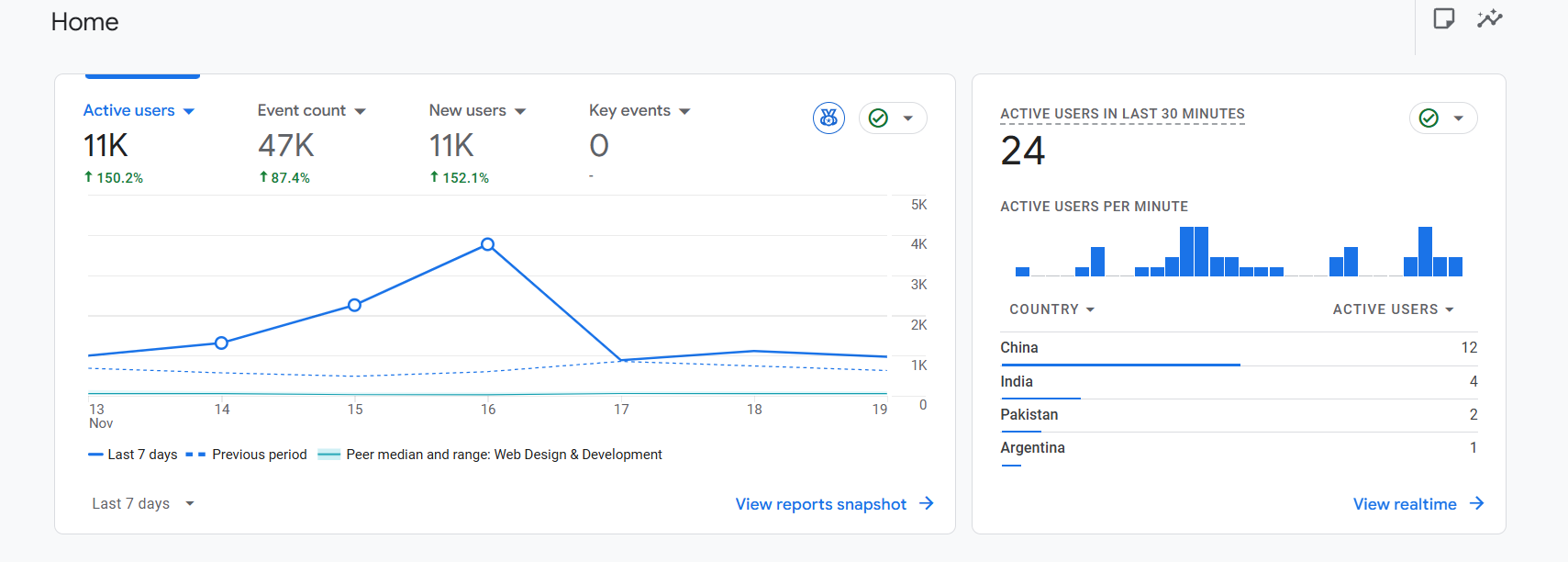
Websites that had historically seen zero traffic from China suddenly saw dozens of sessions a day. Some saw hundreds. A few saw thousands. And in the most extreme cases, Realtime reports displayed over 6,000 users online, almost all from Lanzhou or Singapore.
What made the timing interesting was the scale of uniformity. If a botnet attacks websites, the patterns usually differ based on the category of the target. Ecommerce sites may get scraped for pricing. Blogs might get crawled for content. Malicious actors test specific plugins or CMS vulnerabilities. However, in this case the effect was symmetrical. Personal blogs, SaaS dashboards, WordPress landing pages and news websites all saw nearly identical spikes. That uniformity suggested the issue was not an attack on the sites themselves but rather something connected to analytics tracking.
Several users noticed the surge correlated with their ad campaigns, especially Performance Max. Others noticed spikes shortly after publishing new articles. Some saw the traffic appear every time they opened GA4 Realtime. These inconsistencies led to deeper investigation.
By mid-October, enough reports had accumulated that Google’s internal product team acknowledged the issue. The confirmation helped settle the debate on whether something was wrong on the website side. It was not. The problem existed within GA4’s filtering logic and how it interprets measurement calls.
How These “Visitors” Behave Inside Google Analytics
One of the most reliable ways to identify this anomaly is to examine what the visits look like inside GA4. Although GA4 is capable of filtering many well-known bots automatically, some forms of non-human traffic can still slip through if they mimic typical browser patterns or directly interact with analytics endpoints.
The traffic from Singapore and Lanzhou shares several characteristics that make it stand out. Website owners who monitored the pattern noticed the same device categories, the same operating systems, and the same engagement signals appearing repeatedly. Even though the bots are coming through different IP addresses or infrastructure, the fingerprint remains surprisingly consistent.
Below is a breakdown of the most common signals.
-
Geographic Signals
The first cue is the sudden dominance of two locations. Lanzhou appears in GA4’s city-level breakdown almost universally, even on websites with no presence or awareness in China. Singapore appears alongside it, often in the same hour or even at the exact same minute.
Some site owners noticed the pattern move through different Chinese regions over time, but Lanzhou remains the most frequently reported point of origin. This adds weight to the observation that the geographic indicator is tied to how GA4 interprets the request, not necessarily where the request was truly sent from.
A few users spotted Indonesia and Brazil in the mix, though in much smaller volumes. These variations are likely tied to how VPNs or proxy layers are routing the bot traffic.
The pairing of Singapore and Lanzhou is the clue most people use to identify the issue quickly. If both appear in Realtime at the same moment, especially with identical behavior patterns, the traffic is almost certainly related.
-
Device and Operating System Signatures
When people started comparing their data, one specific pattern emerged: a large portion of this traffic appears to come from older Windows systems. Windows 7 was the most commonly reported, although there were scattered entries from older Windows 10 build signatures as well.
This observation led some to theorize that an outdated botnet or crawler infrastructure might be generating the hits. Others suggested the devices might be intentionally spoofed to look outdated, since older systems often signal less scrutiny from automated filters.
Another repeating element is the screen resolution. Two values appeared in many reports:
• 1280 x 1200
• 3840 x 2160The first appears to correspond to the ghost visits that do not touch the server. The second appears among the subset of bots that do load the actual site. That distinction helps explain why some users see Cloudflare logs while others see none.
When several analytics dashboards across different industries show identical system signatures, that consistency typically points to an automated pattern.
-
Engagement Anomalies
Engagement metrics offer the most direct evidence that the traffic is inauthentic. Instead of following normal browsing patterns where a user scrolls, clicks or triggers events, these sessions almost always record the bare minimum.
Most affected sessions have:
• a single pageview
• zero scroll events
• no click or interaction events
• a session duration of less than ten seconds
• no repeated visitsFor a few websites, GA4 registers the visits as landing on a 404 page. That is usually impossible unless someone requests a non-existent URL or unless the traffic is interacting with analytics endpoints without actually requesting a webpage.
Some sessions jump from page to page, simulating a simple crawler. A few WordPress users reported that even their least-discovered posts, some years old, received these visits. This randomness makes it harder to connect the pattern to scraping. Instead, it aligns with behavior that occurs when analytics calls are fired without direct human navigation.
Website owners familiar with crawlers noted that genuine scrapers tend to request assets like CSS, images or feeds. These visits do none of that.
Why Google Confirmed This as Inauthentic Traffic
As the volume of reports increased, Google’s analytics team initiated a deeper review. Eventually, one of the GA4 Product Experts shared a detailed explanation confirming that the traffic was not human. This clarification helped settle confusion within the community, especially among those worried about hacking attempts or compromised servers.
According to Google’s internal findings, the surge was linked to a new category of bot traffic that was bypassing GA4’s standard filtering systems. Standard bot exclusions handle widely known crawlers and self-declared robots, but when a system masks itself to resemble a human browser, detection becomes more challenging. In this instance, the bots were capable of generating measurement signals that mimicked basic user behavior, enough to appear legitimate on the surface but without the deeper interaction that would accompany real browsing.
One of the indicators Google referenced was the pattern of events. GA4 typically expects certain event sequences during a session. Humans scroll, navigate, click buttons, submit forms or interact with elements on the page. These bots, however, fired only the initial pageview events. A human user could technically close a tab immediately, but statistically, such a pattern would not occur thousands of times per day across unrelated properties.
Another angle Google monitored was the distribution of device types. The unusual concentration of outdated Windows machines, alongside the near absence of mobile traffic, signaled a non-organic pattern. Mobile devices dominate global browsing, so any spike that is almost exclusively desktop-driven needs careful scrutiny.
The product expert clarification highlighted that Google’s filtering logic is being updated to handle this new behavior. Although no timeline was publicly provided, the acknowledgment indicates that GA4’s bot detection capabilities will be improved. Until then, the responsibility of managing the visible data falls on website owners.
The confirmation eased concerns for many who feared the traffic was an SEO attack. While bot activity can be a precursor to malicious behavior, the pattern here did not suggest intrusion attempts. Instead, it resembled a test or routine from an automated system interacting directly with analytics endpoints rather than the website itself.
Community Findings and Theories About the Source
Once Google confirmed that the spike was inauthentic, the discussion across analytics and SEO communities shifted toward uncovering where these signals were coming from. Although no official source has been named, several patterns have emerged from user observations, log comparisons and broader trends in automated activity.
-
AI Crawlers as a Possible Source
One widely discussed theory involves AI crawlers. Developers noted that large-scale model training systems might be interacting with analytics endpoints indirectly. These crawlers sometimes request cached or intermediary versions of webpages, and if those versions contain analytics code, GA4 events can fire even though the crawler never loads the actual site. Because Singapore and regions of China host significant AI and cloud infrastructure, this explanation gained traction.
-
Traffic Routed Through Tencent Networks
Another angle revolves around Tencent-linked ASNs. Some users traced portions of the traffic back to ASN ranges associated with Tencent. While this does not prove direct involvement, it suggests that proxy layers or cloud infrastructure tied to these networks may be part of the event generation flow. Large companies often share infrastructure for multiple unrelated systems, making it hard to draw firm conclusions.
-
Scrapers Triggering Analytics via Cached Pages
Several webmasters noticed that the behavior resembled metadata or structural scraping. Tools designed to analyze website layouts, permalinks or content patterns sometimes access pre-rendered pages served by caching systems. When analytics code is embedded in these cached responses, it can lead to GA4 events being recorded without an actual page visit. This is especially common on WordPress sites using aggressive caching or CDN layers.
-
Analytics Evasion or Spoof Testing
Some in the community suggested that the spike might be related to systems testing ways to evade analytics detection. If a bot can produce event patterns that resemble real sessions, identifying or filtering them becomes more difficult for analytics platforms. This theory points toward the possibility of experimental behavior rather than targeted scraping.
-
Affiliate or Tracking Tools Interacting with GA4
A smaller group observed similarities to affiliate tracking, rank monitoring or keyword-checking tools. These systems occasionally make indirect requests that pass through layers containing analytics scripts. While less discussed than the AI crawler theory, it remains a plausible explanation for a portion of the traffic.
-
Broad, Non-Targeted Source Rather Than Focused Attacks
The most important insight is that this activity appears across sites of all sizes and niches. Personal blogs, SaaS platforms, ecommerce stores and news sites all report the same patterns. This uniformity strongly suggests that the system generating these events is not targeting specific websites but interacting with GA4 in a generalized way.
Despite the confusion it creates, the community largely agrees that the traffic is not harmful. No reports show compromised accounts, unusual server requests or vulnerability scans. The issue remains confined to analytics distortion, which aligns with Google’s eventual confirmation that the spike is non-human activity being misclassified as valid traffic.
Impact on SEO, Conversion Tracking and Reporting Accuracy
When a new pattern of traffic appears, the first concern many website owners express is whether their rankings are at risk. Search performance is a sensitive topic, especially for websites relying on organic visibility for traffic and revenue. The thought of hundreds of low-engagement visits artificially inflating bounce rates raises immediate questions.
The short answer is that this type of analytics pollution does not harm SEO. Google Search does not use GA4 data when ranking websites. This has been clarified for years and repeated consistently. Analytics data is designed to help website owners understand their audience. Search ranking systems depend on completely different signals such as crawlability, link structures, content quality, on-page experience, and AI-driven relevance models.
That said, polluted analytics data can indirectly interfere with decision-making. For example, a business evaluating the performance of a landing page may misinterpret the actual conversion rate if hundreds of bot sessions dilute the metrics. This can lead to misguided adjustments or unnecessary redesigns. Similarly, marketers using Performance Max campaigns may see skewed attribution in GA4 if fake sessions overlap with genuine ad traffic.
For eCommerce stores, the problem becomes more complex. If sales funnels are monitored through GA4, abnormal spikes can obscure drop-off points. Merchants rely on these insights to optimize checkout flows and product pages. When bots inflate session counts without progressing through the funnel, it becomes harder to identify real bottlenecks.
Another area affected is A/B testing. If experiments depend on analytics events, unreliable traffic can distort results. Even if the testing platform itself is unaffected, stakeholders may review analytics reports when evaluating outcomes.
The biggest disruption is often psychological. Seeing hundreds of random visits from unknown locations, especially from regions that are normally blocked, leads to unnecessary worry about hacking attempts. The pattern feels intrusive even when it poses no direct threat.
From a strategic perspective, the main impact is a temporary reduction in data reliability. The website itself is not harmed, and rankings remain unaffected, but the analytics layer requires cleanup to maintain clarity.
How to Identify This Ghost Traffic Inside GA4
Before filtering or blocking anything, it helps to understand how this anomaly appears inside different areas of GA4. Once you know what to look for, the pattern becomes easy to spot. Many site owners noticed the issue only after monitoring the Realtime dashboard closely, but the signs are visible across multiple reports.
The most obvious place to begin is the Realtime view. If the issue affects your website, you might notice one or two users appearing almost constantly, sometimes refreshing at short intervals. They often come from Singapore or Lanzhou, though whether GA4 truly resolves that geography accurately is uncertain. The behavior stays similar regardless of day or time, which makes it stand out from genuine users.
A deeper inspection of engagement reports reveals additional hints. In most cases, these sessions trigger only the first event sequence GA4 expects during session initialization. If you expand the event stream for an affected session, you often see only the session_start and page_view events. Some sessions occasionally fire view_search_results or view_item events, but these are inconsistently triggered and lack accompanying signals that would appear in a real browsing session. For example, genuine product views from an ecommerce site often include scroll events, click events and potential add_to_cart triggers. In contrast, these ghost sessions drop off immediately.
One interesting detail shared by several site owners involves 404 pages. In some accounts, GA4 registers these visits as landing directly on a not-found page. This suggests that the measurement call does not originate from a standard page request. Instead, it may be hitting an analytics endpoint or mapping to a virtual path that does not correspond to any real page on the site. This type of behavior aligns with old forms of referral spam, though modern spam systems tend to avoid direct page analysis.
Another indicator can be found in the Traffic Acquisition report. If you sort by session source or medium, these visits often show up under direct none. Since they do not come from a referral, ad click or organic search result, GA4 labels them as direct traffic. Under normal circumstances, direct traffic has its own patterns, but seeing a sudden surge from unfamiliar locations, paired with zero engagement, is a strong sign of something unusual.
You can also examine the User Explorer reports. If your GA4 property has access to user-level reporting, comparing client IDs can be helpful. Many ghost sessions reuse a small set of identifiers, while others rotate continuously. Consistency in user agents or operating systems can also provide confirmation.
One more technique involves comparing analytics with firewall logs. If your firewall shows zero requests from China or Singapore, yet GA4 consistently shows traffic from those countries, the discrepancy indicates that the requests never reached your server. This is one of the most reliable signs that the traffic is interacting with GA4 endpoints directly.
Filtering and Cleanup: Google’s Recommended Workarounds
Until Google rolls out an updated filtering system, site owners must rely on manual cleanup approaches. GA4’s architecture differs significantly from Universal Analytics, so global filters are more limited. Instead of applying a single dimension-based filter across all reports, the most reliable workaround revolves around using exclusion segments inside Explore reports. These do not modify stored data, but they help you analyze clean data while the underlying issue continues.
-
Identify the Bot Traffic Pattern (Ghost Session Fingerprint)
The first step is identifying the fingerprint of the ghost traffic. This usually involves isolating sessions with extremely low engagement, short duration, country signals matching Singapore or China, and non-interactive event sequences. Once you recognize this cluster, you can construct an exclusion segment based on those attributes.
-
Build an Exclusion Segment in GA4 Explore Reports
A practical example is creating a segment that excludes sessions from Singapore or China only when the session duration falls below a specific threshold. This protects websites with real visitors from these regions while filtering bots efficiently. Once created, the segment can be applied to Explore reports to give you a clean, more representative dataset.
-
Use Explore Reports for Clean Historical Analysis
These custom explorations present a clearer view of your historical behavior data, though they are limited to the last fourteen months. This limitation is one of the reasons many users wish GA4 offered global dimension-based filters similar to Universal Analytics.
-
Apply Data Filters Carefully (Permanent Exclusion)
Another approach involves configuring data filters at the property level. GA4 data filters are permanent and remove excluded traffic from your dataset forever. Because filtered data cannot be restored, Google recommends adopting this method only after rigorous validation.
-
Modify Events to Flag or Filter Bot Sessions
Some site owners have experimented with event modification. This method allows you to alter events, such as adding a custom parameter to the session_start event that identifies suspicious traffic. Once added, you can filter based on this parameter. This technique offers flexibility but requires technical expertise and careful testing.
-
Use Google Tag Manager to Block Suspicious Analytics Events
For those using Google Tag Manager, client-side checks can supplement your filtering strategy. You can evaluate user agent strings, inspect window dimensions, or analyze environment properties before firing analytics events. Any anomalies can be used to prevent event firing. This stops some bot-generated hits but is not bulletproof, since advanced bots can spoof these properties.
Despite the limitations of other approaches, the exclusion segment method remains the safest. It enables clean analysis without altering or losing permanent data. This makes it ideal for long-term projects, audits, campaign reviews and trend analysis.
Firewall-Level and Server-Level Mitigation
If the analytics layer is affected, the next question is how to reduce or block the traffic before it reaches your website or GA4. While the ghost traffic that interacts with GA4 directly cannot be blocked through firewalls, some of the bots that do reach the server can be mitigated using standard security tools.
Cloudflare users have reported success with ASN-based blocking. Two ASNs in particular, linked to Tencent’s infrastructure, have been associated with part of the traffic. Blocking these can reduce the portion of bots that load the actual site. The approach requires navigating to the firewall rules section in Cloudflare and configuring a rule that blocks or challenges requests originating from those ASNs. Site owners have also used managed challenges for older operating systems, especially Windows 7. This type of challenge forces the visitor to complete an automated verification process, which most bots cannot handle.
Another effective method involves rate limiting. If your website is receiving repeated hits from similar user agents, you can throttle the number of allowed requests. This slows down any scraping attempts without blocking real users.
For those not using Cloudflare, similar strategies can be implemented at the server level. Hosting providers with security tools often allow you to block traffic based on user agents, geographic location or behavioral patterns. GeoIP blocking may be an option, though this should be used cautiously for websites with global audiences.
Advanced users can analyze their raw access logs to spot repeating patterns. If particular IP blocks or user agents consistently appear, they can be added to deny lists. These measures will not prevent the ghost activity that never touches the server, but they can reduce resource usage and prevent legitimate scrapers from inflating analytics further.
Some developers have experimented with injecting hidden analytics traps. These traps consist of URLs that no human user would visit. When bots access them, the system flags them as suspicious. The challenge with this method is that spambots are becoming increasingly aware of such traps.
Another creative approach involves adjusting caching layers. In some cases, bots interact with static assets generated by caching systems. Reducing cache preloading or altering caching rules may reduce exposure, especially for websites that use CDNs aggressively.
While none of these strategies offer a comprehensive solution, they can help manage the portion of traffic that interacts with your server. The ghost traffic that triggers GA4 directly is the area where Google must implement a fix. Until then, mitigation remains partial.
What This Means for AI Crawling and the Modern Web
Whenever a new pattern of automated activity appears, the broader conversation shifts to how the modern web is being consumed. Over the last few years, AI models, search assistants and data indexing systems have transformed how information is collected and processed. Traditional web crawlers were relatively easy to identify. They declared themselves in the user agent, followed predictable patterns and rarely interacted with analytics scripts. Modern systems are far more complex. Some replicate human-like browsing behaviors to gather contextual signals. Others access cached or pre-rendered versions of websites that include analytics snippet execution.
This surge in activity from China and Singapore may be a preview of that evolving landscape. While we still cannot confirm the exact source, the behavior matches a category of crawlers designed to operate silently. They do not leave clear footprints in access logs, do not download assets and do not behave like malicious scanners. Instead, they generate narrow analytics events without touching the website. That type of behavior suggests indirect interaction.
Consider how large-scale AI systems train on massive amounts of publicly available data. These systems may access web snapshots stored in intermediary layers. Some hosting environments, especially those using enterprise-level caching, generate static versions of pages with analytics scripts embedded. When crawlers interact with those snapshots, the analytics calls fire. From the perspective of GA4, this looks like a real user because the analytics script executes, even though no browser directly loaded the page.
Another possibility is that AI-focused crawlers ping metadata endpoints. These endpoints sometimes include JavaScript-rendered previews that still fire analytics calls. As AI-driven search engines evolve, they need structured signals, entity extraction and contextual depth. Their crawling behavior often extends beyond raw HTML, tapping into dynamic or pre-rendered content.
Singapore and certain Chinese routes are major hubs for cloud infrastructure. Everything from CDN edge nodes to large GPU clusters operates in those regions. If a new generation of crawlers is being tested, these regions are logical launch points. The combination of consistent device signatures, non-interactive sessions and large-scale uniformity aligns with automated behavior that is not necessarily malicious but is poorly filtered by GA4.
A different angle involves diagnostic systems. Sometimes companies deploy large-scale analytics tests to understand how measurement libraries behave across environments. If such tests involve firing analytics events without fully loading pages, they could accidentally pollute analytics across thousands of sites. Although there is no public evidence linking this phenomenon to such tests, the pattern is similar to past episodes where analytics providers adjusted their scripts.
Regardless of the exact cause, one thing is becoming clear. Website analytics must evolve to keep pace with AI-driven data collection. As more crawlers use simulated browsing or interact with cached layers, analytics systems will need to detect these behaviors at a deeper level. Simply relying on user agent strings or IP blocks is no longer enough. Advanced systems must analyze event sequences, interaction patterns and statistical anomalies.
This surge from China and Singapore is not the first signal of disruption. It is likely a sign of how analytics accuracy will be challenged in the years to come. As AI search grows, models will need to gather data from the open web at unprecedented scale. Without strong filtering, these systems risk polluting analytics. As website owners, we must stay aware of how these interactions shape our understanding of user behavior.
When Will Google Fix This? Updates from GA4 Product Experts
Google’s confirmation that this traffic is inauthentic offers some reassurance. More importantly, it marks the beginning of a remedy. The product experts have shared a few insights into how the fix is being approached.
First, Google identified the root cause. This alone is significant because detection is often the most time-consuming part of solving bot traffic issues. Once the source is understood, engineers can implement more robust filtering mechanisms that isolate the signals these bots generate.
Second, Google has acknowledged the need for stronger spam detection within GA4. In the transition from Universal Analytics to GA4, several community members noted that GA4 felt less equipped to handle large-scale analytics noise. GA4’s event model is powerful but more sensitive to non-human activity. Google’s team appears aware of this shortcoming.
Third, the fix will focus on filtering at the analytics processing layer rather than leaving it to website owners. This means future bot traffic should never enter your visible reports. Once the updated logic is deployed, GA4 will identify these ghost sessions and remove them automatically. It may take time, however, for older sessions to be reprocessed, if that is possible at all. GA4’s architecture does not always support retroactive cleanup.
Fourth, the product experts indicated that the surge in bot traffic also affects billing for GA360 customers. High session counts mean increased costs, which puts pressure on Google to resolve the issue quickly. Anything that affects enterprise-level billing typically receives priority.
While no exact timeline has been publicly announced, the tone of the responses suggests that the fix is actively being developed rather than merely planned. Given the widespread impact, it is reasonable to expect progress within the coming weeks or months.
Until the update arrives, segment-based filtering remains the most reliable method for cleaning your data. While not ideal, it allows website owners to continue analyzing trends without waiting for the permanent solution.
Final Thoughts from DefiniteSEO
As the web shifts toward AI-driven discovery and advanced crawling, analytics systems must adapt. What we are witnessing with this surge from China and Singapore is not an isolated event. It is likely a preview of future challenges around measurement accuracy. GA4 offers powerful event-level insights, but it also exposes vulnerabilities when bots mimic human-like patterns.
From an SEO perspective, your rankings remain unaffected. The disruption is limited to analytics visibility. However, analytics influence everyday decisions about content, funnels and campaigns. When data becomes unreliable, decisions can drift in the wrong direction.
At DefiniteSEO, we encourage website owners to approach this situation with a calm, practical mindset. Pollution of analytics data is frustrating, but it is manageable with the right filters and a clear understanding of where the issue originates. Google Analytics team is actively working on a fix, and the community has already established reliable workarounds.
This episode also highlights the broader importance of data integrity. As analytics becomes more intertwined with AI-driven optimization, accurate signals matter more than ever. Maintaining clean, trustworthy datasets will be central to navigating the next era of search and digital visibility.
Frequently Asked Questions
1. Should I worry that the traffic is coming from China or Singapore?
Not in this specific case. The locations shown in GA4 do not reflect real visitors hitting your website. Many site owners who blocked these regions in Cloudflare still saw the sessions appear in GA4. That alone indicates the requests never reached their servers. This is a measurement-layer issue rather than a regional threat. The geographic labels are artifacts of how GA4 resolves certain types of requests.
2. Can this type of bot activity harm my SEO rankings in Google Search?
No. Google Search does not use GA4 data when evaluating rankings. Even if thousands of these ghost sessions inflate bounce rates or reduce average engagement time, those numbers stay inside your analytics dashboard and never influence organic rankings. Search systems operate independently from analytics systems. Google’s documentation and public statements confirm that analytics plays no role in ranking decisions.
3. Could this be a hacking attempt, vulnerability scan or malware botnet?
Unlikely. The behavior does not match typical attack patterns. Malicious bots try to load login pages, access admin panels, scan REST endpoints, or probe file paths. None of this traffic leaves those footprints. Many website owners reviewed their raw logs and found no evidence of requests originating from the corresponding regions. The sessions behave like analytics events, not intrusion attempts, and they leave no operational traces.
4. Why does GA4 show a 404 page for many of these sessions?
This happens because measurement calls can activate analytics without loading an actual webpage. When GA4 resolves those calls, it tries to attribute them to a path. If no path exists, GA4 assigns a 404-equivalent URL. This behavior mirrors older forms of referral spam where analytics was triggered without a full site load. It is not an indication that your site has broken links.
5. Is Cloudflare blocking these visits correctly?
Cloudflare blocks real server requests, but these ghost sessions often do not reach your server at all. That is why Cloudflare shows zero corresponding hits. The issue occurs upstream, where analytics calls fire independently of page loads. Some related bots do reach the server, and Cloudflare can challenge or block them, but the bulk of the GA4 noise comes from measurement-layer interactions, not from true page requests.
6. Why do some bots appear with screen resolutions like 1280×1200 or 3840×2160?
These values come from simulated environments. Automated systems often emulate fixed viewport sizes when executing scripts. The 1280×1200 resolution frequently appears in headless browsing environments. The 3840×2160 variant likely corresponds to higher-end GPU rendering setups. When these environments execute analytics scripts, the simulated viewport becomes part of the recorded session.
7. Can I use GA4 filters to permanently block this traffic?
You can, but it requires caution. GA4’s permanent data filters remove traffic irreversibly. If you accidentally filter out real traffic from certain regions, the lost data cannot be restored. This is why Google recommends using Explore segment exclusions instead. Segments allow you to analyze clean data without modifying the underlying dataset. Permanent filters should be used only when you have validated the behavior over several weeks.
8. Will server-side tagging help reduce this issue?
Yes, in many cases. Server-side tagging introduces additional validation layers before events reach analytics. You can build rules that block events based on user agents, IP reputation, engagement depth, or device patterns. This reduces the likelihood of ghost sessions reaching GA4. However, server-side tagging works best when integrated thoughtfully. It is not a plug-and-play fix.
9. How can I confirm whether these bots ever touched my actual website?
The most reliable method is comparing GA4 client IDs with your firewall or server logs. If a specific GA4 client ID logs dozens of sessions but never appears in your Cloudflare logs, that is evidence of ghost traffic. Some users test this by appending a diagnostic pixel using Google Tag Manager. When genuine visitors fire that pixel, Cloudflare logs it. Bots that hit GA4 directly will not trigger any server-side trace.
10. Could this spike be related to Google Ads, especially Performance Max?
Several advertisers observed that the surge aligned with active ad campaigns, but no conclusive link has been found. What likely happened is that high-volume campaigns made anomalies easier to notice. Ghost sessions appeared both on sites with active ads and on those with no ads at all. The underlying source seems independent of the advertising ecosystem.
11. Why are the visits always from desktop, never mobile?
Because the system generating these calls is automated. Mobile devices dominate human browsing behavior, yet automated environments rarely simulate mobile patterns. Emulated browsers running in server racks often default to desktop environments. This is a strong indicator that the activity is not coming from real users.
12. Should I block China and Singapore entirely to stop this?
Blocking those regions will only stop the subset of bots that reach your server. It will not stop ghost interactions with GA4. If you operate a site with legitimate audiences in these regions, blocking them may cause unintended harm. A more effective strategy is applying Cloudflare managed challenges for outdated systems and using analytics exclusions rather than blanket geo-blocking.
13. Does this spike affect conversion rates, revenue dashboards or eCommerce funnels?
Yes, but only inside GA4. Conversion rates may appear lower because the number of sessions increased artificially. Revenue values inside GA4 remain accurate since bots do not execute conversion events. The problem is interpretative rather than operational. Your actual store performance is unaffected.
14. How long will this issue continue?
Google has confirmed that its engineering teams are actively working on a permanent fix. While no public timeline has been shared, the tone of official responses suggests that mitigation is already underway. Because the issue impacts GA360 billing, it is likely being treated with urgency. Until the update rolls out, manually filtering your reports is the best approach.
15. Can this happen again in the future?
Yes. As AI-driven crawling expands, analytics pollution may become more common. GA4 will need ongoing improvements to maintain accuracy. Website owners should expect that analytics hygiene will become part of regular maintenance, just like security scanning or performance optimization.