If you’ve spent months refining product pages and blog posts but your category pages are still just a grid of thumbnails with no text and a generic title, you’re not alone. Category pages are the most underused ranking asset on most sites, and they’re often sitting on commercial-intent keywords that your individual product or article pages can never touch. A well-optimized category page is a keyword-rich hub that ranks for broad queries, funnels authority to everything beneath it, and signals to Google that your site has genuine topical depth in that area.
- Why Category Pages Deserve Their Own SEO Strategy
- URL Structure: Getting the Foundation Right
- Title Tags and Meta Descriptions That Actually Rank
- Fixing the Thin Content Problem on Category Pages
- Internal Linking: Category Pages as Your Site’s Link Hubs
- Pagination: What to Do When Products Span Multiple Pages
- Faceted Navigation and Filter Pages
- Crawl Budget and Category Page Efficiency
- Canonicalization and Duplicate Content
- Schema Markup for Category Pages
- Measuring Category Page Performance
- Frequently Asked Questions
Why Category Pages Deserve Their Own SEO Strategy
Category pages rank for the queries that drive commercial intent: “running shoes for men”, “WordPress SEO plugins”, “standing desks under $500”. These are mid-funnel searches where the user knows what they want but hasn’t committed to a specific product yet. That’s a high-value position to hold, and category pages are the right pages to hold it.
Most site owners put their SEO effort into product pages and blog posts and treat categories as structural scaffolding. That’s a mistake. In my experience working across thousands of WordPress, WooCommerce, and custom e-commerce websites, category pages are often the second-largest source of organic traffic on an entire domain, sometimes larger than the homepage. They attract more natural external links than individual products do (a blogger linking to a running shoe resource will link to the category, not a single SKU), and they distribute that authority downward to everything beneath them.
A 2024 Botify analysis of enterprise e-commerce sites found that fewer than 10% of category and filter pages were generating measurable organic traffic, while the other 90% were consuming crawl budget without ranking for anything useful. That split tells you two things: there’s a real problem to fix on the waste side, and there’s real headroom to capture on the optimization side for the pages that are close to ranking.
The goal is to stop thinking of categori pages as containers and start treating each one as a rankable asset with its own keyword target, its own content, and its own technical health to maintain.
URL Structure: Getting the Foundation Right
A clean URL is the foundation that everything else builds on, and category pages often get this wrong at the platform level before any SEO work even begins. The pattern I recommend is domain.com/category-name/ for a top-level category and domain.com/category/subcategory/ for a nested one. Descriptive, short, and legible to both humans and search engines.
A few things to avoid. Parameter-based category URLs like domain.com/shop?cat=42 carry no keyword weight, create canonicalization headaches, and look untrustworthy to users. Unnecessary depth like /products/all/category/subcategory/items/ dilutes authority and makes the URL hard to share or link to. And numbers or IDs in the slug tell Google nothing about what the page covers. /womens-running-shoes/ is better than /cat/109/ in every meaningful way.
If you’re restructuring existing category URLs from a legacy mess, the work is worth doing. Moving from parameter-based to clean slug-based URLs is one of the highest-ROI technical changes you can make on a site with a product catalogue. Handle the redirects correctly: every old URL needs a 301 to its new destination and internal links pointing to the old paths need to be updated. My guide to handling redirects for SEO covers the implementation in detail.
Breadcrumbs reinforce the URL hierarchy for both users and Google. A breadcrumb trail like Home > Clothing > Jackets communicates exactly where the page sits in the site structure and helps users navigate without repeatedly hitting the back button. DefiniteSEO generates breadcrumb markup automatically for supported themes.
Title Tags and Meta Descriptions That Actually Rank
The most common category title tag I see is something like “Jackets | Shop Jackets | BrandName”. That’s two repetitions of the same word and no modifier that helps a user choose your result over the other eight on the page. Google frequently rewrites these in search results for exactly that reason.
A stronger formula puts the primary keyword first, adds a modifier that communicates breadth, specificity, or a benefit, and puts the brand last. “Men’s Running Shoes: 40+ Styles for Road and Trail | BrandName” or “Technical SEO Resources: Practical Guides for Site Owners | DefiniteSEO”. The keyword is up front for weight, the modifier makes the result click-worthy, and the brand sits at the end where it belongs.
Avoid title tags that describe the category to Google rather than to the user. Google already knows what your page covers from its content. The title tag’s job is to win the click over the competition. Think about what actually differentiates your selection: the range, the curation, the pricing, the expertise. Put that in the modifier.
For meta descriptions, the category page has one clear job: signal breadth and relevance in roughly 150 characters. Don’t try to name every product. Describe what the category is for and give the user a reason to choose your result. “Browse 40+ men’s running shoes for road, trail, and track. Free shipping on orders over $50.” That’s specific, it sets accurate expectations, and it makes a small promise the page can keep.
My article on writing title tags that rank goes deeper into the formula, and my meta description guide has the character count guidance and real examples you need for the description field.
“The best category title tag is not the cleverest one. It’s the one that matches what people are actually typing, adds one concrete modifier to stand out in the search result, and comes in under 60 characters. That discipline alone puts you ahead of most competitor sites in my experience.”
Fixing the Thin Content Problem on Category Pages
Thin content is the most widespread category page problem I run into, and it’s one of the easiest to fix once you understand what “thin” actually means here. It doesn’t mean “short”. It means the page offers Google and the user nothing that distinguishes it from a generic list of items.
A category page with a heading, a product grid, and no text is thin content. Google has nothing to rank it for, no signal about what the category covers or who it’s for, and no way to differentiate it from a similar page on a dozen competitor sites. The fix is not to dump 1,000 words of keyword-stuffed copy below the products. That pattern is from 2012 and Google has gotten very good at ignoring it.
The fix is a short, honest introductory section at the top of the category page, placed before the product grid. Two to four paragraphs covering what the category includes, who it’s for, and why someone should browse it. For a running shoes category, that might mean a paragraph about the terrain types covered, one about how the range is curated, and one about what to look for when choosing. Practical, specific, useful. Not a keyword list in prose disguise.
In my own testing with DefiniteSEO’s crawl and content tools across dozens of sites, category pages with 200 to 400 words of unique introductory content consistently outrank equivalent pages with no text at all, controlling for other factors. The content doesn’t need to be long. It needs to be genuine.
You can also use H3 headings inside the category to introduce subcategory groups with a sentence of context. This adds natural keyword variation and helps users understand what’s grouped under each section without having to click through and come back.
Internal Linking: Category Pages as Your Site’s Link Hubs
Category pages are the natural link hubs of any well-structured site. They sit above product and article pages in the hierarchy, they attract external links because they represent a whole range rather than a single item, and they’re visited by users who are exploring and ready to be guided. That combination makes them the right place to push link equity downward and laterally across the site.
From a category page, links should flow in two directions. Downward, to individual products or articles within the category. And laterally, to related categories a browsing user might also care about. A “Women’s Running Shoes” page should link to “Women’s Trail Running Shoes” and “Running Accessories” as useful alternatives, not just present an endless product grid with nowhere else to go.
One pattern that’s consistently effective but often overlooked: a curated featured section near the top of the category, with links to specific highlighted items. A “Most Popular This Season” block passes link equity to your highest-priority pages rather than spreading it evenly across a 200-item grid where every product gets the same signal.
The risk with category pages is that they become invisible in your own internal link structure. If the only crawlable path to a category runs through a JavaScript-rendered mega-menu that collapses on mobile, Google may not follow those links reliably. I cover this and other structural pitfalls in my guide to internal linking strategy. And if you haven’t checked recently, run a crawl to see whether any of your category pages have become orphan pages with no crawlable path at all. It happens more often than you’d think, especially after a navigation redesign or a theme switch.
Pagination: What to Do When Products Span Multiple Pages
Pagination is one of the trickier areas of category page optimization, and the landscape shifted in 2019 in a way that a lot of sites still haven’t caught up with. Google officially confirmed in March of that year that it no longer uses rel=prev and rel=next link attributes to understand paginated series. Many SEOs had been relying on those tags for years. They’re not harmful if you still have them, but they’re not doing what you think.
The current approach is simpler. Treat page 1 of each category as the primary version. Make sure the strongest content, the most important products, and the most relevant introductory text are on page 1. For pages 2, 3, and beyond, decide deliberately whether they’re worth indexing based on whether they contain anything distinct or whether they’re just a continuation of the same list.
For most sites, I’d recommend letting Google index the first two or three pages of a category and either applying a noindex meta tag to deeper pages or adding self-referencing canonicals pointing back to page 1 if the deeper pages have no unique content value. My article on pagination SEO covers the specific tag options and when to use each one.
Infinite scroll is the UX preference on many modern sites but it creates a crawl problem if implemented without a fallback. If your infinite scroll doesn’t load content on crawlable paginated URLs, Google can’t reach anything beyond the first viewport. The right implementation gives users progressive loading for a smooth experience and gives crawlers paginated URLs with distinct paths they can follow.
“Pagination is where I see sites accidentally hiding half their catalogue from Google. The UX team wants infinite scroll. The SEO side needs crawlable URLs. The answer is both: progressive loading for users, paginated fallback URLs for bots. You really don’t have to choose one and sacrifice the other.”
Faceted Navigation and Filter Pages
Faceted navigation, the filter system that lets users narrow a category by size, colour, price range, brand, and other attributes, is excellent for usability and genuinely problematic for SEO if you don’t control it deliberately.
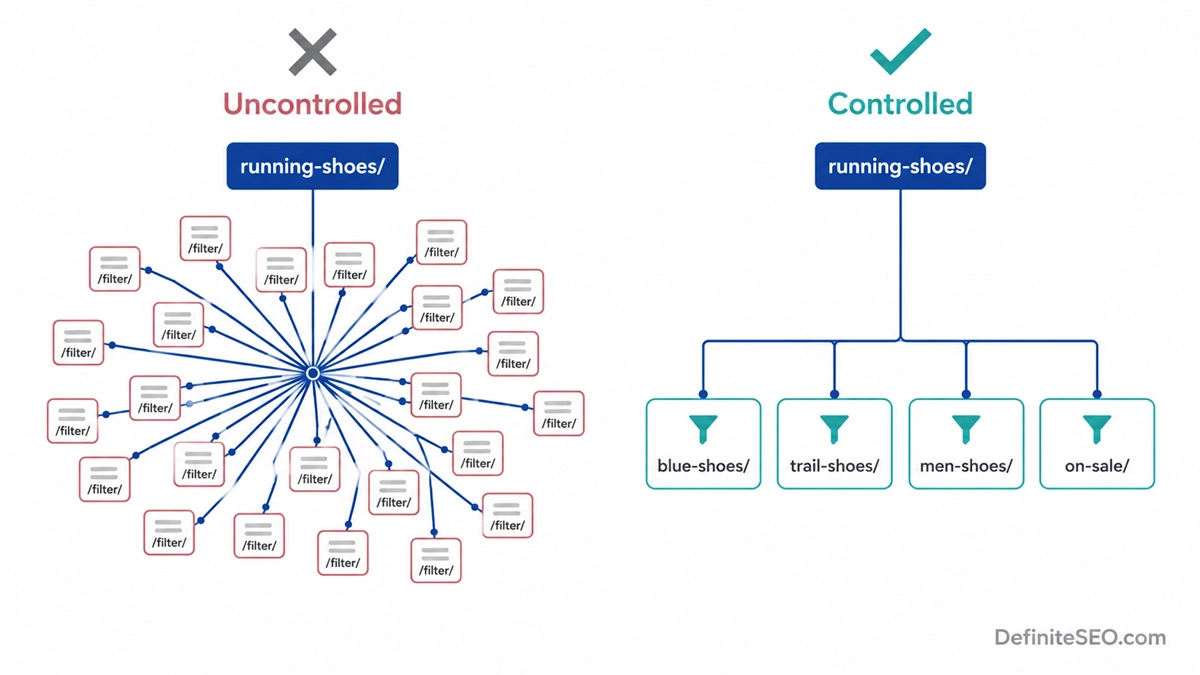
A category with 200 products and six filter dimensions can generate tens of thousands of unique URL combinations. Most of those pages have near-identical content, no inbound links, and no realistic chance of ranking for a distinct keyword with real traffic behind it. According to Google’s own crawl budget documentation, URL bloat from uncontrolled faceted navigation is one of the most common causes of indexing lag on large websites. I’ve audited mid-size e-commerce sites where 10,000 actual products had generated over 400,000 crawlable filter URLs from unchecked faceted navigation. That’s not a product catalogue; it’s a crawl trap.
The solution is to decide deliberately which filter combinations are worth indexing and to suppress the rest. A filter page targeting “blue running shoes” with genuine search volume might deserve its own indexed URL. A filter page for “blue, size 10, under $90, on sale, available for next-day delivery” almost certainly doesn’t.
For the pages you don’t want indexed, your main options are: use rel=canonical on the filter URL pointing back to the base category, apply a robots meta noindex tag on the filter URL, or block the parameter patterns in robots.txt. Each option has different implications for how Googlebot spends its time on your site. My guide to faceted navigation SEO explains when to use each approach in detail. If you’re unsure about the practical difference between noindex and nofollow in this context, my comparison of noindex vs nofollow will clear that up.
Crawl Budget and Category Page Efficiency
Crawl budget is how much time and resource Googlebot is willing to spend on your site in a given period. For small sites, it’s rarely a crisis. For sites with large product catalogues or platforms that generate URLs dynamically, it becomes a meaningful constraint that’s worth managing actively.
The most visible symptom of a crawl budget problem is new pages or updated category pages taking several weeks or longer to appear in search results, even after you’ve submitted them in Search Console. Another signal is important pages being crawled irregularly, which you can track in the crawl stats report inside Search Console.
Category pages are both a source of crawl waste and a tool for crawl efficiency. Uncontrolled filter URLs and sort variants consume budget on low-value content. Well-structured categories with proper canonical signals and clean internal linking help Googlebot navigate efficiently to the pages that actually matter.
The practical steps for category pages specifically: reduce URL bloat (covered in the faceted navigation section above), ensure your XML sitemap includes only the category URLs you want indexed and excludes parameter variants, and check that your category page server response times are reasonable. Googlebot reduces its crawl rate on slow servers, so a category page loading in 3 seconds is being crawled less frequently than one loading in 400ms. My guide to crawl budget optimization covers the full set of levers and how to prioritize them for different site types.
One check that often gets skipped: make sure all your category pages return a proper 200 status code. Pages that return 200 but display a “no results found” message are soft 404s in Google’s evaluation. They waste crawl budget in the same way a true 404 does, but they’re harder to catch because your monitoring tools won’t flag them as errors.
Canonicalization and Duplicate Content
Category pages generate duplicate content in two main ways, and both are worth understanding and addressing.
The first is sort parameters. A URL like /jackets/?sort=price-asc shows the same products as /jackets/ in a different order. Useful for users, nearly identical for Google. The standard fix is to add a self-referencing canonical tag on the base category URL and have all sorted variants point their canonical back to the base. Google reads the canonical, understands which version to treat as authoritative, and doesn’t split its evaluation across both.
The second is session IDs and tracking parameters. Some e-commerce platforms append session identifiers or UTM-style parameters to URLs during user sessions, creating a unique URL for every visit to the same page. This can produce thousands of near-identical category URLs generated continuously. Block these at the parameter level using Google Search Console’s URL Parameters tool or handle them at the platform or server level before they hit Google’s crawler.
One judgment call worth thinking about: if a filter or sort combination is genuinely targeting a distinct keyword with real search volume and traffic potential, it might be worth treating that URL as a standalone page with its own canonical rather than pointing it back to the base. A “cheapest running shoes” filter URL with consistent organic demand might deserve to be indexed independently. Make those decisions on a per-filter basis using actual Search Console data, not as a blanket policy.
For categories being deprecated or merged, use 301 redirects rather than leaving them live with canonical tags pointing elsewhere. My guide on redirects for SEO covers the mechanics of deprecating category URLs cleanly.
Schema Markup for Category Pages
Two schema types are directly relevant to category pages: BreadcrumbList and ItemList.
BreadcrumbList schema tells Google the position of this category within your site hierarchy, and it can produce a breadcrumb snippet in desktop search results, showing the path from the homepage to the category directly in the SERP. Note that as of January 2025, Google removed breadcrumb trails from mobile search snippets entirely, so this is now a desktop-only visual enhancement. That said, it’s still worth implementing. Desktop breadcrumbs improve click-through for users who want to understand where the page sits before clicking, and the schema itself supports your internal structure signals regardless of the snippet format.
ItemList schema marks up the list of products or articles on the category page with structured data. For e-commerce categories in particular, this enables product carousels and image-enriched results in certain search contexts. You list each item with a name, URL, position in the list, and optionally an image and description. Google’s support for this is solid and the additional visual real estate in the SERP is a genuine benefit worth pursuing.
DefiniteSEO generates BreadcrumbList schema automatically for supported WordPress themes. For ItemList, you’d typically add it through a custom function or a compatible WooCommerce schema plugin.
I want to be direct about something that trips up a lot of site owners: schema does not directly improve rankings and does not cause AI search engines to cite your page more often. Google’s own documentation says no special structured data is required for AI Overviews, and Ahrefs research found that adding JSON-LD correlated with a 4.6% decrease in AI Overview appearances on some query types. Schema is a machine-readability tool and a rich-result eligibility signal. Add it for those reasons, and let your content do the citation work.
Measuring Category Page Performance
Category page optimization isn’t a one-time project. You set it up, wait two to three months for Google to re-crawl and re-evaluate, and then come back to assess what’s working and what needs a second pass.
In Google Search Console, filter the Performance report by page and look at your category URLs directly. The three metrics that tell you the most: impressions (is Google serving your category for relevant queries at all), click-through rate (are users choosing your result over the competition), and average position (where are you landing for the keywords that matter). A category with high impressions and low click-through rate usually has a title tag or meta description problem. A category stuck at positions 8 to 12 for months likely needs stronger content or more internal links pointing to it from other indexed pages.
In GA4, check the organic channel’s landing page report. Category pages that appear there are actual entry points from search, not just pages people navigate to after arriving elsewhere. Those are your priority pages to keep optimized and to refresh periodically. Category pages that never appear as landing pages in organic might not be ranking at all, might have a canonical issue sending traffic to a different URL, or might be ranking but not getting clicked.
One pattern to watch: category pages that were performing well and then dropped suddenly. In my experience, that almost always traces back to a template change, an accidental canonical tag modification during a theme update, or a crawl budget problem triggered by a faceted navigation change that wasn’t reviewed. Check the URL Inspection tool first and look at the cached version to confirm Google is seeing the version of the page you expect.
FAQs
What is category page optimization in SEO?
Category page optimization is the process of making category-level URLs rank for broad, commercial-intent search queries by improving their content, metadata, URL structure, internal linking, and technical health. A well-optimized category page targets a cluster of related keywords, provides useful introductory content before the product or article grid, and handles technical issues like pagination and faceted navigation so Google can crawl and index it efficiently.
Should category pages be indexed by Google?
Yes, your main category pages should be indexed. They target the broad keywords that drive discovery and they’re often the highest-traffic entry points on a site. What you should exclude from indexing are the derivative URLs created by sort orders, filter combinations, and session parameters. Those typically have duplicate or near-duplicate content with no distinct keyword target and no realistic chance of ranking for anything useful on their own.
How much content do category pages need?
Two to four paragraphs of unique introductory content is usually enough, roughly 150 to 400 words placed at the top of the page before the product or article grid. The content should genuinely describe what the category covers and who it’s for. Longer is not better; useful is better. A wall of keyword-dense copy below the fold that nobody reads won’t help you rank and can signal low overall page quality to Google.
What URL structure works best for category pages?
Use short, readable slugs that reflect the hierarchy: domain.com/category/ for top-level categories and domain.com/category/subcategory/ for nested ones. Avoid ID numbers, avoid parameter-based URLs like ?cat=42, and keep nesting to two or three levels maximum. Deeper hierarchies reduce perceived page authority and make URLs harder to share or link to naturally.
Should I noindex empty category pages?
Yes. An empty or near-empty category page that returns 200 with minimal content is treated by Google as a soft 404, even if your server doesn’t flag it that way. Either populate the category with enough products or content to make it genuinely useful, or noindex it until you can. Leaving it live and indexed wastes crawl budget and can dilute your overall site quality signals.
How do I handle duplicate content across similar category pages?
Use self-referencing canonical tags on the base category URL and have sorted or filtered variants point back to the base. Write distinct introductory text for each category, even closely related ones. If two categories are genuinely covering the same products under different names, consider consolidating them into one URL with a 301 redirect rather than trying to differentiate two pages that are fundamentally the same.
Does schema markup help category pages rank better?
No, schema markup does not directly improve rankings or increase how often AI engines cite a page. BreadcrumbList schema makes the site hierarchy machine-readable and eligible for breadcrumb snippets in desktop search results. ItemList schema enables product carousels and richer visual results for e-commerce categories. Both are worth implementing for those specific benefits, but the content and technical structure drive the actual rankings. Schema is hygiene, not a ranking lever.
How should I handle pagination on category pages?
Google stopped using rel=prev and rel=next in March 2019, so that markup is no longer a functional pagination signal. The current approach is to treat page 1 as the primary version, put your strongest content and products there, and decide deliberately whether deeper pages are worth indexing. For most sites, noindexing or canonicalizing pages 3 and beyond to the base URL is a safe default. Make sure all pagination uses crawlable HTML links rather than JavaScript-only navigation so Googlebot can follow the pages you want it to reach.
What’s the most common mistake on category pages?
Treating category pages as structural containers rather than rankable pages. A category page with no unique content, a generic title tag, and no deliberate internal linking strategy will rarely rank well even on a site with strong overall domain authority. The category page needs to be built for a keyword target the same way a landing page would, with genuine content, a clear title, and links pointing to it from other indexed pages.
How does faceted navigation affect category page SEO?
Faceted navigation creates large numbers of near-duplicate URLs from a small set of products, which dilutes link equity, wastes crawl budget, and can trigger thin content assessments across the affected URLs. The solution is to index only the filter combinations that target distinct search demand and to canonicalize or noindex the rest. Always audit which filter URLs are currently indexed in Google Search Console before deciding how to handle them, since Google may have already de-prioritized most of them on its own.
Should category pages link to each other?
Yes. Lateral links between related categories help users discover adjacent content and help Google understand the topical relationships between your site’s sections. A “Women’s Running Shoes” category linking to “Women’s Trail Running Shoes” and “Running Accessories” reinforces your site’s depth in that topic area and gives users a path to keep browsing. Keep the links contextual and genuinely useful, not a footer-style dump of every category on the site.
How long does it take to see results after optimizing category pages?
For most sites, category pages that are re-crawled after optimization show measurable movement within four to eight weeks. Newer sites with less overall authority may take three to six months for meaningful ranking changes on competitive keywords. The fastest way to accelerate results is to make sure the optimized category is included in your XML sitemap and has crawlable internal links pointing to it from other indexed pages, so Googlebot picks it up in the next crawl cycle rather than waiting for a routine discovery pass.