Half the SEO audits I run open with a URL problem the owner never knew they had: the same page reachable at four different web addresses, or a slug that reads like a database burped it out. URL structure is the way you organise and format the web addresses across your site, the protocol, domain, folders, and slug that together tell people and search engines what a page is and where it sits in your hierarchy. Get it right once and it pays you back quietly for years, because URLs are one of the few SEO assets you rarely have to touch again.
A good URL is short, lowercase, readable, served over HTTPS, and built from real words separated by hyphens, with a logical folder path that mirrors how your site is organised. Keep your target keyword in the slug because it is a small, honest signal, not because it will move you up ten spots. Use subfolders over subdomains for content you want to rank together, avoid messy parameter URLs where you can, and keep one canonical version of every address. When you do have to change a URL, map a 301 from the old one to the new one and update your internal links. Stability beats cleverness: the best URL structure is the one you never need to rebuild.
- What URL structure is
- Why URL structure matters for SEO
- The anatomy of a clean URL
- Subfolders vs subdomains: which one to use
- Static vs dynamic URLs: parameters and faceted pages
- The small formatting rules that quietly add up
- Should you put keywords in your URLs?
- How to change URL structure without losing rankings
- URL structure in the age of AI search
- Your URL structure checklist
- Frequently Asked Questions
What URL structure is
URL structure is the consistent pattern you use to name, organise, and format every web address on your site. It covers the protocol (https), the domain (definiteseo.com), the path of folders that leads to the page (/technical-seo/), and the final slug that names the page itself (url-structure). Put those parts in a predictable order and you have a structure. Let them grow at random and you have a mess that search engines have to untangle.
Think of it as the filing system for your website. A well structured site reads like a clean set of labelled folders, where anyone glancing at the address bar can guess what the page is about and roughly where it lives. A poorly structured one reads like a hard drive where everything got dumped on the desktop. Both can technically work, but only one of them scales without pain.
Here is a clean example next to a messy one for the same page:
Clean:  https://definiteseo.com/technical-seo/url-structure/
Messy:  https://definiteseo.com/p?id=4471&cat=12&ref=home
Same content, very different signals. The first tells you and Google exactly what the page is. The second tells you nothing and forces a guess.
Why URL structure matters for SEO
URL structure matters because your URLs do three jobs at once: they help search engines crawl and understand your site, they nudge real people to click in the search results, and they form the addresses that every internal and external link points to. Get the structure wrong and you create friction in all three places at the same time.
On the crawling side, a logical folder structure helps search engines understand how your pages relate and which ones sit at the top of your hierarchy. When your URLs sprawl into endless parameter variations, you start to waste crawl budget, the finite number of pages a bot will fetch from your site in a given window. I have watched ecommerce sites generate tens of thousands of near duplicate filter URLs that soaked up crawl activity while their actual product pages went weeks between visits. That is structure quietly working against you.
On the ranking side, the URL is a genuine but modest signal. Google’s John Mueller has been blunt about it, saying the URL “brings minimal additional signal for search engines, while the content and everything else bring a lot of strong signals.” So the URL is not where rankings are won. But it is part of how Google reads context, and a tidy structure makes every other signal easier to interpret.
On the human side, URLs show up in the search results, in browser tabs, in shared links, and in autocomplete. A clean, readable URL earns trust before anyone lands on the page. Backlinko’s analysis of 11.8 million Google results found that short URLs correlate with higher organic click through rate, which is exactly what you would expect: people trust definiteseo.com/url-structure far more than a string of IDs and tokens.
There is a fourth reason that often gets missed. Your URLs are the anchors for all your internal linking and every backlink you ever earn. Change a URL carelessly and you risk breaking links that took years to build. Stable, well chosen URLs protect that equity.
The anatomy of a clean URL
A clean URL is built from a small set of parts in a predictable order, and each part has a job. Read left to right, a well formed address goes protocol, then domain, then folder path, then slug, with nothing wasted in between. Here is the whole thing labelled:
https://definiteseo.com/technical-seo/url-structure/
\___/   \____________/ \__________/ \___________/
protocol     domain        folder        slug
The protocol: serve everything over HTTPS
Always serve your pages over HTTPS, not plain HTTP. HTTPS encrypts the connection between the browser and your server, and Google confirmed it as a ranking signal back in August 2014. It is a lightweight signal on its own, but it has become a baseline trust requirement: modern browsers flag plain HTTP pages as “Not secure,” which scares users off before they read a word. Get an SSL certificate, force every HTTP request to redirect to its HTTPS version, and never look back. There is no scenario in 2026 where a public site should run on HTTP.
The domain and subdomain
Your domain is your brand, so keep it short, memorable, and consistent. The piece people overlook is the www versus non www decision. Pick one, definiteseo.com or www.definiteseo.com, and redirect the other to it, because to a search engine those are two different hostnames serving the same content. I see split signals from this more often than you would think, usually on older sites that never tidied it up.
The folder path
The folder path is the sequence of directories that locates your page, and it should mirror how your site is actually organised. A path like /technical-seo/url-structure/ tells Google this page is a technical SEO topic, sits inside that category, and is one of its members. That grouping helps search engines understand topical relationships and helps users orient themselves. Keep the path shallow where you can, since burying a page five folders deep usually signals it is far from your homepage and carries less authority.
The slug
The slug is the final, page specific part of the URL, and it should be a short, human readable description of the page. For this article the slug is simply url-structure. Strip out stop words like “a”, “the”, and “for” when they add nothing, lowercase everything, separate words with hyphens, and describe the page honestly. A good slug is the one a person could read aloud over the phone without spelling anything out.
Subfolders vs subdomains: which one to use
For content you want to rank together, use subfolders, not subdomains. A subfolder lives on your main domain as a path, like definiteseo.com/blog/, while a subdomain sits in front of the domain as its own host, like blog.definiteseo.com. The practical difference is that Google has historically treated a subdomain as a somewhat separate site, which can split the authority you have built rather than concentrate it on one domain.
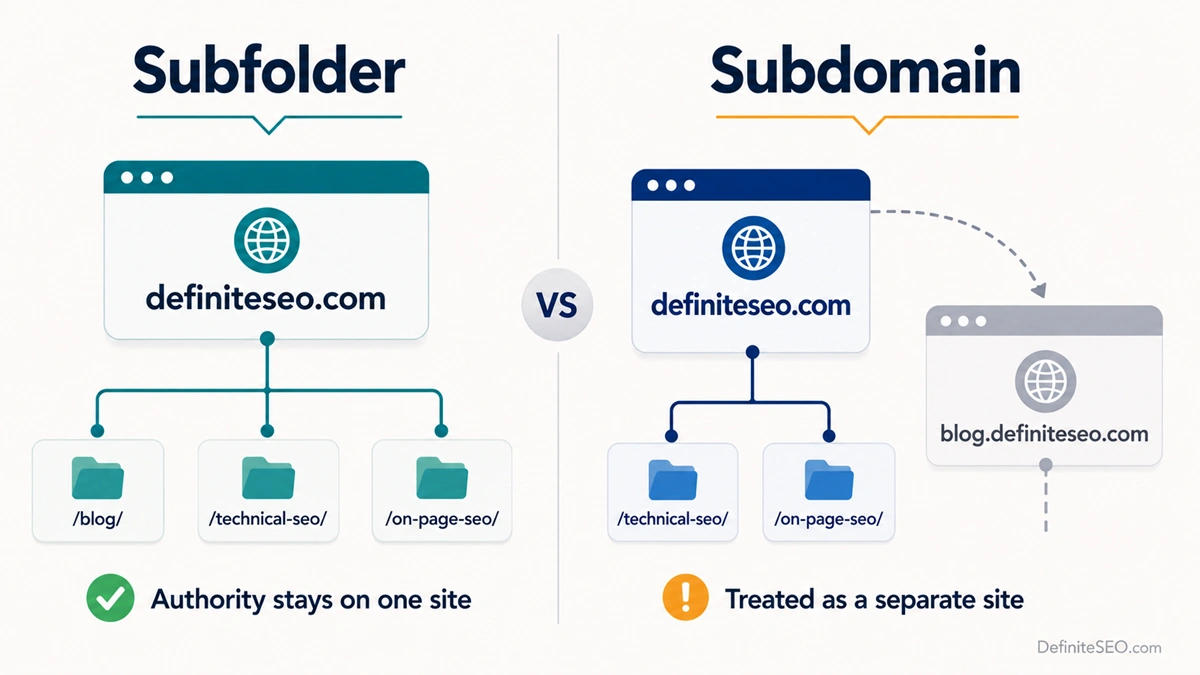
In my own experience migrating blogs off subdomains and into a /blog/ subfolder, the consolidated authority almost always helps the content compete faster, because every link and every signal now reinforces a single domain instead of two. That matches what most large case studies report when sites move a subdomain back into a subfolder.
The honest nuance is that Google says it can treat subdomains and subfolders equally, and for genuinely separate properties a subdomain is the right call. A help centre running on third party software, a status page, a regional store on a different platform, those often belong on subdomains for technical reasons. The rule of thumb I use: if you want it to rank as part of your main site and feed the same topical authority, put it in a subfolder. If it is operationally separate, a subdomain is fine.
If you are choosing between a subfolder and a subdomain purely for SEO, choose the subfolder almost every time. The only good reasons to pick a subdomain are technical or organisational, never “I heard it ranks better,” because it usually does not.
Static vs dynamic URLs: parameters and faceted pages
A static URL is a fixed, readable address like /technical-seo/url-structure/, while a dynamic URL is generated on the fly and usually carries parameters after a question mark, like /products?category=12&sort=price&color=red. Static URLs are easier for people to read, easier for Google to understand, and far easier to keep canonical, so they should be your default for any page you want indexed.
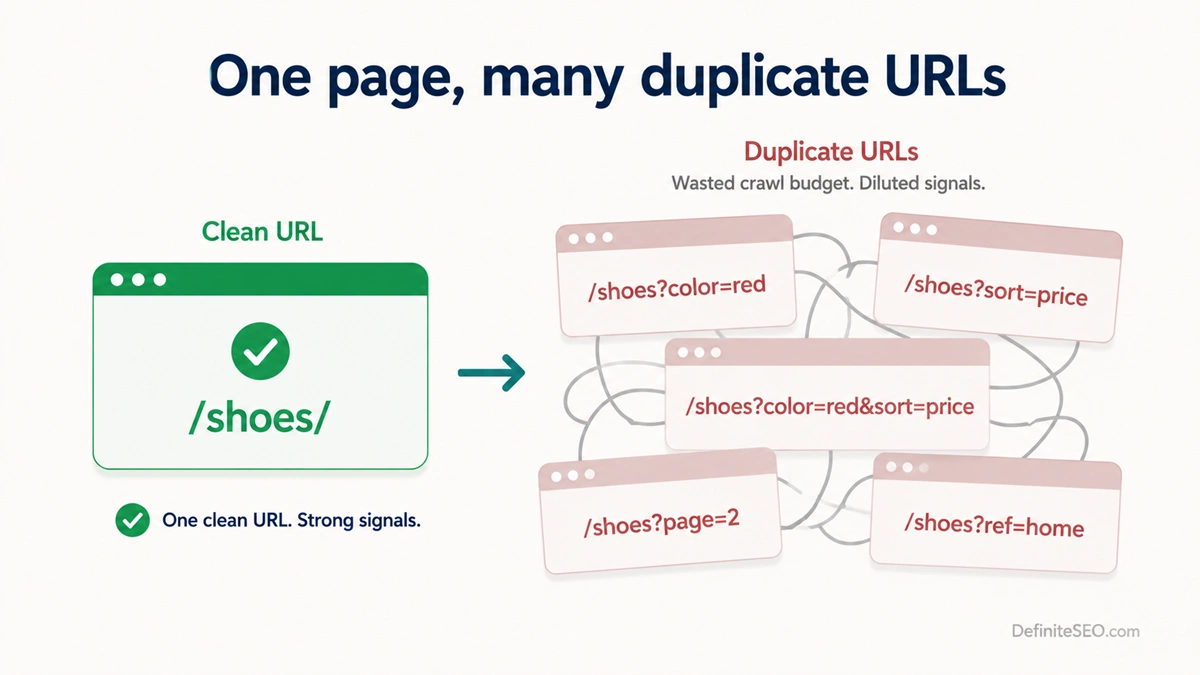
Dynamic and parameter URLs are not evil. They are how search, sorting, tracking, and filtering work, and Google can crawl them fine. The problem is duplication. When a single product list can be reached through dozens of filter and sort combinations, each producing its own URL, you can spawn thousands of near identical pages from a handful of real ones. This is the classic faceted navigation trap, and it is the most common parameter problem I find on ecommerce audits, where the same fifty products show up under hundreds of color, size, and sort URLs.
You have a few levers for keeping parameters under control:
- Canonical tags. Point every filtered or sorted variation back to the clean, canonical version of the page with a rel=”canonical” tag, so Google knows which one to index and consolidates the signals onto it.
- Robots rules. For parameters that should never be crawled, like internal tracking tokens, you can disallow them in your robots.txt so bots do not waste time on them.
- Noindex where needed. For thin filtered pages you do not want in the index but still want crawled for their links, a noindex tag is the cleaner tool than blocking.
- Sensible pagination. For long category lists, handle your pagination deliberately so page two and beyond do not turn into duplicate or orphaned mess.
Where you control the system, prefer clean static paths. Most modern platforms, WordPress included, can rewrite ugly query strings into readable slugs, and that one setting removes a whole class of problems before it starts.
The small formatting rules that quietly add up
None of the formatting details below will rank you on their own, but breaking them creates duplicate URLs, confusing links, and avoidable cleanup later. Treat them as hygiene: cheap to do right, annoying to fix in bulk.
Trailing slashes
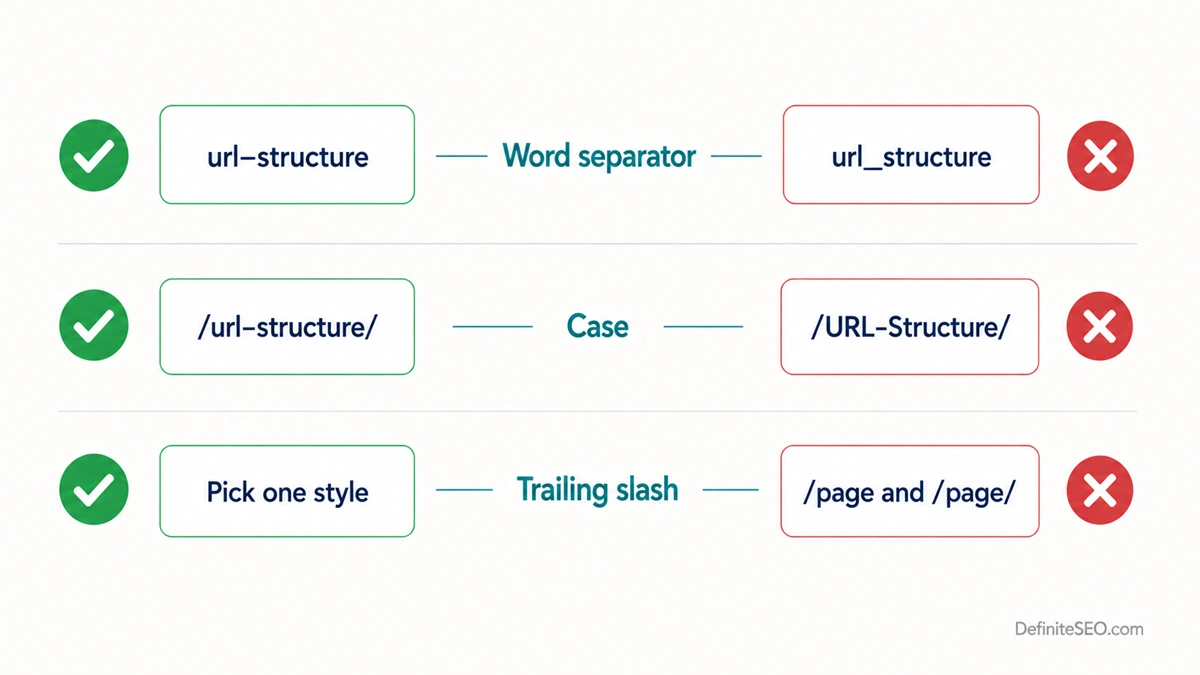
Pick one trailing slash style and enforce it everywhere, because Google treats /page and /page/ as two different URLs for anything other than the root domain. That means the same content can sit at two addresses, splitting signals and risking duplicate content. The root domain is the exception, where definiteseo.com and definiteseo.com/ are seen as equivalent. For every other page, choose with slash or without, redirect the other version, and keep your internal links and your XML sitemap consistent with the choice.
Hyphens vs underscores
Use hyphens to separate words in URLs, never underscores. Google reads hyphens as spaces, so url-structure is parsed as two words, “url” and “structure.” Underscores get glued together, so url_structure reads as the single token “urlstructure.” Matt Cutts confirmed this on Google’s behalf years ago and it has not changed since. If your platform defaults to underscores, switch it. This is one of the rare URL rules with a clear right answer.
Capitalization
Keep your URLs lowercase. Most servers treat /URL-Structure and /url-structure as two distinct addresses, which is yet another way to accidentally create duplicates, and mixed case looks careless in the address bar. Force lowercase at the server or CMS level so a stray capital letter in a link never spawns a second version of the page.
URL length
Keep URLs as short as they can be while still describing the page. Backlinko’s study of 11.8 million results found that the average URL in the top ten is about 66 characters, and that position one URLs run roughly 9.2 characters shorter on average than position ten URLs. That is a correlation, not a magic number, so do not obsess over it. The real reasons short wins are practical: shorter URLs earn more clicks, are easier to read and share, and point to pages closer to your homepage. Aim to keep the meaningful part under about 60 characters and drop any word that does not help a reader understand the page.
Should you put keywords in your URLs?
Yes, include your primary keyword in the slug when it fits naturally, but treat it as a small bonus, not a ranking strategy. John Mueller has called the keyword in URL a “very small ranking factor” and added that it is “not something I’d say is even worth your effort to restructure your site just so you can get keywords in your URL.” That is about as clear as Google gets. A keyword in the slug is a lightweight signal, and the moment you start contorting your structure to force exact match keywords in, you have lost the plot.
The reason to include the keyword anyway is mostly human. A slug like /technical-seo/url-structure/ confirms to a searcher scanning the results that the page is about exactly what they typed, which supports clicks, and it gives you natural, descriptive anchor text when other sites link to you using the bare URL. So put the keyword in once, keep it readable, and move on. This is the same logic that drives smart keyword placement everywhere else on the page: place it where it genuinely helps a reader, not where it games a robot.
What you must not do is stuff. /best-cheap-affordable-url-structure-seo-guide-tips is not a URL, it is a confession. Keyword stacking in the slug looks spammy to users and does nothing for rankings, and in some cases reads as the kind of over optimization Google has warned about.
How to change URL structure without losing rankings
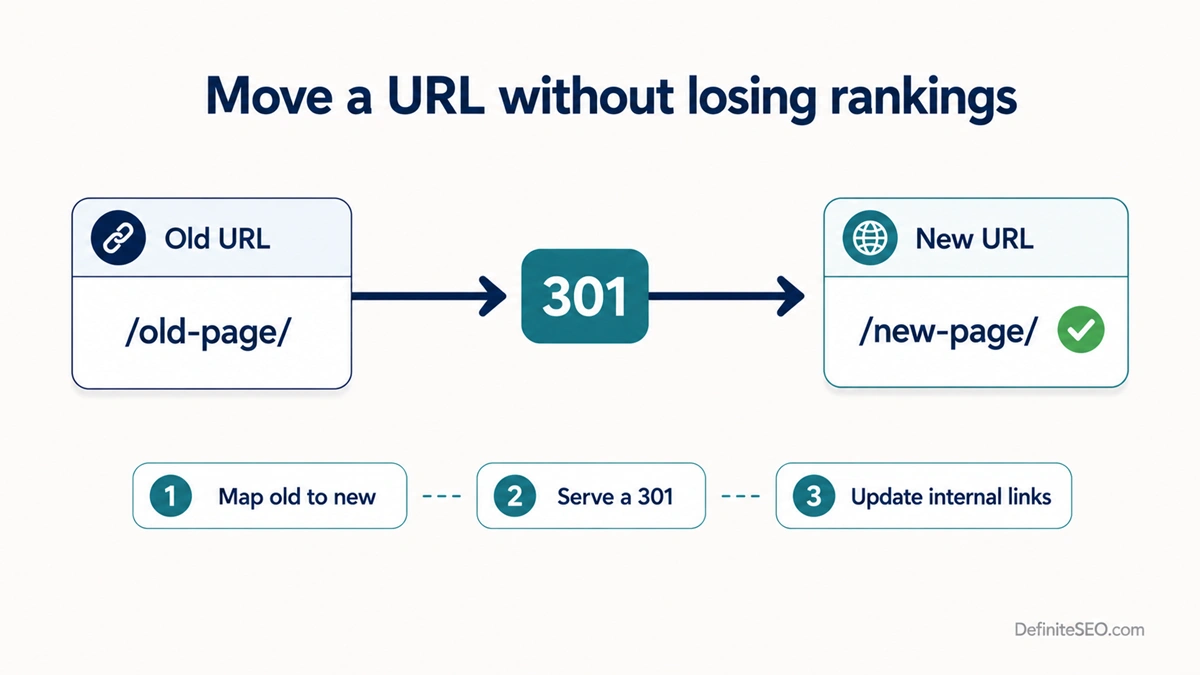
If you must change a URL, the rule is simple: never let an old, indexed URL just die. Map every old address to its new one with a permanent redirect, and you carry the rankings and link equity across instead of dropping them. Skip that step and you hand Google a wall of 404s, watch your rankings fall, and break every external link that ever pointed at the old page. I have cleaned up enough botched migrations to tell you the redirect map is the whole game.
Here is the safe sequence I follow:
- Decide whether the change is worth it. Changing URLs forces search engines to recrawl and reprocess, and Mueller has repeatedly warned that frequent URL changes disrupt rankings. If the only reason is cosmetic, leave it alone. Stability is a feature.
- Map old to new. Build a one to one list of every old URL and the new URL it should become. Do not lazily redirect everything to the homepage, since a redirect to an irrelevant page often gets treated as a soft 404 and the equity evaporates.
- Use a permanent 301 redirect. A 301 redirect tells search engines the move is permanent and passes the ranking signals to the new URL. A temporary 302 does not, so using the wrong one is a quiet, common mistake.
- Serve the right status code. Confirm the old URL actually returns a 301 and the new one returns a clean 200, because the wrong HTTP status code can silently sink a migration that otherwise looks fine.
- Update internal links and your sitemap. Change your menus, in content links, and sitemap to point straight at the new URLs. Redirects are a safety net, not a substitute for linking to the final destination.
- Monitor after launch. Watch Search Console for crawl errors and coverage changes for a few weeks. A brief ranking wobble is normal, a sustained drop means something in the map is wrong.
URL structure in the age of AI search
For AI search engines like ChatGPT, Perplexity, and Google’s AI Overviews, your URL structure mostly matters as a crawlability and clarity signal rather than a ranking lever. These engines can only cite a page they can fetch and parse cleanly, so a logical, static, HTTPS URL that resolves to a single canonical version makes your content easy to retrieve and attribute. A tangle of parameter duplicates does the opposite, scattering the same content across addresses an engine has to reconcile before it trusts any of them.
There is a softer benefit too. A descriptive URL is a compact piece of context. When an AI engine weighs whether your page answers a query, a clean address like /technical-seo/url-structure/ reinforces the topic in a tiny but consistent way, alongside your headings and body. It will not get you cited on its own. What gets you cited is concrete, attributable substance: a controlled study reported that adding statistics, quotations, and source citations to a page raised its visibility in AI answers by roughly 30 to 40 percent, while keyword stuffing scored worse than doing nothing. The URL is the doormat, not the meal. Keep it clean so the engine walks in, then earn the citation with the content.
The one prerequisite worth checking once is access. Confirm your robots rules allow the AI crawlers that matter, including OAI-SearchBot, PerplexityBot, and Google-Extended, and make sure your main content renders in plain HTML rather than hiding behind heavy client side JavaScript. A blocked or unreadable page has its citation odds set close to zero no matter how good the URL looks.
Your URL structure checklist
Run any new or existing URL against this list and you will catch the vast majority of structural problems before they cost you anything:
- Served over HTTPS, with HTTP redirecting to it
- One canonical hostname, www or non www, with the other redirected
- Lowercase throughout, enforced at the server level
- Words separated by hyphens, never underscores or spaces
- Short and readable, with the meaningful part ideally under about 60 characters
- A folder path that mirrors your real site hierarchy and stays shallow
- Primary keyword present in the slug, naturally, used once
- A single trailing slash convention, enforced everywhere
- Parameters controlled with canonicals, robots rules, or noindex as needed
- Every changed URL covered by a 301 to its correct destination
- Internal links and sitemap pointing at the final, canonical URLs
The thread running through all of it is stability. The best URL structure is one you design carefully, set once, and almost never have to touch again. Spend the effort up front, keep your addresses clean and human, and your URLs become the part of your SEO that quietly takes care of itself while you focus on the content that actually moves rankings.
If I could give you one rule that prevents most URL problems before they happen, it is this: decide your structure once, write it down, and stop fiddling with it. Almost every URL disaster I have cleaned up started with someone changing addresses they did not need to change.
FAQs
What is a good URL structure for SEO?
A good URL structure is short, lowercase, served over HTTPS, and built from real words separated by hyphens, with a logical folder path that reflects how your site is organised. It includes your primary keyword in the slug naturally and keeps one canonical version of every address. The goal is a URL a person can read and understand at a glance, because what is clear to a human is usually clear to a search engine.
Does URL structure affect Google rankings?
URL structure affects rankings, but only modestly and mostly indirectly. Google’s John Mueller has said the URL provides minimal additional signal compared to your content. The bigger impact comes from how structure influences crawling, duplicate content, click through rate, and the stability of your links. So a clean URL supports your SEO rather than driving it, and a messy one creates friction that holds you back.
Should I use subfolders or subdomains?
Use subfolders for any content you want to rank as part of your main site, since they keep all your authority on one domain. Subdomains are treated as somewhat separate sites and can split that authority. Reserve subdomains for content that is genuinely separate for technical or organisational reasons, such as a help centre on third party software or a status page, where independence is the point.
Are hyphens or underscores better in URLs?
Hyphens are better, and it is not close. Google reads a hyphen as a space, so url-structure is correctly parsed as two words, while an underscore glues words together, so url_structure reads as one token. Matt Cutts confirmed Google’s preference for hyphens years ago and the guidance has not changed. Always separate words in URLs with hyphens.
How long should a URL be?
Keep URLs as short as you can while still describing the page, ideally with the meaningful part under about 60 characters. Backlinko’s analysis of 11.8 million results found the average top ten URL is around 66 characters and that higher ranking URLs tend to be slightly shorter. That is a correlation, not a target, so prioritise readability and drop any word that does not help a reader understand the page.
Do keywords in URLs help SEO?
Keywords in URLs help a little, as a lightweight signal, but they are not worth restructuring your site for. John Mueller called the keyword in URL a very small ranking factor. The real value is human: a keyword in the slug confirms relevance to searchers scanning results and gives you descriptive anchor text in raw link shares. Include your keyword once, keep it natural, and never stuff.
Does a trailing slash matter for SEO?
A trailing slash matters because Google treats /page and /page/ as two different URLs for anything other than the root domain. Serving the same content at both versions can split signals and create duplicate content. Pick one convention, redirect the other version with a 301, and keep your internal links and sitemap consistent. For the root domain only, the two versions are treated as equivalent.
Should URLs be lowercase?
Yes, URLs should be lowercase. Most servers treat /URL-Structure and /url-structure as distinct addresses, so mixed case can accidentally create duplicate pages, and it simply looks careless in the address bar. Enforce lowercase at the server or CMS level so a stray capital letter in a link never generates a second version of the page.
What are parameter URLs and why are they a problem?
Parameter URLs are dynamic addresses that carry extra values after a question mark, like ?color=red&sort=price, usually generated by filters, sorting, search, or tracking. They become a problem when many combinations produce many near duplicate URLs from a handful of real pages, which wastes crawl budget and confuses indexing. Control them with canonical tags, robots rules, or noindex, depending on whether you want each variation crawled or indexed.
How do I change a URL without losing rankings?
Change a URL by mapping the old address to the new one with a permanent 301 redirect, then updating your internal links and sitemap to point at the new URL. The 301 passes ranking signals and link equity to the new location, while a missing redirect leaves a 404 that drops your rankings and breaks inbound links. Only change URLs when there is a real reason, because frequent changes disrupt rankings.
Is HTTPS required for good URL structure?
HTTPS is effectively required. Google confirmed it as a ranking signal in 2014, and browsers now flag plain HTTP pages as not secure, which deters users before they read anything. Get an SSL certificate, redirect all HTTP traffic to HTTPS, and treat it as a baseline rather than an optimization. There is no good reason to run a public site on HTTP in 2026.
Does URL structure matter for AI search engines like ChatGPT and Perplexity?
URL structure matters for AI search mainly as a crawlability and clarity signal, not a ranking lever. A clean, static, HTTPS URL with a single canonical version is easy for engines to fetch, parse, and attribute, while parameter duplication makes your content harder to trust. The citation itself is earned by concrete, attributable content, so keep the URL clean to get the engine in the door, then win the mention with substance.