Most of the SEO problems I get called in to fix turn out to be structural. The owner is convinced they need more content or more backlinks, and what they actually have is a pile of genuinely good pages that Google cannot find, cannot prioritise, or cannot connect to one another. The pages exist. They just live in a maze.
Site architecture is the way you organise and link everything on your website, from the homepage down to the last blog post. Get it right and Google crawls you efficiently, works out what you are about, and channels authority to the pages you care about. Get it wrong and even brilliant content sits in the dark, waiting for a crawler that never quite gets there.
I have rebuilt the structure of enough sites to say this plainly: architecture is the highest leverage technical work most teams ignore. So let me walk you through how it actually works, what the evidence really says (because some of the popular advice is flat out wrong), and how to plan a structure that both Google and the new AI answer engines can read.
Site architecture is how your pages are organised and linked together. It matters because Google discovers and ranks pages mainly by following internal links, so a clear hierarchy decides what gets crawled, indexed, and treated as important. Keep the pages that matter within a few clicks of the homepage, group related content into topic clusters, use clean descriptive URLs, and connect related pages with natural anchor text. Treat the old “three click rule” as a guideline rather than a law, but do keep your key pages shallow, because click depth is a real signal of importance to Google. Fix orphan pages, thin tag pages, and messy URLs, and your existing content will usually perform better without a single new word.
- What site architecture actually means
- Why site architecture is the foundation of technical SEO
- The principles behind a structure that ranks
- Flat vs deep architecture, and the three click myth
- How to plan your site architecture step by step
- Internal linking, the engine that holds it together
- Navigation, breadcrumbs, and sitemaps
- Site architecture by website type
- The site architecture mistakes I see most often
- How to audit and fix your current structure
- Site architecture in the age of AI search
- Frequently asked questions
What site architecture actually means
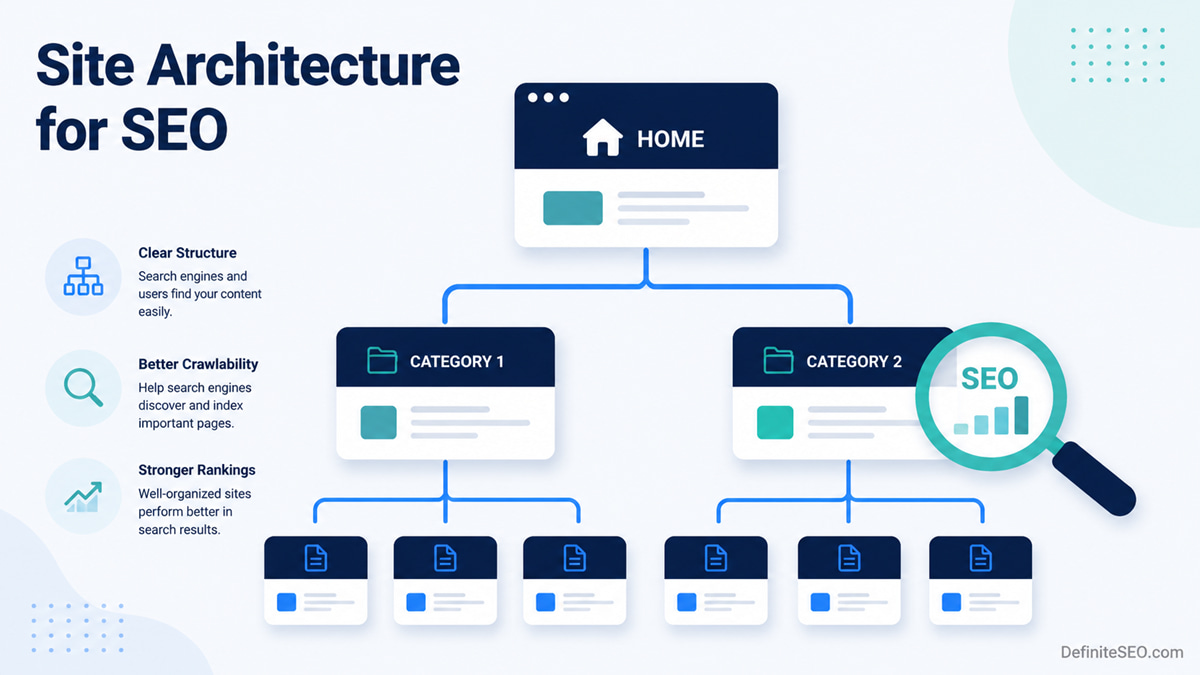
Site architecture is the structure of your website: how pages are grouped, layered, and linked so that people and search engines can move through them. Think of it as the floor plan of a building. The homepage is the entrance, your main categories are the corridors, and your individual articles and product pages are the rooms.
A good floor plan means anyone can walk in and find what they need without a guide. A bad one means visitors get lost, and crawlers waste their time wandering hallways that lead nowhere.
There are a few layers worth naming, because people muddle them constantly. The hierarchy is the conceptual tree of homepage, categories, subcategories, and pages. The URL structure is how that tree shows up in your web addresses. The internal linking is the web of connections that ties related pages together, including but not limited to the navigation menu. These three work together, yet they are not the same thing, and treating them as identical is where a lot of sites go wrong.
Why site architecture is the foundation of technical SEO
Here is the part that makes architecture non negotiable. Google does not magically know every page you publish. It finds pages by following links, and the structure of those links decides almost everything downstream.
How Google discovers your pages
Google discovers new pages mainly by crawling links it already knows about and following them to pages it does not. Its own documentation is blunt on the mechanics: it can generally only crawl a link if that link is a proper HTML anchor element with an href attribute. A clickable span, an onclick handler with no href, a button wired up with JavaScript, none of those are reliable. If your navigation or your related links are built that way, you can have great content that Google simply never reaches.
That single fact reframes how you should think about structure. Your internal links are not decoration. They are the roads Google drives on, and a page with no road leading to it is invisible.
Crawl budget, and who actually needs to care
You have probably read scary advice about conserving crawl budget. Let me add the caveat that most of that advice leaves out. Google defines crawl budget as the set of URLs it can and wants to crawl, shaped by how much your server can handle and how much demand there is for your content. It genuinely matters, but mostly for big sites.
Google says so directly. Its large site guidance is aimed at sites with more than a million pages that change moderately often, or sites with more than ten thousand pages that change every day, or sites where a lot of URLs sit in the “Discovered, currently not indexed” bucket. If your site is a few hundred or a few thousand pages that update now and then, Google flatly tells you not to worry about it. So if you run a normal business site or blog, do not lose sleep over crawl budget. Do keep your structure clean anyway, because the same habits that save crawl budget on huge sites also make small sites easier to understand. If you do operate at scale, our guide to crawl budget optimization goes deeper on where the real waste hides.
How authority moves through your site
Internal links do more than help discovery. They pass authority. When one page links to another, it hands over a slice of ranking signal, the thing SEOs have long called link equity. Your homepage is usually your strongest page, because it tends to attract the most external links. Architecture decides how much of that strength flows down to the pages that actually need to rank.
In a tidy structure, authority travels in a sensible path: homepage to category to article, with related articles cross linking each other. In a messy one, strength pools at the top and trickles unpredictably, leaving your money pages starved. This is why two sites with similar content can rank so differently. One channels its authority on purpose. The other leaves it to chance.
Topical authority and relevance
Structure also tells Google what you are an expert in. When you cluster related pages and link them together, you create a dense, connected body of work on a subject, and that concentration signals depth. It reinforces the broader reputation signals Google rewards, the experience, expertise, authoritativeness, and trust it looks for in content that deserves to rank. A scattered site of one off posts struggles to show that depth, even when the individual articles are strong.
The principles behind a structure that ranks
Before the step by step, here are the principles I come back to on every project. Internalise these and the specific decisions get easier.
Keep the pages that matter shallow
The fewer clicks it takes to reach an important page from the homepage, the more important Google tends to consider it. John Mueller from Google has said as much: a page one click from the homepage reads as significant, and Google gives it a little more weight. So put your priority pages near the top, and do not bury your best work eight clicks deep behind layers of menus.
Build a clear hierarchy
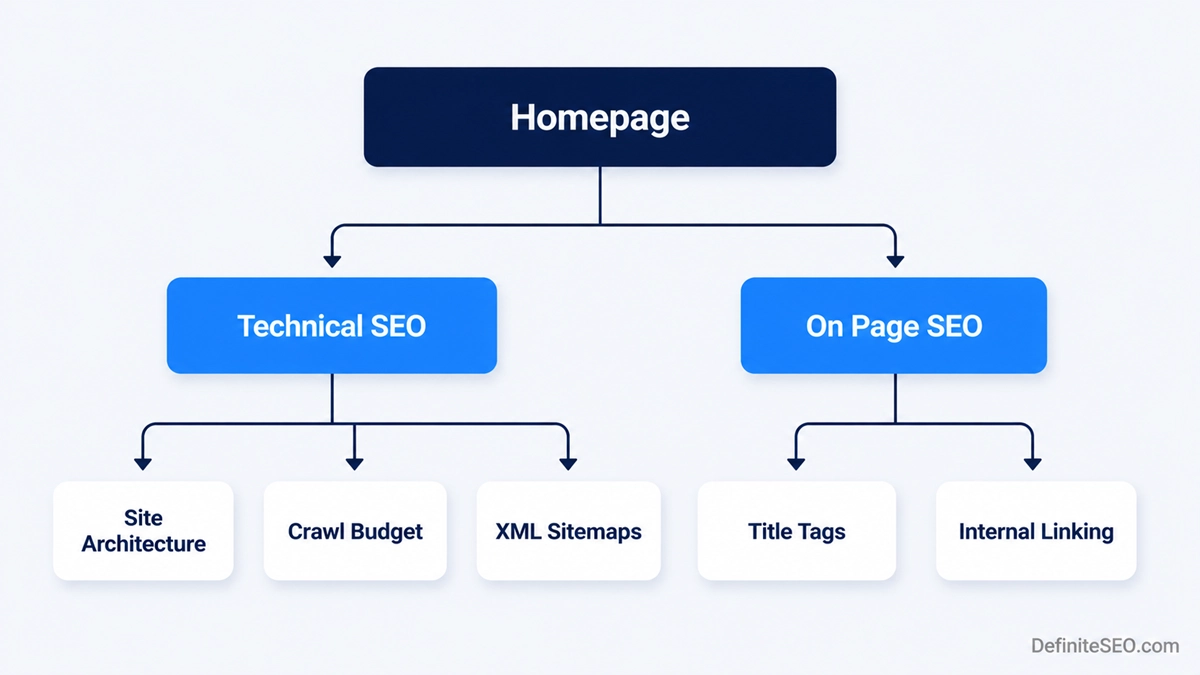
Organise your content into a logical tree. Broad topics become categories, narrower ones become subcategories or articles underneath them. A simple version looks like this:
Homepage
  Technical SEO (category)
    Site architecture
    Crawl budget optimization
    XML sitemaps
  On page SEO (category)
    Title tags
    Internal linking
Every page should have an obvious home. If you cannot decide which category a page belongs to, that is usually a sign your categories need rethinking, not that the page needs to live in three of them.
Group content into topic clusters
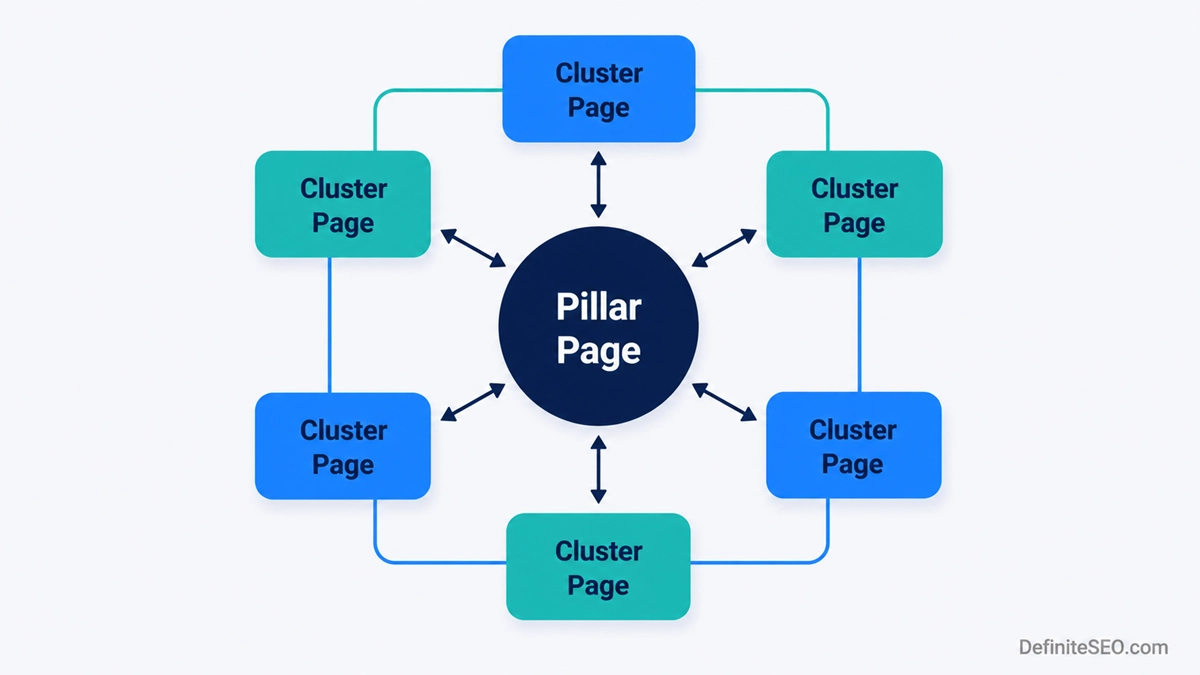
The pillar and cluster model has become the default way to organise content, and for good reason. You publish one broad pillar page on a big topic, then a set of focused pages on the subtopics, and you link them all together. The pillar links down to each cluster page, each cluster page links back up to the pillar, and the related cluster pages link across to each other.
I should be honest about the status of this idea. Siloing and topic clusters are an SEO community best practice, popularised by people like the team at HubSpot and various agencies, not a named technique Google endorses in its documentation. What Google does confirm is that internal links signal relevance and that grouping related content helps it understand your site. The cluster model is simply a reliable way to produce those signals on purpose. Supporting it with semantically related keywords across the cluster helps each page cover its subtopic fully rather than repeating the same phrases.
Keep URLs clean and predictable
Google recommends URLs built logically and in a way that humans can read. Use real words that describe the page, group similar content into directories, and skip the random strings of numbers and parameters where you can. A URL like /technical-seo/site-architecture/ tells a person and a crawler exactly where they are. A URL like /?p=4471 tells them nothing.
One honest caveat, because the internet oversells this. Putting keywords in the URL is, in Mueller’s own words, a very lightweight ranking factor. Clean URLs help users understand and trust your links, and they help you organise your site, but do not expect a keyword stuffed slug to move rankings on its own. Readability and structure are the real wins.
Flat vs deep architecture, and the three click myth
This is the section where I get to clear up the most stubborn confusion in all of site architecture, so stick with me.
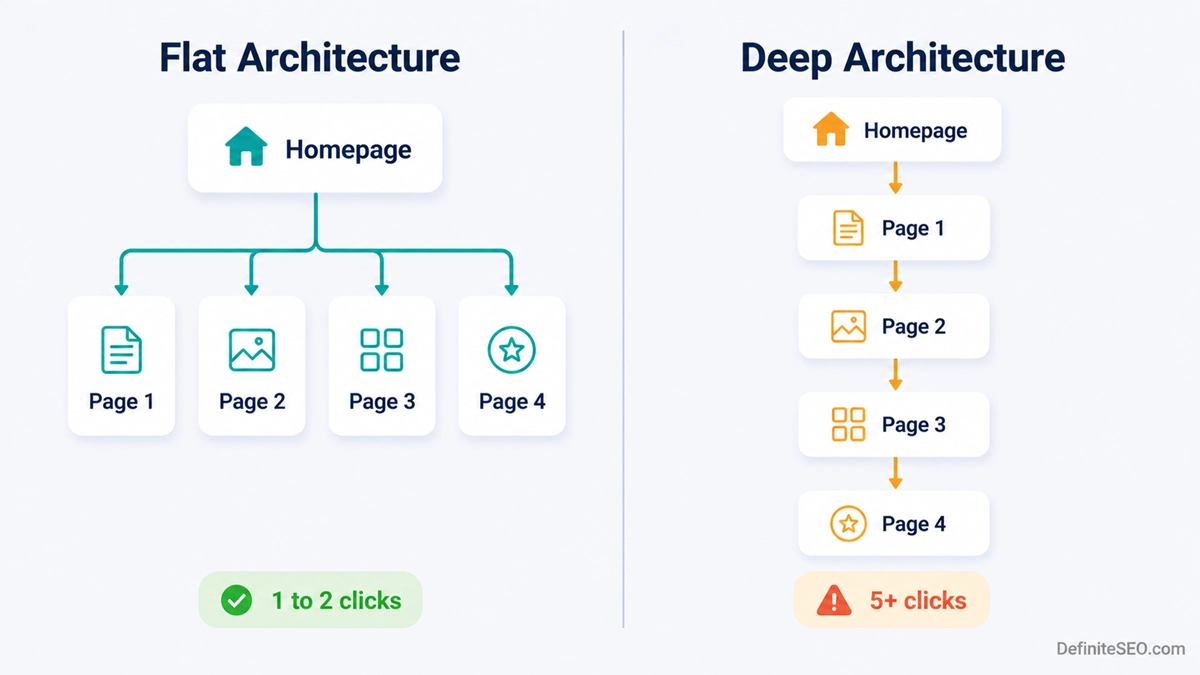
A flat architecture keeps most pages close to the homepage, reachable in a small number of clicks. A deep architecture stacks pages in long chains, where you click and click and click before you arrive. As a general rule, flatter is better for SEO, because it keeps important pages shallow and spreads authority more evenly.
Now the myth. You have heard the “three click rule”, the claim that every page on a website must be reachable within three clicks or users get frustrated and leave. It sounds authoritative. It is also not supported by data. The Nielsen Norman Group, the most respected name in usability research, points to a study by Joshua Porter that tested it directly: user dropoff did not increase past three clicks, and satisfaction did not fall either. What actually frustrates people is not the number of clicks, it is clicks that feel uncertain, where they cannot tell if they are heading the right way. Three easy, confident clicks beat one confusing one.
So should you ignore click depth entirely? No, and this is the trap people fall into. The usability three click rule is debunked, but click depth as an SEO signal is real and separate. Google does treat pages closer to the homepage as more important, as Mueller has said openly. The effect is modest, and it works indirectly through crawling and the flow of authority rather than as a big direct ranking lever, but it is real. Keep your priority pages shallow for that reason, not because of a usability rule that never held up.
Do not flatten your URLs just to fake a shallow site. Google has said there is no benefit to an artificially flat URL structure. What counts is how many clicks through actual links it takes to reach a page, not how many slashes sit in the address bar. A page at /blog/category/post/ that is linked from your homepage is shallow in the way that matters. Stripping the folders out of the URL changes nothing for crawlers and only makes your structure harder to manage.
How to plan your site architecture step by step
Whether you are building fresh or untangling an existing mess, the process is the same. Plan it on paper before you touch the CMS.
- Map your topics before your pages. List the core subjects your site needs to cover, and the questions your audience actually asks. These become your categories and your pillar pages. Doing this first stops you from organising around your internal departments instead of your visitor’s needs.
- Group everything into clusters. Slot every existing and planned page under a topic. Anything that does not fit a cluster is a flag: either it needs a home, or it should not exist.
- Design the hierarchy from the homepage down. Decide what links from the homepage, what links from each category, and how deep the deepest important page sits. Aim to keep priority pages within two or three clicks.
- Set your URL structure to match. Mirror the hierarchy in your directories so URLs stay logical and readable. Decide it once, then stick to it, because changing URLs later means redirects and risk.
- Plan the internal links. Map which pages link to which, on purpose. The cluster connections, the contextual links inside the content, the breadcrumb trail. This is the step most people skip, and it is the one that does the heavy lifting.
A spreadsheet is enough for most sites. One row per page, with columns for its topic, its parent, its target URL, and the pages it should link to. Boring, I know. It will also save you from the kind of structural debt that takes months to repay.
Internal linking, the engine that holds it together
If hierarchy is the skeleton, internal linking is the muscle. It is how discovery, authority, and relevance actually move through the structure you designed, and it deserves real attention rather than a few “related posts” widgets bolted on at the end.
A few rules I hold to. Every important page should have at least one internal link pointing to it, because Google says plainly that every page you care about should be linked from somewhere on your site. Use descriptive anchor text that tells the reader and Google what the linked page is about, rather than “click here”. Link from your strong pages to the ones that need a boost, since that is how you pass authority where you want it. And link across related pages within a cluster, not just up and down the hierarchy, so the whole topic reads as connected.
There is no magic number for links per page, despite what you may have read. Link where it genuinely helps the reader, keep it relevant, and do not cram fifty links into a paragraph hoping to sculpt your way to the top. Relevance and usefulness are what hold up.
Navigation, breadcrumbs, and sitemaps
Three structural elements deserve their own mention, because they do specific jobs.
Your main navigation is the most powerful set of internal links on your site, because it appears across the whole thing. Whatever you put in the header menu, you are telling Google is important. So be deliberate. A bloated mega menu that links to everything signals that nothing in particular matters.
Breadcrumbs are the little trail that shows where a page sits, like Home then Technical SEO then Site architecture. They help users orient themselves, and Google uses breadcrumb structured data to categorise the page and treats the breadcrumb links as normal links for ranking purposes. One nuance worth knowing: Google removed the visual breadcrumb display from desktop search results in late 2024, so do not expect them to always show in the snippet. The structural value remains regardless. Google recommends your breadcrumbs reflect a typical path a user would take to the page, which does not have to mirror your URL exactly.
An XML sitemap lists your important URLs for search engines. It is useful, especially for newer or larger sites, but understand its limits. Google calls a sitemap “merely a hint”, and submitting one does not guarantee crawling or indexing. A sitemap supplements good architecture. It never replaces it. If your only plan for getting pages discovered is the sitemap, your internal linking has a hole in it.
Site architecture by website type
The principles hold everywhere, but the pressure points change with the kind of site.
For a blog or content site, your structure lives or dies on categories and clusters. Keep your categories few and meaningful, build pillar pages for your big topics, and cross link related posts heavily. The biggest risk here is sprawl: years of posts with no home, slowly drifting into orphanhood.
For an ecommerce store, category pages are your most valuable SEO real estate, and the giant risk is faceted navigation. Every filter combination for colour, size, price, and brand can spin up a new URL, and Google warns that this can generate an almost infinite URL space that drowns crawlers in low value pages. Manage it deliberately, often by disallowing filter parameters in your robots.txt so crawlers spend their time on pages that matter. Long product listings raise the related question of pagination, which needs its own handling so deep products stay reachable.
For a large or enterprise site, everything above scales up and crawl budget finally becomes a genuine concern. Flat, disciplined structure, ruthless control of duplicate and parameter URLs, and strong internal linking to deep pages are what keep a site of that size crawlable.
The site architecture mistakes I see most often
After enough audits, the same problems keep surfacing. Here are the ones to hunt down.
Orphan pages. Pages with no internal links pointing to them. Google may still find them through your sitemap or an external link, but they are crawled less and treated as less important, and often they are simply forgotten. Tracking down orphan pages and linking them back into the structure is one of the fastest wins in any audit.
Burying important pages too deep. If your best converting page takes six clicks to reach, you are telling Google it does not matter much. Pull it up.
Thin tag and category pages. WordPress will happily generate a separate archive page for every tag you have ever used, most of them holding one or two posts. These near empty pages add little and can dilute your relevance.
In WordPress, set your tag archives to noindex unless you actively curate them into useful, populated hubs. Most sites use tags loosely, which spawns dozens of thin pages that compete with each other and waste crawl attention. If you are unsure which signal to send, our explainer on noindex vs nofollow covers exactly what each one does and when to reach for it.
Keyword cannibalization. When several pages target the same keyword, they compete with each other and confuse Google about which to rank. Often this traces straight back to weak architecture, where similar content was published over and over with no plan. The fix is usually to consolidate the overlapping pages into one stronger page and redirect the rest.
Messy, inconsistent URLs. A mix of dated slugs, random parameters, and changing patterns makes a site hard to read and hard to maintain. Pick a clean structure and apply it consistently.
How to audit and fix your current structure
You cannot fix what you have not mapped, so start by seeing your site the way a crawler does.
Crawl your site with a tool such as DefiniteSEO. It crawl your site like Googlebot and hand you the data that matters here: the click depth of every page, which pages are orphaned, where redirect chains and broken links hide, and how your internal links are distributed. Cross reference that with Google Search Console, where the Pages report and crawl stats show you what Google is actually indexing versus ignoring.
From there, the work is straightforward even when it is not quick. Pull deep pages closer by linking to them from higher up. Link orphans back into their clusters. Consolidate cannibalising pages. Where you change a URL, map a clean 301 from the old address to the new one, and avoid chains where one redirect points to another that points to a third, since each hop costs you. Our guide to redirects walks through doing this without losing rankings, and if you are seeing odd crawl behaviour, checking your HTTP status codes will often reveal what is tripping the crawler up.
A full restructure carries real risk, so treat it like the surgery it is. Map every redirect, update internal links to point at the final URLs rather than relying on redirects, and watch Search Console closely for the weeks after. Done carefully, you keep your equity. Done carelessly, you can knock yourself down for months.
Structure your site for the visitor first and the crawler second. If a real person can find any page in a few obvious steps, Google almost always can too.
Site architecture in the age of AI search
Here is where I have to separate what I know from what I suspect, because the honest answer is that this area is still settling.
What I am confident about: the same clean architecture that helps Google helps AI search too. Tools like Google AI Overviews, ChatGPT Search, and Perplexity still rely on crawling and on understanding how your content connects. They are pulling from the same web, often through the same kind of crawling, plus their own bots such as GPTBot and PerplexityBot. A site that is easy to crawl, clearly structured, and rich in clear internal links gives these systems the same head start it gives Google. Clear hierarchy, descriptive headings, and good structured data all make your content easier for a machine to parse and quote.
What I am more cautious about: the specific claims floating around that siloing or a particular structure guarantees more AI citations. The field people are calling generative engine optimisation is young, the studies are thin, and a lot of confident advice is really just educated guessing. My honest take is that you do not need a separate AI strategy for architecture. Build a structure that is genuinely well organised and easy to crawl, make each page answer its question clearly and completely, and you are doing the thing that helps across Google and the answer engines alike. When the dust settles, I suspect the winners will be the sites that were well structured all along.
Resist the urge to spin up a new category for every post. A handful of strong, well filled categories will always beat thirty thin ones, both for your readers and for the search engines trying to make sense of you.
Bringing it together
Site architecture is not the glamorous part of SEO. No one celebrates a tidy hierarchy the way they celebrate a viral post or a hard won backlink. But it is the foundation everything else stands on, and when it is wrong, nothing else quite works. When it is right, your content gets found, your authority lands where you aim it, and your best pages stop hiding.
If you do one thing after reading this, open your site and ask how many clicks it takes to reach your most important page, and whether anything you care about has no links pointing to it at all. That small audit has a habit of revealing exactly where the leverage is. Start there.
Frequently asked questions
What is site architecture in SEO?
Site architecture in SEO is the way a website’s pages are organised, grouped, and linked together so that search engines and people can find and navigate them. It covers the hierarchy of homepage, categories, and pages, the URL structure that reflects that hierarchy, and the internal links that connect related pages. Good architecture makes a site easier to crawl, index, and understand.
How is site architecture different from URL structure?
Site architecture is the overall organisation and linking of a website, while URL structure is just one expression of it in your web addresses. Architecture includes your hierarchy, your navigation, and your internal links, not only the slashes in a URL. You can have a clean URL structure and still have poor architecture if your important pages are orphaned or buried deep.
How many clicks should it take to reach any page on my site?
There is no fixed number that applies to every site, but a practical target is to keep your important pages within two or three clicks of the homepage. Click depth is a real signal of importance to Google, so the pages you most want to rank should sit near the top. Less important pages can sit deeper without harm.
Is the three click rule real?
The three click rule is not supported by usability data and is best treated as a myth. Research cited by the Nielsen Norman Group found that user dropoff and satisfaction did not get worse when a task took more than three clicks. What frustrates users is uncertainty about whether they are clicking in the right direction, not the raw number of clicks. Click depth still matters for SEO, but that is a separate concept from the usability rule.
Does site architecture affect rankings directly?
Site architecture affects rankings mostly indirectly, by shaping how Google crawls your site, which pages it treats as important, and how authority flows between pages. Google confirms that internal links are a relevancy and discovery signal, and that pages closer to the homepage are seen as more important. The effect works through crawling and authority flow rather than as a single direct ranking factor.
What is the difference between a flat and a deep site structure?
A flat site structure keeps most pages reachable within a few clicks of the homepage, while a deep structure stacks pages in long chains that take many clicks to reach. Flatter structures are generally better for SEO because they keep important pages shallow and distribute authority more evenly. Very deep structures risk leaving pages crawled less often and treated as less important.
How many categories should a website have?
A website should have as few categories as it needs to organise its content meaningfully, and most sites do better with a small number of well filled categories than with many thin ones. The right count depends on the breadth of your content, but if a category holds only one or two pages, it probably should not exist yet. Strong, populated categories send clearer relevance signals.
Should I noindex tag and category pages in WordPress?
You should noindex WordPress tag pages unless you actively curate them into useful, well populated hubs, because loosely used tags create thin, near duplicate archive pages that add little value. Category pages are usually worth keeping indexed when they are well organised and hold real content, since they often serve as useful landing pages. The deciding factor is whether the page offers genuine value to a searcher.
Does site architecture affect crawl budget for small sites?
Crawl budget is rarely a concern for small sites, and Google explicitly says that sites without a large number of rapidly changing pages do not need to worry about it. Crawl budget becomes a real issue mainly for very large sites, those with hundreds of thousands or millions of pages, or sites with heavy duplicate and parameter URLs. Small sites benefit from clean architecture for clarity, not for crawl budget.
What is a topic cluster or content silo?
A topic cluster, sometimes called a content silo, is a group of related pages organised around one central pillar page and linked together. The pillar covers a broad topic, the cluster pages cover specific subtopics, and internal links connect them so search engines see a connected body of work on the subject. It is an SEO community best practice for building topical authority rather than a technique Google names directly.
How do I find orphan pages on my site?
You can find orphan pages by crawling your site with DefiniteSEO and comparing the crawled pages against a full list of your URLs from your sitemap or CMS. Pages that exist but receive no internal links are your orphans. Once identified, you fix them by adding relevant internal links from related pages so they rejoin your structure.
Can changing my site structure hurt my rankings?
Changing your site structure can hurt rankings if it is done carelessly, mainly through broken links, lost redirects, or pages that suddenly sit deeper or become orphaned. The way to protect yourself is to map every changed URL to a clean 301 redirect, update internal links to point at the final URLs, avoid redirect chains, and monitor Google Search Console after the change. Done methodically, a restructure preserves your rankings and often improves them.
Does site architecture matter for AI search like ChatGPT and Google AI Overviews?
Site architecture matters for AI search for the same reasons it matters for traditional search: AI answer engines crawl the web and rely on clear structure to find and understand content. A site that is easy to crawl, logically organised, and well linked gives systems like Google AI Overviews, ChatGPT Search, and Perplexity an easier time parsing and citing it. There is no separate architecture trick proven to win AI citations, so a genuinely well structured site remains the best approach.
What tools can I use to audit my site architecture?
The most useful tools for auditing site architecture are dedicated crawlers like Screaming Frog and Sitebulb, the site audit features in DefiniteSEO, and Google Search Console. The crawlers show you click depth, orphan pages, redirect chains, and internal link distribution, while Search Console shows what Google is actually indexing. Used together, they give you a clear picture of where your structure is failing.