HTTP status codes are one of the most overlooked yet decisive factors in technical SEO. Every time a search engine like Google crawls your website, it relies on these server responses to determine whether a page should be crawled, indexed, ignored, or removed. From 200 success signals to 301 redirects and 404 errors, each status code shapes how your site is discovered and understood in search. When implemented correctly, they streamline crawl efficiency, preserve link equity, and strengthen indexation. When mismanaged, they create crawl waste, indexing gaps, and ranking instability. This guide breaks down HTTP status codes from a practical SEO perspective, helping you build a clean, reliable response structure that aligns with modern search engines and AI-driven crawling systems.
Outline
- Introduction to HTTP Status Codes in SEO
- How Search Engines Use HTTP Status Codes
- Complete Breakdown of HTTP Status Code Categories
- 2xx Status Codes and SEO: Success Isn’t Always Simple
- 3xx Redirects: Authority Flow, Canonicalization and SEO Impact
- 4xx Errors: Crawl Waste, UX Issues and Ranking Loss
- 5xx Errors: Server Failures That Hurt SEO Performance
- Soft Errors: The Most Overlooked SEO Issue
- HTTP Status Codes and Crawl Budget Optimization
- Status Codes and Index Coverage Reports
- HTTP Status Codes in Site Migrations and Redesigns
- Advanced Scenarios: JavaScript, APIs and Headless Sites
- Log File Analysis: Understanding Real Bot Behavior
- Tools to Monitor and Debug HTTP Status Codes
- Common HTTP Status Code Mistakes That Hurt SEO
- Best Practices Framework: Managing Status Codes at Scale
- FAQs: HTTP Status Codes & SEO
Introduction to HTTP Status Codes in SEO
HTTP status codes are often treated as a purely technical layer, something developers configure and SEOs occasionally glance at during audits. That view misses their real role. Status codes are one of the most direct communication channels between your website and search engines. Every time a crawler requests a URL, the response code determines what happens next: whether the page is crawled, indexed, ignored, or even removed from the index.
What makes them particularly important today is how modern search systems interpret site quality. Engines no longer rely solely on content relevance. They assess site reliability, structure, and consistency. A website returning incorrect or misleading status codes introduces ambiguity, and ambiguity is rarely rewarded in search.
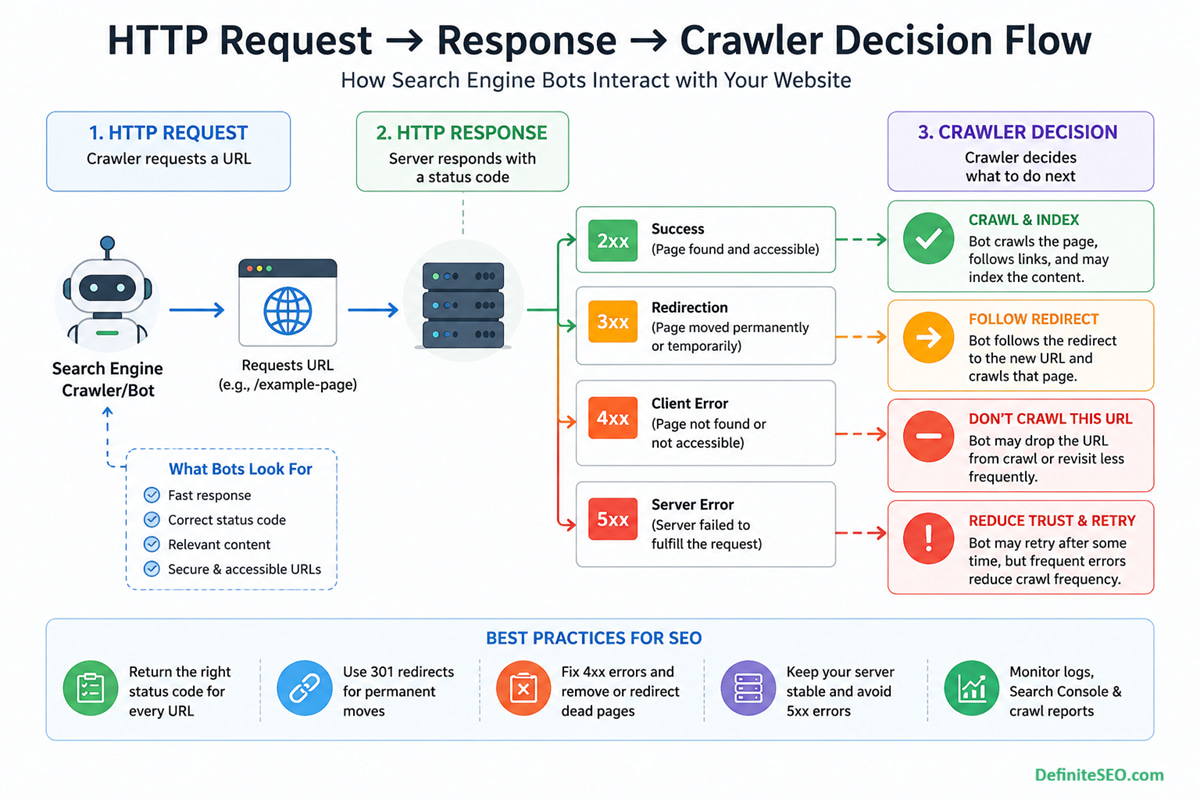
How Search Engines Use HTTP Status Codes
Search engines do not “see” your website the way users do. They rely on structured signals, and HTTP status codes are among the first signals processed during a crawl. Before content is rendered, before links are followed, the crawler evaluates the server response.
Search engines rely not only on HTTP responses but also on internal linking signals to determine page importance. Pages without internal links, often referred to as orphan pages, may behave unpredictably in indexing despite returning correct status codes.
Before a search engine even receives an HTTP response, it first checks directives like robots.txt to determine whether the URL should be crawled at all. Only then do status codes come into play to define how that request is handled (see: robots.txt guide).
Crawl Behavior and Response Interpretation
When a crawler requests a URL, the status code determines whether it should proceed:
- A 200 response invites crawling and evaluation
- A 301 signals relocation and redirects the crawler elsewhere
- A 404 indicates a dead end
- A 503 suggests temporary unavailability and prompts retry
This decision happens instantly and at scale. On large websites with millions of URLs, or ecommerce sites with faceted navigation, these signals shape how efficiently bots navigate the site.
Indexation Decisions Based on Status Signals
Indexing is not automatic. A page must first qualify. Status codes act as a gatekeeper:
- 200 pages are eligible for indexing
- 404 and 410 pages are excluded or removed
- Improper codes can cause misclassification, such as soft 404s
A subtle but critical point here is that incorrect status codes can mislead search engines. For example, a page returning 200 but showing an error message may still be crawled repeatedly, wasting crawl resources.
Interaction with Crawl Budget and Rendering
Crawl budget is finite. When bots encounter unnecessary redirects, broken pages, or server errors, they spend resources inefficiently. Over time, this reduces the frequency of crawling important pages.
I’ve observed this repeatedly in enterprise audits. Websites with unmanaged 4xx and 5xx issues often struggle with slow indexation, even when content quality is high. The issue is not content. It is crawl inefficiency caused by poor response management.
Real-World Example: Large Site Crawl Inefficiency
Consider an ecommerce website with thousands of discontinued product pages returning 404 instead of 410 or being properly redirected. Search engines repeatedly attempt to crawl these URLs, assuming they may return later.
Now multiply that by tens of thousands of URLs. The result is wasted crawl budget, delayed indexing for new pages, and a weaker overall crawl pattern.
Indexation is not determined by HTTP status codes alone. Search engines also rely on directives like noindex and nofollow to understand whether a page should appear in search results or pass link equity.
Search engines rely on multiple signals to determine how and when to crawl pages. While XML sitemaps help with URL discovery, HTTP status codes define how those URLs are processed after being accessed (see: XML sitemap guide).
Complete Breakdown of HTTP Status Code Categories
HTTP status codes are grouped into five categories, each signaling a different type of response. Understanding these categories is essential before diving into individual codes.
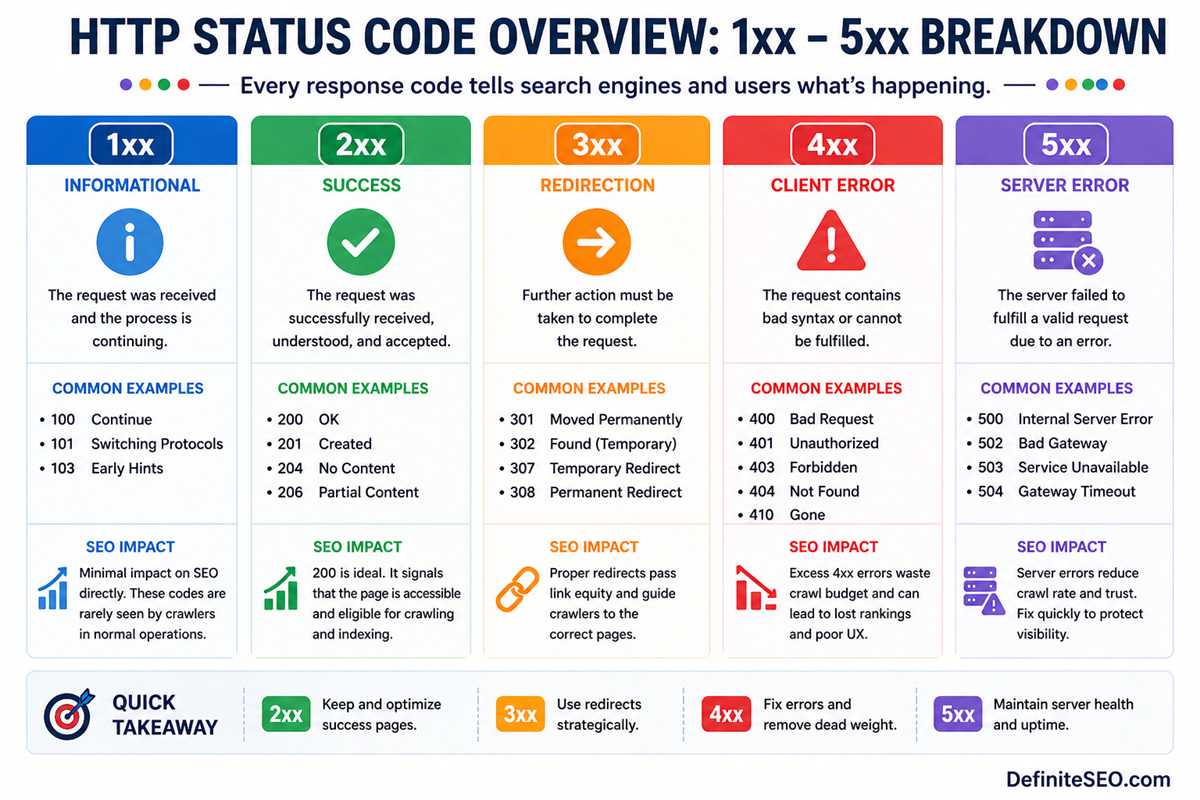
1xx Informational Responses
These codes indicate that the request has been received and processing is continuing. They are rarely encountered in SEO workflows and generally do not impact crawling or indexing directly.
2xx Success Codes
These indicate that the request was successfully received, understood, and processed. The most common is 200 OK, which signals that a page is accessible and ready to be evaluated for indexing.
However, success does not always mean correctness. A page can return 200 and still be problematic if the content is thin, duplicated, or misleading.
3xx Redirection Codes
3xx redirection codes indicate that the requested resource has moved. They play a central role in SEO because they influence how authority and link equity are transferred across URLs.
Proper use of redirects helps consolidate signals, while misuse creates confusion and crawl inefficiencies.
4xx Client Errors
These occur when the request cannot be fulfilled due to issues on the client side, such as requesting a non-existent page. For SEO, these represent dead ends that can impact user experience and crawl flow.
5xx Server Errors
These indicate that the server failed to fulfill a valid request. Unlike 4xx errors, these are considered more serious because they suggest instability or reliability issues.
Search engines interpret persistent server errors as a signal that a site may not be trustworthy or consistently accessible.
2xx Status Codes and SEO: Success Isn’t Always Simple
The 2xx category is often seen as the “safe zone” in SEO. If a page returns 200, many assume everything is working correctly. In reality, this is where some of the most subtle SEO issues occur.
200 OK – The Standard Indexing Signal
A 200 status code confirms that a page is accessible and can be indexed. It is the default response for most valid pages and forms the backbone of search engine indexing.
However, returning 200 is only the beginning. Search engines still evaluate content quality, duplication, and relevance before deciding whether to include the page in search results.
204 No Content – When Empty Responses Confuse Crawlers
A 204 response indicates that the request was successful but there is no content to return. While technically valid, it can create ambiguity for search engines.
If overused or misconfigured, it may result in pages being ignored or inconsistently processed.
206 Partial Content – Niche but Relevant
This code is used when only part of a resource is delivered, often for media files or large downloads. While it has limited direct SEO implications, improper implementation can affect how resources are loaded and rendered.
Soft 200 Errors and Hidden Risks
One of the most overlooked issues is the soft 200. This occurs when a page returns a 200 status code but behaves like an error page.
Common examples include:
- “Product not found” pages returning 200
- Empty category pages without proper messaging
- Thin pages created by filters or parameters
Search engines may eventually detect these and classify them as soft 404s, but until then, they consume crawl budget and dilute site quality signals.
3xx Redirects: Authority Flow, Canonicalization and SEO Impact
Redirects are one of the most powerful tools in technical SEO. When implemented correctly, they guide both users and search engines seamlessly across URL changes. When mishandled, they create confusion, loss of authority, and crawl inefficiencies.
301 vs 302 vs 307 vs 308 – Understanding the Differences
Not all redirects are equal:
- 301 indicates permanent redirection and passes strong ranking signals
- 302 suggests a temporary move
- 307 and 308 are HTTP/1.1 equivalents with stricter method handling
In modern SEO, search engines often treat 302 similarly to 301 over time, but relying on that behavior is risky. Clear intent remains the best practice.
Permanent vs Temporary Redirects in Practice
Choosing between permanent and temporary redirects is not just technical. It reflects how you want search engines to treat the destination URL.
A permanent redirect consolidates signals. A temporary one preserves the original URL’s identity.
Misusing these can result in fragmented rankings and indexing inconsistencies.
Redirect Chains and Loops
Redirect chains occur when one URL redirects to another, which redirects again. Loops occur when redirects circle back to the original URL.
Both create friction:
- They slow down crawling
- They dilute link equity
- They degrade user experience
Impact on Link Equity and Rankings
Redirects pass authority, but not always perfectly. Each additional step introduces potential loss.
A clean, direct redirect structure ensures that link equity flows efficiently from old URLs to new ones, preserving rankings and visibility.
Redirect Strategy During Migrations
Site migrations are where redirects matter most. Poor implementation can lead to traffic loss, indexing issues, and ranking drops.
A well-structured redirect map ensures continuity and minimizes disruption.
4xx Errors: Crawl Waste, UX Issues and Ranking Loss
4xx errors are often dismissed as normal, especially on large websites. Some level of 404s is expected. The issue begins when they become widespread, unmanaged, or strategically incorrect.
Broken internal links pointing to 404 pages create crawl dead ends. This often happens in complex structures like pagination, where improper handling can generate large volumes of low-value or broken URLs.
404 Not Found vs 410 Gone
Both indicate that a page is unavailable, but they communicate different intent:
- 404 suggests the page may return in the future
- 410 confirms permanent removal
Search engines tend to process 410 responses faster, removing them from the index more quickly. This makes them useful for intentional content pruning.
Soft 404 Errors and Misinterpretation
Soft 404s occur when a page appears empty or invalid but returns a 200 status code. Search engines eventually flag these, but not immediately.
This delay creates inefficiency. Crawlers continue to revisit these pages, assuming they may contain valuable content.
403 and 401 Access Issues
These codes indicate restricted access:
- 401 requires authentication
- 403 forbids access entirely
If critical pages return these codes unintentionally, they become invisible to search engines. This can lead to sudden drops in indexation.
Broken Internal Links and Orphan Creation
Internal links pointing to 404 pages create crawl dead ends. Over time, this disrupts site structure and can lead to orphaned pages that are difficult for search engines to discover.
Impact on Crawl Budget
Large volumes of 4xx errors signal inefficiency. Search engines may reduce crawl frequency, focusing only on high-confidence areas of the site.
From an operational perspective, managing 4xx errors is less about eliminating them entirely and more about controlling their impact. Strategic handling ensures that crawl resources are directed where they matter most.
5xx Errors: Server Failures That Hurt SEO Performance
Server-side errors sit in a different category altogether. While 4xx errors signal issues with specific URLs, 5xx responses raise concerns about the reliability of the entire website. Search engines interpret repeated server failures as a sign that a site cannot be consistently accessed, and that directly affects crawl behavior.
From experience working on high-traffic platforms, I often point out that even short bursts of server instability can create disproportionate SEO impact. It is not always about prolonged downtime. Sometimes, intermittent failures during peak crawl times are enough to disrupt indexing patterns.
500 Internal Server Error – Common Causes
A 500 error is a generic server failure. It does not tell search engines what went wrong, only that something did.
Typical causes include:
- Misconfigured server settings
- Faulty plugins or backend scripts
- Database connection failures
- Memory or resource exhaustion
When crawlers encounter repeated 500 errors, they begin to reduce crawl frequency. Over time, important pages may be crawled less often, delaying updates in search results.
502, 503, 504 – Communication and Availability Issues
These errors provide more context than a generic 500:
- 502 Bad Gateway indicates invalid responses between servers
- 503 Service Unavailable signals temporary downtime or maintenance
- 504 Gateway Timeout occurs when a server fails to respond in time
Among these, 503 is particularly useful when used correctly. It tells search engines that the downtime is temporary and that they should return later. This is a controlled way to handle maintenance without risking deindexing.
Temporary vs Persistent Server Errors
Search engines treat server errors differently based on frequency and duration.
- Temporary issues lead to reduced crawl rates but eventual recovery
- Persistent errors may trigger deindexing of affected pages
The distinction is critical. A planned maintenance window handled with proper 503 responses is far less damaging than recurring, unhandled 500 errors.
Impact on Crawl Frequency and Trust
Search engines allocate crawl resources based on trust and reliability. A site that frequently fails to respond correctly loses that trust.
In practical terms:
- Crawl intervals increase
- Fewer pages are revisited
- Newly published content takes longer to index
This is why server performance is not just a UX or DevOps concern. It is directly tied to search visibility.
Handling Downtime Without Losing Rankings
A controlled approach to downtime makes a measurable difference:
- Use 503 responses for planned maintenance
- Keep downtime windows as short as possible
- Monitor server logs during high crawl periods
- Ensure critical pages remain accessible whenever possible
Well-managed infrastructure preserves both crawl consistency and ranking stability.
Soft Errors: The Most Overlooked SEO Issue
Soft errors rarely trigger alarms, yet they quietly erode SEO performance. They occur when the server response and the actual page experience do not align.
This mismatch creates confusion. Search engines rely on status codes for clarity. When those signals are misleading, crawlers are forced to interpret intent, and that often leads to inefficiencies.
What Are Soft 404s and Soft 200s
A soft 404 happens when a page looks like an error page but returns a 200 status code. A soft 200 is a broader concept where a successful response masks an underlying issue.
Common patterns include:
- Empty category pages with “no results found” messages
- Expired product pages without proper redirects
- Thin pages generated by filters or parameters
Why Search Engines Flag Them
Search engines analyze both content and response behavior. When they detect a mismatch, they classify the page accordingly.
The issue is timing. Detection is not immediate. Until then, crawlers continue to revisit these pages, assuming they may provide value.
Detection Methods in Search Console and Logs
Soft errors can be identified through:
- Google Search Console’s “Soft 404” reports
- Log file analysis showing repeated crawling of low-value pages
- Crawling tools that highlight thin or duplicate content
I often highlight log analysis as the most revealing method. It shows not just what exists, but what search engines are actually doing.
Fixing Soft Errors at Scale
Resolving soft errors requires a structured approach:
- Return proper 404 or 410 codes for invalid pages
- Redirect outdated content to relevant alternatives
- Improve content depth for thin pages
- Manage parameter-based URLs effectively
Addressing these issues reduces crawl waste and strengthens overall site quality signals.
HTTP Status Codes and Crawl Budget Optimization
Crawl budget is not just about how many pages a search engine like Google can crawl, but how efficiently it can move through your site. HTTP status codes play a defining role in shaping that efficiency. When crawlers encounter clean 200 responses on valuable pages, they continue deeper into your site. When they hit unnecessary 404 errors, long redirect chains, or inconsistent responses, they waste time on URLs that provide no value. Over time, this affects how frequently your important pages are discovered and updated in the index.
Optimizing crawl budget, therefore, is less about limiting pages and more about guiding crawlers intelligently. Correct use of 301 redirects ensures smooth transitions, 410 responses help remove obsolete URLs faster, and minimizing soft errors prevents repeated crawling of low-value pages. In large or dynamically generated websites, these small adjustments create a compounding effect. A well-structured response system allows search engines to prioritize high-impact pages, resulting in faster indexation cycles and more reliable visibility across search results.
Crawl budget is heavily influenced by how efficiently a website responds to requests. Incorrect status codes, excessive redirects, and server errors can significantly reduce crawl efficiency (see: crawl budget optimization guide).
Status Codes and Index Coverage Reports
Index coverage reports provide a window into how search engines interpret your site. HTTP status codes form the backbone of these reports, even if they are not always visible directly.
Understanding this connection allows for more precise debugging and faster resolution of indexing issues.
Mapping Status Codes to Search Console Reports
Different response types correspond to different report categories:
- 200 responses appear under “Valid”
- 404 and 410 fall under “Excluded” or “Error”
- Soft 404s are explicitly flagged
Recognizing these patterns helps identify root causes quickly.
“Excluded,” “Error,” and “Valid” States Explained
Each category reflects a different stage of indexing:
- Valid pages are indexed and eligible to rank
- Excluded pages are intentionally or unintentionally omitted
- Error pages indicate problems preventing indexing
The nuance lies in interpretation. Not all excluded pages are problematic, but some signal deeper issues.
HTTP Status Codes in Site Migrations and Redesigns
Site migrations are where status codes move from being important to being critical. A single misconfiguration can disrupt years of accumulated authority.
What separates successful migrations from failed ones is not just planning, but execution at the response level.
Pre-Migration Audit of Existing URLs
Before any changes are made, a full inventory of URLs is essential. This includes:
- Active pages
- Redirected URLs
- Broken or outdated content
Understanding the current state ensures that no valuable URLs are lost during the transition.
Redirect Mapping Strategy
Each old URL should have a clear destination. This mapping defines how authority flows after migration.
Best practices include:
- One-to-one redirects where possible
- Avoiding blanket redirects to the homepage
- Maintaining relevance between source and destination
Common Migration Mistakes
Even well-planned migrations can fail due to execution errors:
- Using 302 instead of 301 for permanent moves
- Creating redirect chains
- Leaving orphaned URLs without redirects
- Returning 200 for missing pages
These issues disrupt both crawling and indexing.
Post-Migration Monitoring and Validation
The work does not end after launch. Continuous monitoring is required to ensure stability.
Key checks include:
- Verifying redirect accuracy
- Monitoring crawl errors
- Tracking indexation changes
- Reviewing server logs for anomalies
I often stress that post-migration monitoring is where long-term success is secured. Early detection prevents lasting damage.
Advanced Scenarios: JavaScript, APIs and Headless Sites
Modern websites increasingly rely on JavaScript frameworks, APIs, and headless architectures. These introduce new layers where HTTP status codes must be handled correctly.
The complexity is not just technical. It affects how search engines render and interpret content.
Status Codes in Client-Side Rendering Environments
In client-side rendering, the initial server response may return 200 even if the content fails to load properly.
This creates a disconnect:
- Search engines receive a “successful” response
- Actual content may be incomplete or missing
Ensuring that meaningful content is accessible during initial load is essential.
API Responses and SEO Implications
APIs often serve content dynamically. If API endpoints return incorrect status codes, the rendered page may appear broken to users and crawlers alike.
For example:
- API failures returning 200 instead of 500
- Missing data not triggering proper error responses
These issues are difficult to detect without deeper technical analysis.
Handling Errors in Headless CMS Architectures
Headless systems separate frontend and backend logic. This separation increases flexibility but also introduces risk.
Proper handling requires:
- Consistent status codes across layers
- Synchronization between frontend rendering and backend responses
- Monitoring for mismatches
Log File Analysis: Understanding Real Bot Behavior
Most SEO insights are derived from tools that simulate crawling. Log files, on the other hand, reveal what actually happens. They show how search engine bots interact with your server in real time, including the exact HTTP status codes they encounter.
This is where theory meets reality. You may assume your site is clean based on a crawler report, yet logs often tell a different story. I consistently use log analysis in enterprise projects to uncover inefficiencies that traditional audits miss, especially in large, dynamic websites.
How Bots Actually Encounter Status Codes
Every request made by a crawler is recorded in server logs. This includes:
- Requested URL
- Timestamp
- User agent
- Returned status code
By analyzing these logs, you can see patterns such as repeated crawling of 404 pages, excessive redirects, or frequent encounters with server errors.
Identifying Crawl Inefficiencies in Logs
Log data highlights where crawl budget is being wasted:
- High frequency of 404 or soft 404 URLs
- Bots stuck in redirect chains
- Important pages receiving fewer crawl hits
- Repeated attempts on broken or outdated URLs
These insights are difficult to obtain through surface-level tools alone.
Prioritizing Fixes Using Log Insights
Not all issues carry equal weight. Log analysis helps prioritize based on actual bot behavior rather than assumptions.
For example:
- A rarely crawled 404 page may not require urgent action
- A frequently crawled broken URL should be fixed immediately
This approach ensures that efforts are aligned with real impact.
Enterprise-Level Monitoring Frameworks
At scale, log analysis becomes an ongoing process rather than a one-time audit.
Effective setups include:
- Automated log parsing tools
- Regular reporting dashboards
- Alerts for spikes in error responses
- Integration with SEO and DevOps workflows
For large websites, this level of monitoring is what separates reactive SEO from proactive optimization.
Tools to Monitor and Debug HTTP Status Codes
Managing HTTP status codes effectively requires the right set of tools. Each tool provides a different perspective, and together they create a comprehensive diagnostic framework.
Google Search Console
Search Console offers direct insights from Google’s perspective. It highlights:
- Coverage issues
- Soft 404 errors
- Server-related problems
While it does not provide raw data, it is invaluable for identifying high-level issues.
Screaming Frog SEO Spider
This tool simulates crawling and provides detailed reports on:
- Status codes across URLs
- Redirect chains and loops
- Broken links
It is particularly useful for pre-launch audits and ongoing monitoring.
Sitebulb and DeepCrawl
These tools go deeper into analysis, offering:
- Visual crawl maps
- Issue prioritization
- Advanced reporting for large sites
They are well-suited for enterprise environments where complexity is high.
Server Logs and Custom Monitoring Tools
Log files remain the most accurate source of truth. Combined with custom monitoring solutions, they provide unmatched visibility into real crawler behavior.
Using DefiniteSEO SEO Checker for Quick Audits
For quick diagnostics, DefiniteSEO’s SEO Checker can identify common status code issues without requiring complex setup. It serves as an accessible starting point, especially for smaller teams or rapid assessments.
Common HTTP Status Code Mistakes That Hurt SEO
Even well-optimized websites often suffer from recurring status code mistakes. These issues are rarely dramatic on their own, but collectively they weaken crawl efficiency and indexing clarity.
Some of the most frequent problems include:
- Using temporary redirects where permanent ones are needed
- Returning 200 status codes for error or empty pages
- Ignoring recurring server errors
- Allowing redirect chains to grow over time
- Blocking critical resources unintentionally
What makes these mistakes dangerous is their subtlety. They do not always trigger immediate ranking drops, but they create friction that accumulates over time.
From an operational standpoint, the goal is not perfection but consistency. A clean, predictable response structure builds trust with search engines.
FAQs: HTTP Status Codes & SEO
What is the most important HTTP status code for SEO?
The 200 status code is essential because it signals that a page is accessible and eligible for indexing. However, its effectiveness depends on content quality and proper implementation.
Do 404 errors hurt SEO rankings directly?
Individual 404 errors do not harm rankings, but excessive or unmanaged 404s can waste crawl budget and affect overall site efficiency.
Should I use 301 or 302 redirects for SEO?
Use 301 for permanent changes and 302 for temporary ones. While search engines may treat them similarly over time, using the correct code ensures clarity.
How do I fix soft 404 errors?
Return the correct status code for invalid pages, improve thin content, or redirect users to relevant alternatives.
Can server errors cause deindexing?
Yes, persistent 5xx errors can lead search engines to remove affected pages from the index if they cannot be accessed reliably.
How often should I audit HTTP status codes?
Regular audits are recommended, especially after site changes, migrations, or significant content updates.